

Being an avid fan of overclocking video cards I was very much looking forward to this part of the testing. The GT versions of the 6600 GPU already run 200 MHz higher than the standard 6600 GPU, so I was skeptical as to how high the core could go. On the memory side, the card uses 1.6ns GDDR3 so that should give it a 600 MHz max frequency (1.2 GHz DDR), 100 MHz higher than stock.
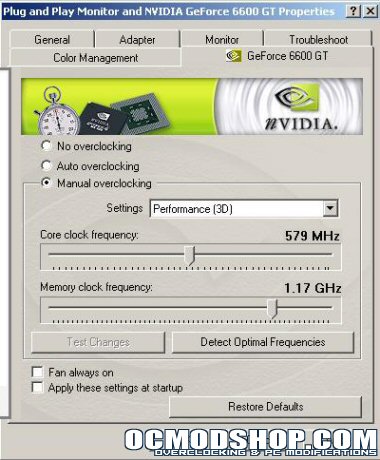
To begin the testing I installed ForceWare Coolbits 2.0 registry hack and let the Forceware driver’s auto detect the optimal clock frequencies. After a short period of testing the driver’s settled on 579 MHz core and 1.17 GHz memory clock. These settings were 100% stable under all situations and all features of the card work. I would have liked to see a higher memory speed but overall, not too bad. Pushing the card to its limits I was able to complete some 3DMark03 tests with artifacts at 614 MHz core and 1.29 GHz memory clock. Any higher and the tests would not run. This should give you a good idea of the cards ceiling.
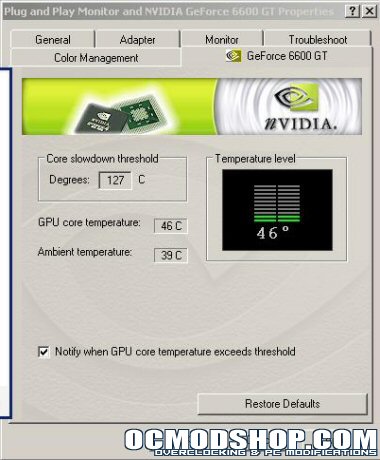
A neat feature of this card is the ability to monitor GPU core temperatures in the Forceware drivers. Below you can see the interface which includes a threshold temperature and all statistics are updated real time.
The cooling solution Asus used clearly does a good job for stock overclocking. At idle the temperature monitor noticed a 2 degree difference between stock and overclocked settings. However, for you tweakers, with some better cooling on the GPU (like water) you should be able to boost not only the core clocks a bit more but also the memory speeds (as the memory temperature on a video card is adversely impacted by the heat distributed laterally through the PCB from the GPU, remove the GPU heat and the memory is generally cooler).
Conclusion
I was very impressed with the overall performance of the EN6600GT. The card is very capable at lower resolutions, being able to pull good frame rates with all the eye candy. At higher resolutions, the card is a little underpowered to run high anti-aliasing and anisotropic filtering, let alone if you want to vertical sync with your monitor (frame rate cap to prevent screen tearing). The card however does produce very playable frame rates at high resolutions if you don’t feel the need to turn on all the eye candy. If you’re a gamer, this card should be best suited on a 1024×768 monitor or maybe even a 1280×1024 monitor if you like image quality. The bundle that comes with the card is good; Asus knew enough to throw in a full version game, some software, and even a disc tote, keeping those who look for good retail bundles at bay.
The Asus Extreme N6600GT does what I think it set out to do. It gives the middle-of-the-road gamers on a PCI-Express system a card to drool over, it offers good overclocking headroom for tweakers, and it allows for expandable performance through SLI compatibility. The EN6600GT follows in the footsteps of its bigger 6800 series brethren without feeling completely crippled as many middle-of-the-road cards have been in the past. In a nutshell, it’s a great card, with great performance at a great price (around $200!). I am giving the Asus Extreme N6600GT 9.5 out of 10 and the OCmodshop seal of approval. I want to thank Asustek for sending us this new graphics card for review.
Pros:
Cons:
|
 |

