
The performance of computer systems has been steadily increasing as faster processors, memory, and video cards are continuously being developed. The one key component that is often neglected when looking at improving the performance of a computer system is the hard drive. Hard drive manufacturers have been constantly evolving the basic hard drive used in modern computer systems for the last 25 years, and the last few years have seen some exciting developments from faster spindle speeds, larger caches, better reliability, and increased data transmission speeds.
The drive type used most in consumer grade computers is the hearty ATA type drive (commonly called an IDE drive). The ATA standard dates back to 1986 and is based on a 16-bit parallel interface has undergone many evolutions since its introduction to increase the speed and size of the drives that it can support. The latest standard is ATA-7 (first introduced in 2001 by the T13 Technical Committee (the group responsible for the ATA standard)) which supports data transfer rates up to 133MB/sec. This is expected to be the last update for the parallel ATA standard.
As long ago as 2000 it was seen that the parallel ATA standard was maxing out its limitations as to what it could handle. With data rates hitting the 133MB/sec mark on a parallel cable, you are inviting all sorts of problems because of signal timing, EMI (electromagnetic interference) and other data integrity issues; thus industry leaders got together and came up with a new standard known as Serial ATA (SATA). SATA has only been around a few years, but is destined to become “the standard” due to several benefits to be addressed in this Tech Tip.
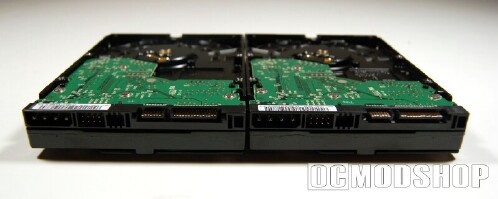
The two technologies that we will be looking at are: ATA (Advanced Technology Attachment) – a 16-bit parallel interface used for controlling computer drives. Introduced in 1986, it has undergone many evolutions in the last 18+ years, with the latest version being called ATA-7. Wherever an item is referred to as being an ATA device, it is commonly a Parallel ATA device. ATA devices are also commonly called IDE, EIDE, Ultra-ATA, Ultra-DMA, ATAPI, PATA, etc. (each of these acronyms actually do refer to very specific items, but are commonly interchanged) SATA (Serial Advanced Technology Attachment) – a 1-bit serial evolution of the Parallel ATA physical storage interface.
Basic Features & Connections
SATA drives are easy to distinguish from their ATA cousins by the different data and power connections found on the back of the drives. A side-by-side comparison of the two interfaces can be seen in this PDF from Maxtor, and the following covers many of the differences…
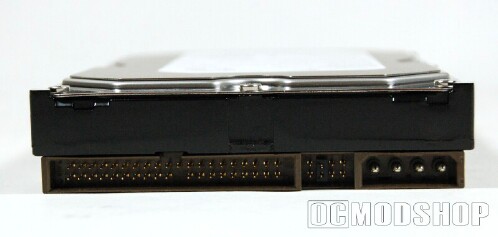
Standard ATA drives, such as this 200GB Western Digital model, have somewhat bulky, two inch wide ribbon cable with 40-pin data connections and receive the 5V necessary to power them from the familiar 4-pin connection. The basic data cables for these drives have looked the same for years. A change was made with the introduction of the ATA-5 standard to better improve the signal quality by making an 80 wire cable used on the 40-pin connector (these are commonly called 40-pin/80-wire cables). To improve airflow within the computer system some manufacturers resorted to literally folding over the ribbon cable and taping it into that position. Another recent physical change also came with the advent of rounded cables. The performance of the rounded cables is equal to that of the flat ribbon, but many prefer the improved system air flow afforded, ease of wire management, and cooler appearance that come with them.
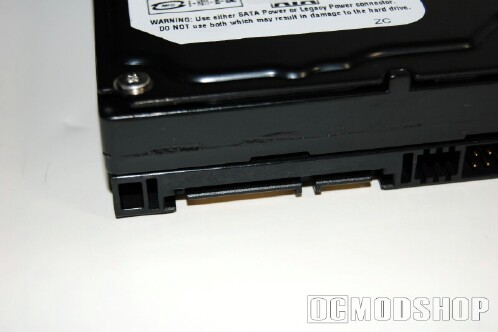
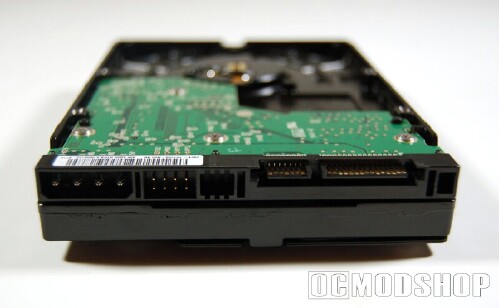
SATA drives, such as this 120GB Western Digital model, have a half inch wide, 7 “blade and beam” data connection, which results in a much thinner and easier to manage data cable. These cables take the convenience of the ATA rounded cables to the next level by being even narrower, more flexible and capable of being longer without fear of data loss. SATA cables have a maximum length of 1 meter (39.37 inches), which is much greater than the recommended 18 inch cable for ATA drives. The reduced footprint of SATA data connections frees up space on motherboards, potentially allowing for more convenient layouts and room for more onboard features!
A 15-pin power connection delivers the 250mV of necessary power to SATA drives. 15-pins for a SATA device sounds like it would require a much larger power cable than a 4-pin ATA device, but in reality the two power connectors are just about the same height. For the time being, many SATA drives are also coming with a legacy 4-pin power connector for convenience.
Many modern motherboards, such as this Chaintech motherboard, come with SATA drive connections onboard (many also including the ATA connectors as well for legacy drive compatibility), and new power supplies, such as this Ultra X-Connect, generally feature a few of the necessary 15-pin power connections, making it easy to use these drives on new systems. Older systems can easily be upgraded to support SATA drives by use of adapters, such as this PCI slot SATA controller and this 4-pin to 15-pin SATA power adapter.
ptical drives are also becoming more readily available with SATA connections. Drives such as the Plextor PX-712SA take advantage of the new interface, although the performance will not be any greater than a comparable optical drive with an ATA connection.
Performance
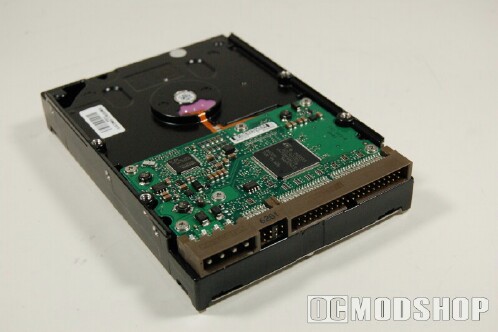
In addition to being more convenient to install and drawing less power, SATA drives have performance benefits that really set them apart from ATA drives.
The most interesting performance feature of SATA is the maximum bandwidth possible. As we have noted, the evolution of ATA drives has seen the data transfer rate reach its maximum at 133 MB/second, where the current SATA standard provides data transfers of up to 150 MB/second. The overall performance increase of SATA over ATA can currently be expected to be up to 5% (according to Seagate), but improvements in SATA technology will surely improve on that.
The future of SATA holds great things for those wanting even more speed, as drives with 300 MB/second transfer rates (SATA II) will be readily available in 2005, and by 2008 speeds of up to 600 MB/second can be expected. Those speeds are incredible, and are hard to imagine at this point.
Another performance benefit found on SATA drives is their built-in hot-swap capabilities. SATA drives can be brought on and offline without shutting down the computer system, providing a serious benefit to those who can’t afford downtime, or who want to move drives in and out of operation quickly. The higher number of wires in the power connection is partially explained by this, as six of the fifteen wires are dedicated to allowing the hot-swap feature.
Price
Comparing ATA drives to SATA drives can be tricky given all of the variables, but in general it is the case that SATA drives will still cost just a bit more than a comparable ATA drive. The gap is closing rapidly though, and as SATA drives gain in popularity and availability a distinct shift in prices can be expected. Considering the benefits of SATA over ATA, the potential difference of a few dollars can easily be justified when considering an upgrade. Computer Geeks currently has a limited selection of SATA drives, but several technical sites, such as The Tech Zone and The Tech Lounge, offer real time price guides to see how comparable drives stack up.
Final Words
The current SATA standard provides significant benefits over ATA in terms of convenience, power consumption and, most importantly, performance. The main thing ATA has going for it right now is history, as it has been the standard for so long that it will not likely disappear any time soon. The future of SATA will be even more interesting as speed increases will help hard drive development keep pace with other key system components.


