

Direct to Disc
To make an exact copy of your tape to DVD without any edits simply use the direct-to-disc feature. In this mode the software automatically captures the video, converts the file to DVD format and burns it to disc.
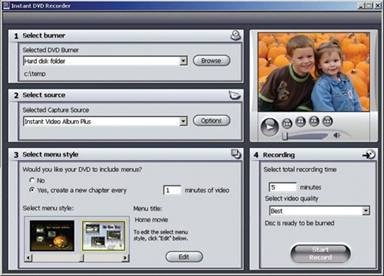
If you have a large number of VHS tapes you want to convert to DVD this can be a tremendous time saver. The software will also automatically add DVD menus and chapter points by detecting scene changes. When the process is complete you will have rescued your family videos from certain loss and will have discs you can play forever, again and again without damaging the quality.
You can even make copies for other members of the family and they can enjoy the moments, memories, events in the same high quality.
Conclusion
Depending on the speed of your DVD burner and the length of your movie memories, the process can be completed in 15 minutes to an hour. Pop the finished disc into your DVD player, grab some popcorn and relive your memories now and for years to come.
If you aren’t completely happy with the movie, want to add or delete video clips or change the sequence and transitions simply go back to the software and make the changes. Either way, your videos are personalized gifts friends and family will cherish forever. And you will have rescued your videotape memories and turned them into brilliant DVD movies that will never fade or disappear.

