Overclocking with the EPoX 8K3A+ is a breeze, because every setting that you would need to change to overclock can be done through the BIOS there is no need to open up your case and mess with jumpers or DIP switches. The way I always overclock is to get the highest possible FSB while keeping my system stable and increasing the overall speed of my CPU in Mhz. Because of all the voltage and memory options with this motherboard I had no problem at all overclocking my 1.2Ghz Thunderbird to 1.3Ghz with a FSB of 185.
I know that a 100Mhz overclock is not very much but I would rather have a high FSB and a few Mhz less than visa versa. I increased my core voltage to 1.85v and the DIMM voltage to 2.9v to achieve this speed. I would have been able to get a much better overclock if I had put a watercooling system on this motherboard and cranked the voltage up to 2.20v. All of the memory settings were at the fastest as well, 2-2-2-1CMD 4-way bank interleave.

I did however encounter some problems, I was able to overclock the FSB higher than 185, however when I reached about 200 I started to get AGP tearing where the screen would look as if the video cards RAM was messed up, displaying all kinds of stuff on the screen.
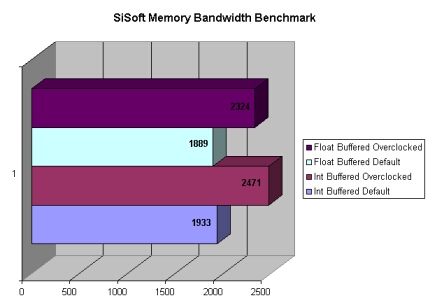
I know that my RAM wasn’t holding me back and I don’t believe it was my video card. I have talked to others who share the same experience when reaching a FSB of 200 so I do not believe that it is an isolated incidence. Another thing is that even at 185 FSB I don’t get very good memory scores in SiSoft I have as well talked to others who experience the same problems.
For all of the benchmarking I was using the 4/10 beta BIOS which EPoX sent to me, I think that they might be trying to fix some of this issues.
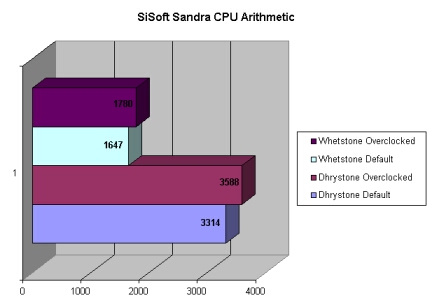
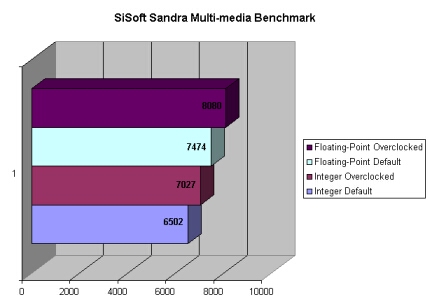
I ran SiSoft Sandra Pro 2002.1.8.59 and benchmarked the CPU, Multimedia, and memory bandwidth. The CPU and Multi-Media benchmarks do well however like I mentioned the memory benchmark is not that great, it should be a lot higher for a FSB of 185.


There is a great rise in score while overclocked compared to the stock speed on the CPU benchmark.
The SiSoft Sandra Multi-Media benchmarking the EPoX 8K3A+ pulled slightly ahead of the default speeds while overclocked.
The SiSoft Sandra Memory Bandwidth benchmarking Surprised me very much, even with a FSB of 185 the memory scores are not the best, don’t get me wrong they are not bad but with this high of a FSB they should be higher.
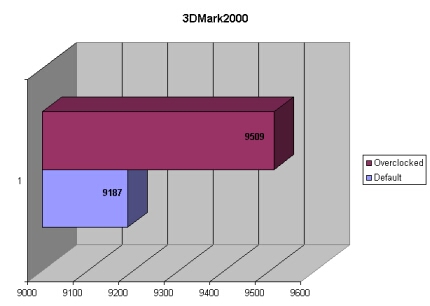
3DMark2000 scores improved by 233 points, again this is more of a video card benchmark but you can see that there is an improvement.
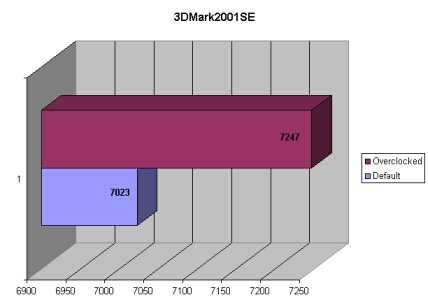
3DMark2001SE had an increase of 224 point after overclocking, not very much but this is about the norm of score improvement when overclocking the CPU. 3DMark2001SE is mainly for testing of video cards which is why there is not a huge margin.
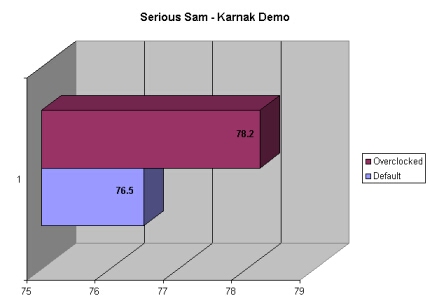
Serious Sam gained 1.7 FPS while overclocked compared to the results from the default speeds. Serious Sam usually does not jump in FPS very much while overclocking the CPU.
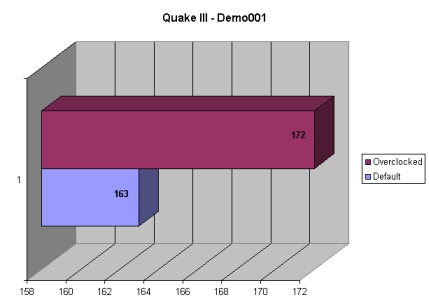
To my surprise Quake III gained 9 FPS for a total of 172, with a little video card overclocking I am sure that 200 FPS would be possible.
Conclusion
This motherboard is by far the best motherboard that I have ever reviewed or even used for that matter even with the low memory scores. There are so many options and features on this motherboard that almost anything is possible.
The main reason why I like this board so much is the fact a core voltage of 2.20v is possible and a 3.20v DIMM voltage. I also really like that there are so many memory options so that I can overclock my RAM in the process of overclocking. Even with all the memory settings there seems to be something that needs to be fixed with the motherboard because of the low memory scores.
There is also the issue of the 200 FSB or above making AGP cards display errors. It’s also great to see that there are 6 PCI slots, and no CNR or AMR which are usually pointless. The onboard RAID is also a great feature which you can take advantage of.

Overall I would give this motherboard a 9/10 and award it the OCmodshop Seal of Approval. I would like to thank EPoX for sending me this motherboard to review and Corsair for sending me the 2700DDR to use in this motherboard, I will have a full review of this RAM within the next few days.
 Pros
Pros
- Awesome overclocker
- Lots of memory tweaking options
- Vcore up to 2.20v
- VDIMM up to 3.20v
- 6 PCI with no CNR or AMR
- Onboard RAID
- Lots of room around the socket
Cons
- Passive northbridge cooling
- No USB 2.0
- Poor DIMM slot placement
- Poor memory scores