

Battery life is rather good with two AA batteries, as they were still good after a month of casual use. The low-power consumer laser, coupled with an aggressive power-saving scheme, allows the batteries to last so long. We had to open this mouse to see what makes it tick…
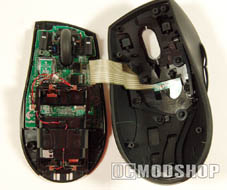
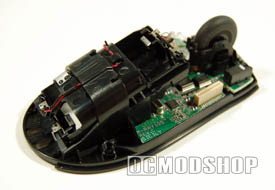
The top of the shell is electronically tethered to the circuit board, which houses the batteries, laser assembly and CPU (yes, even mice have to have some brains, no matter how tiny). The two main buttons are actually soldered on the main board, and are triggered by pressing “levers” on the top shell. A small ribbon cable gathers information from the thumb buttons and communication buttons, and also controls the three LEDs on the top shell (email notification, IM notification, and battery low).
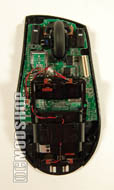
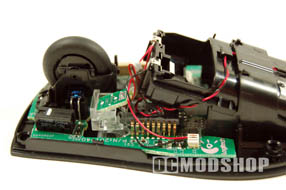
The tilt wheel looks like it is barely secured, and looks like a rubber tire with its top off. Most of the mouse’s volume is taken up from the battery housing, and there are a mess of wires that connect the battery compartment to the mainboard.
Underneath the battery housing is the mouse’s processor (which looks like an old 16-bit chip) and laser sensor. The laser is an infrared semiconductor laser (also called a diode laser), which are the smallest and lowest powered lasers available. This is the same type of laser used in most CD players and laser printers. They are so safe that the emit virtually no laser radiation, but I still wouldn’t look directly into the sensor!
Conclusion
Unfortunately, this mouse caters primarily to Microsoft junkies with small hands. The email buttons are used specifically for Microsoft Outlook and Outlook Express, while the instant messenger button works only with MSN Instant Messenger and Yahoo! Because I use AOL Instant Messenger a majority of the time, the IM button is not useful to me and I use Hotmail and Comcast for email so the email button is not helpful to me either.
This mouse is only available right-handed and it is relatively small in size. It fits perfectly in my hand, but I’m a 5’5” girl! When guys try to use it, they accidentally hit buttons and their hands extend way over the right and left click buttons. I cannot see this mouse being very easy for them to use on a day to day basis. The buttons are easy to differentiate between, but when your hand encloses the entire mouse they are way too easy to accidentally hit.
Overall this mouse is easy to use and high-functioning. The drawbacks are minimal compared to the customization it provides and innovation when compared with other mice available.
 |
 |
 |
|||||||||||||||||||||||||||
|
|
|
|||||||||||||||||||||||||||
 |
|
 |
|||||||||||||||||||||||||||


