
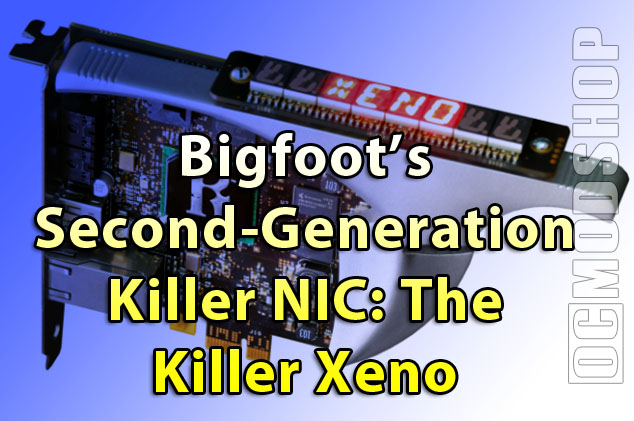
The second-generation Killer Xeno NIC has been given a simpler architecture. A new NPU (Network Processing Unit) has been designed from the ground up with PCI-Express. This new chip offloads Voice Chat and Network traffic from the CPU, isolating all processing tasks to the NPU itself.
- PCIe interface
PCIe interface means higher throughput. PCIe native chip, no bridge chip to slow things down. - 400Mhx Xeno NPU
Dedicated smart packet processor for all network operations ensures delivery of time-sensitive data like game control and VoIP - Windows network stack bypass
Direct to game interrupts speeds game play - Integrated audio chip
Offloads VoIP operations to Killer Xeno NPU for ‘hiccup-free’ voice chat while gaming - On board DDR2 RAM (256MB/Ultra and 128/Pro)
Enables applications such as Firewall, voice chat & Bandwidth control to run on the card simultaneously with no system performance impact - Bandwidth control
Prioritize network traffic for each application - Firewall
Stops intruders with zero gaming performance impact. Based on robust Linux IPTABLES - Plug & Play
Compatible with all online games
How is the USB used?
Since the card features a dedicated USB port, I asked how it could be used. Using FNA apps, you can spawn downloads and torrents directly to an attached USB drive, bypassing the network stack.
Audio processing
Since the new Xeno has audio processing capabilities, I asked if the card would support USB headsets. Harland responded that the Xeno would not support USB headsets, but is looking to add that functionality in the future. Since many multichannel (surround) headsets for the PC utilize USB technology, it appears that these cannot be used with the Xeno’s chat-acceleration technology… you should have a traditional analog headset and mic to gain any benefit that the card boasts.
Bigfoot has partnered with TeamSpeak, Vivex, and Mumble for its audio-acceleration technology. You must use one of these technologies in order to gain any benefit of chat acceleration from the Xeno NIC. In terms of acceleration, The Xeno processes the incoming and outgoing chat audio directly on the card, bypassing your PC’s sound card and bus. This sounds great on paper, but it remains to be seen if this feature will provide any benefit.

You can still use any online chat program you wish, but you will not receive any acceleration benefit. Setting up these chat channels can also take some effort to establish. For example, you can jump online with Left 4 Dead (read our review here) (read our interview with Chet Faliszek here), but you will not be able to use the Xeno’s audio acceleration technology out of the box. You must set up a TeamSpeak channel, or tie into a game that currently is using TeamSpeak.
The Xeno processes online voice chat information seperately from your sound card. Because of this, you can seperate team channels into a dedicated earpiece and microphone (SOCOM style). If you prefer voice information mixed in with game sounds (if you’re using a traditional headset), then you can plug the Xeno’s internal audio out port to an audio-in of your soundcard. Even onboard sound cards have a 4-pin CD-audio in jack, so you should be covered.
FNA Applications
One of the neater features of the original Kilelr NIC was the use of FNA applications. Since the card has a dedicated processor and Linux kernel, applications were written that handle network traffic. One application can download torrents directly to an attached USB drive without ever hitting the PC bus (usb drive must be attached to the Killer’s USB port). Another application can prioritize traffic, so you can easily download or copy files without it affecting your online game. FNA apps written for the original Killer NIC are incompatible with the Xeno, but Bigfoot is working to get new ones out the door as quickly as possible. The card ships with a Firewall, Bandwidth Control and audio FNA applications. Additional features from previous FNA apps will still be available at launch, but you need to go into the Linux Kernel directly to perform these tasks.


Xeno as a Firewall
Using FNA applications, the Killer Xeno can be used as a personal firewall. Since it runs a Linux kernel, you can harness the power of IPtables to completely ban certain IP addresses. You can also manage network bandwidth for your own personal usage patterns. For example, you can use an application that prioritizes the network bandwidth available to certain programs.
Harlan assured me that this application was very simple to use… just select the application from a list that you want controlled… without trying to figure out what port is being used. This has some potential security benefits, as you can completely eliminate Adobe CS4 from accessing the Internet, so no “automatic updates” will take up bandwidth while you’re gaming. More and more software today use rootkits and other obfuscated activation technology, so the Xeno could potentially eliminate these issues.
Availability
At first, Bigfoot’s Killer NIC will be pre-fabricated by manufacturing partners, such as EVGA. In May, Bigfoot will start shipping the Xeno Ultra (Harland calls is the “Harlan Edition”), and will be available through Bigfoot directly. It will cost more, but features a “bling bar” (an eight-character, 14-segment alphanumeric LED display). This display can be programmed with game stats, network stats, or just about anything else, and will be highly coveted by PC gamers with a windowed case. The scroll speed can even be adjusted for maximum readability.
