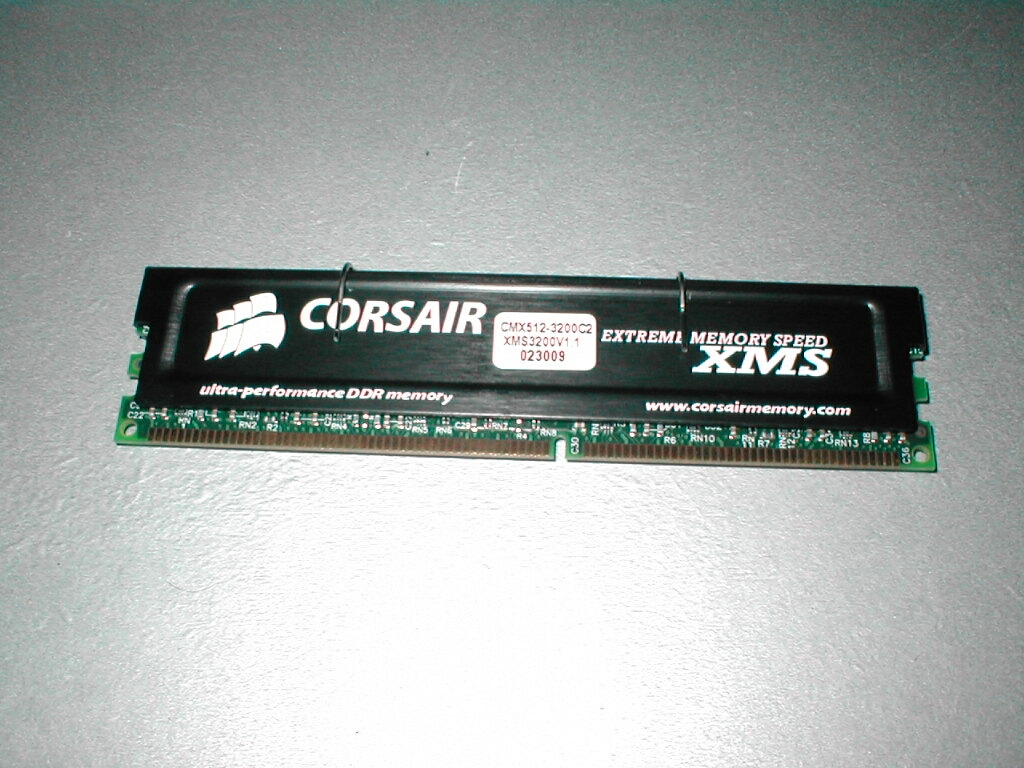
I will be testing this module on an EPoX 8K3A+ because it is the best KT333 motherboard on the market right now. There are only a few companies right now that have a KT400 motherboard available and unfortunately I have not received one yet. I will have the EPoX KT400 motherboard in a few weeks when it comes out at which time I will review the motherboard and revisit this stick of RAM. For benchmarking I will be using SiSoft Sandra’s memory benchmark, Quake 3, and Jedi Knight 2. All of the timings on the RAM will be set to 2-2-2 1T making it the fastest possible. All of the settings for Quake 3 and Jedi knight will be at 640×480 and have the lowest detail to more stress the CPU and memory rather than the video card. I will also be seeing how high this RAM will overclock as far as the FSB is concerned.
Test Bed:
- EPoX 8K3A+
- 1.2GHz Thunderbird
- 80GB Maxtor ATA133 HDD
- Corsair 512MB XMS3200
- 3DPower Geforce 3
- Cooler Master ATC-101-SX2
- Zalman 300w PSU (review to come)
- Sound Blaster Live! Value
- ATi TV Wonder VE
- 10/100 NIC
- Plextor 40x12x40 CDRW (review to come)
- pioneer 16x DVD
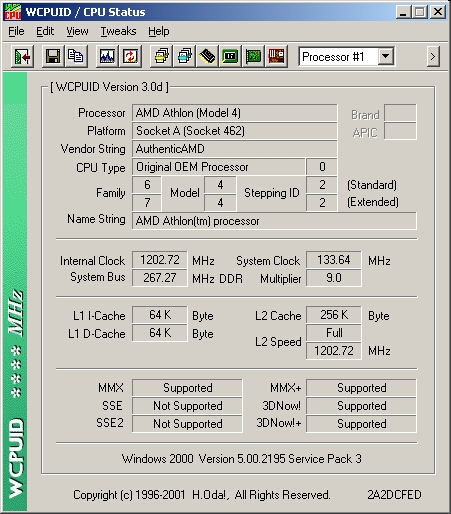
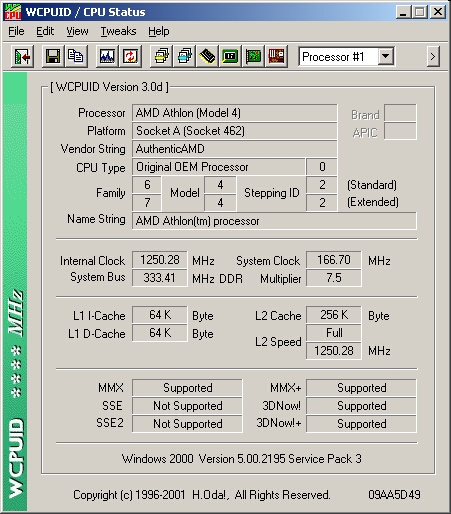
WCPUID is a program that tells you a lot about your CPU like the Internal clock, system bus, system clock, multiplier and a slew of other things like whether it supports MMX, MMX+, SSE, SSE2, 3DNow! or 3DNow+. It will also give you detailed information about the CPU itself like what kind of processor it is, platform, vendor string, CPU type, family, and name string. This is a really small program that is free but it does a great job at telling you what you need to know. At 133 FSB you can see that the internal clock is 1.2Ghz and the system bus is 266MHz which is the RAM bus.
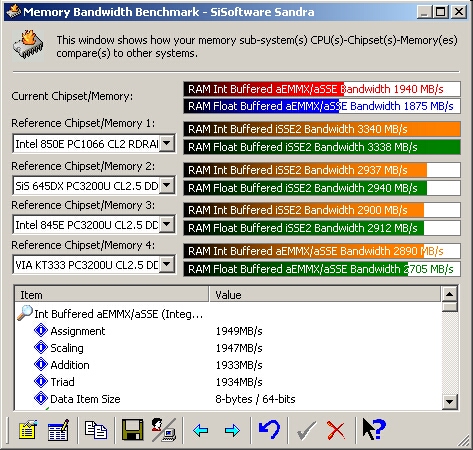
All of the benchmarks were done with all of the settings at the most aggressive, 2-2-2 1T and 4-way bank interleave and the DRAM clock was set at 166. The RAM is tested at 2-3-3 before shipping but I want to run it at 2-2-2 and see what it is really made of. At 133FSB the scores are not bad and I can tell that this RAM really wants to be overclocked.
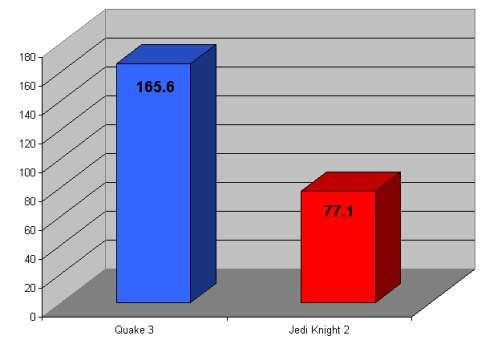
I ran Quake 3 demo001 and Jedi Knight jk2ffa time demos just to get some gaming benchmarks, all of the settings were at the lowest and the resolution was at 640×480. I had all of the settings at the lowest because I wanted to stress the system as a whole rather than just the video card. Quake 3 gave me 165.6 frames per second while Jedi Knight 2 pumped out 77.1. Jedi knight 2 gets about half the FPS that Quake 3 does because it is a newer game and even at the lowest settings still is more intensive overall. Anyways that’s enough of this 133 FSB lets kick it up a notch
I rebooted and set the FSB to 166 in the BIOS and dropped the multiplier to 7.5 which gave me an overall speed of 1250MHz, this also bumped the RAM bus up to 333Mhz rather than 266MHz. At this speed the RAM is still going slower than it is designed to but the right speed for this motherboard.
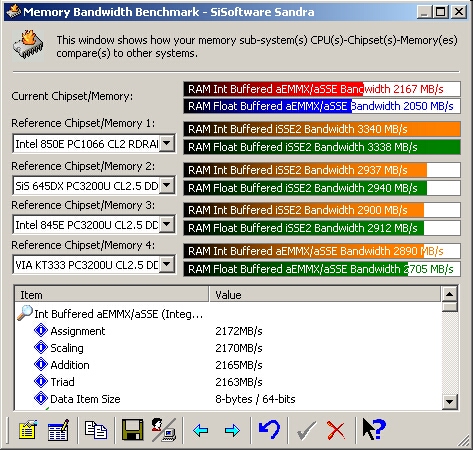
There is a good boost in the SiSoft scores after pushing the FSB up to 166 as you can see. Both the Integer and Floating point operations got higher scores and this RAM hasn’t even broken a sweat.
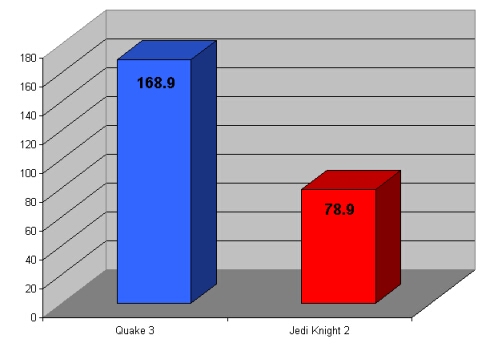
Quake 3 only gained 3.3 FSB more with the FSB at 166 rather than 133. Jedi Knight 2 only gained 1.8 FPS more than it did while at 133 FSB. The reason why there isn’t a huge gain in performance in these game benchmarks is because I am only going for a high FSB not a high MHz. The reason I am not going for the biggest overclock possible is because I don’t want the CPU to limit the RAM. Yes the CPU is a limitation while overclocking but I want to focus on the RAM only because all CPUs are different.