

I haven’t been able to check out the long term effects on this set as it was build in for review purposes but I sure hope that Gigabyte will change the radiators into copper versions as this is a major design flaw in my opinion.
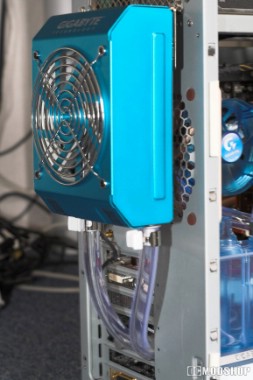
The way the radiator is mounted externally is through the use of a bracket; one side is screwed to the radiator housing and the other side is mounted on the power supply screw holes, you can feed the hoses trough the PCI cover plate provided (which also holds the potentiometer to in or decrease fan speed).
For usage with the socket 775 you need to use a retention backplate. Now I’m not a big fan of backplates for the fact that with the wrong stickers to hold them in place they are hard to remove if you want to get rid of it, but if you’re not as hardware swapping hungry as me then you should be ok, but removing this sucker does take some force.
Anyhow after sticking the plate in place you simply place the cooling block on your cpu and screw in the added screws tightening the springs to about 65% load (or just on feeling ) it’s always a good idea to add the hose to the fittings before installing the block to prevent stress on the CPU and motherboard.
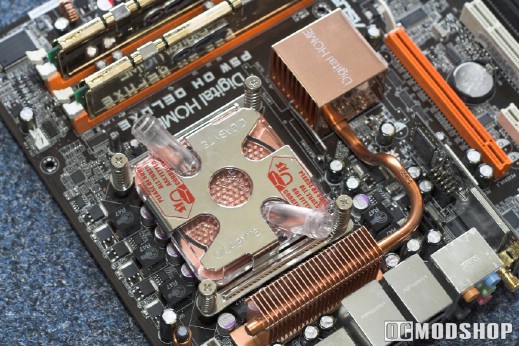
Remember the mosfet cooling fan, and that you might have gotten one with your motherboard? Well this is the reason why you can’t use it, and also a design flaw of Gigabyte by not using fittings that stand upright, never the less they did provide you with a fan to cool the surrounding mosfet`s (or replace the once you got with your motherboard) which would normally get some air from your normal heatsink.
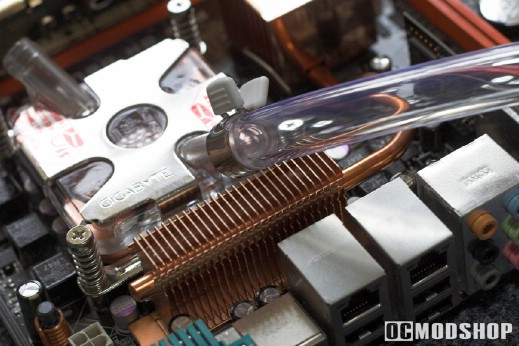
However the design flaw of the fittings might also help to prevent any kinks in the hose, on that side note Gigabyte added any kink springs which do their job very well.
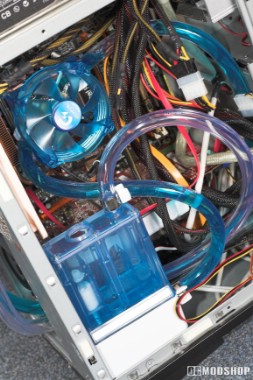
Right so we installed the kit inside the pc housing with the usage of the quick installation guide wich has clear images and good explanation how to connect the various components, so anyone who can handle a set of screwdrivers can install this kit.
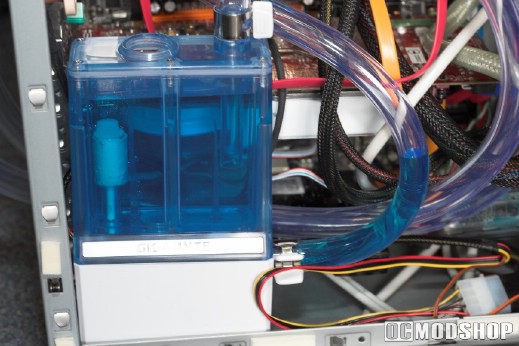
When in use it will take about half a liter of coolant so you still have some left to fill it back up when all the trapped air has bled from the system or when some of the coolant is gone, otherwise a good solution is to use denaturalized water or boiled tap water to get rid of impurity`s to refill the system.



3 comments
i want know the propertys thermodinamic of water galaxy II
Core i7 45nm intel
I have lots of water cooling because Core i7 Speed heat, so must sure fix well. if not then try diff with bracket fits that all … and aslo keep look if anything will happan on leak! becuase it not support the Core i7 but mine one find becuase i know what i doing with system with size,Nm,Lever water, etc
Thank you for the review.
I have an i7-920 system with the X58A-UD7 mobo
Does this kit support the i7? I heard ppl installed it on an i7 cpu (the bracket fits, they say)
also, the mobo has a built-in NB water cooling support, can i install it to cool both CPU and the mobo or NB? do I need extra hoses?
Please help.. the box says i7 support
Comments are closed.