You can also use XM Radio Online, which is a program that delivers 68 of XM’s most popular music channels, and most of them are commercial-free. A regular XM subscription will get you an average of three channels of every genre, but the Online version offers the most popular one for each genre (which is really all you need).
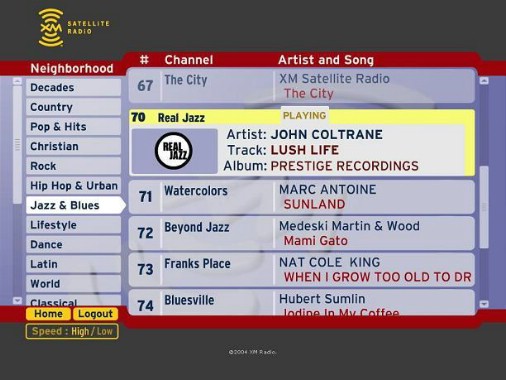
You can login to XM’s website (once you’ve registered your radio and created an account) and stream their online offerings, but this doesn’t help the Media Center user. Fortunately XM has created a plugin for Media Center which allows you to access their Internet streams using the 10-foot interface.
You can stream XM radio over the internet using this Media Center plugin, but you still have to pay XM Radio a monthly service fee ($7.99 per month if you are a non-subscriber, or $3.99 if you already have an account). You don’t have the full XM lineup, but it is very similar to what is available via DirecTV. This plugin reportedly doesn’t work properly with Media Center extenders, so it’s really only useful on the host PC.
Connect XM Radio to your PC?
While it is possible to connect the headphone or analog out jack of your existing XM Radio to your PC, Media Center cannot directly interface with it, meaning that it cannot change channels. You’re really better off just connecting your XM Radio to your Home Theater’s amplifier and tuning using your remote control.
If the reason you want to get XM radio working on your Media Center PC is to schedule recordings or timeshift, then you can look at Delphi’s SkyFi3 XM Radio. It allows you to timeshift, schedule and record shows, but unfortunately doesn’t let you transfer the recordings to your PC.
This is a great option especially if you want to record a channel that isn’t part of XM’s streaming lineup. I like to record interviews with comedians on “Stand Up, Sit Down” on XM’s Comedy channel (150), but this channel isn’t available on DirecTV. I can easily schedule the recording, but unfortunately this requires that the XM radio be docked during the session (as there is no internal XM antenna included in the unit).
There may be other creative ways to get XM content on your PC, but these are the easiest options. If you’re lucky enough to actually find one of the first-generation XM radios for the PC, then you might be able to use it, but XM might not allow the device to register. Even still, there may not be any software that allows you to use the radio from Media Center’s 10-foot interface.
Let’s look at the channel lineup between the different options…