

I went ahead and installed this heatsink to my normal testbed which went pretty well. This clip requires a screwdrive to be used which is always a bad thing because they can slip off and damage your hardware. The clip is alright and because the heatsink is small there is a good amount of room for the screwdriver to fit in the clip and not hit components on the motherboard. Removal of the heatsink was a little tough and the screwdriver ended up slipping off the clip a few times but nothing was damaged.


I will be using an EPoX 8K9A2+ with my Athlon XP 1800+ (1.53GHz) and will be using Motherboard Monitor to get the temperature readings of the CPU. This was done by setting motherboard monitor to “Winbond Diode 2” which will read the on-die thermal diode of the XP. I will be using Arctic Silver 3 as the thermal compound because it is the best on the market. Idle temperatures were taken while idling in the BIOS and the load temperatures were achieved by using Prime95 which put the CPU up to 100% load.
Test Bed:
- EPoX 8K9A2+
- 1800+ Athlon XP
- 60GB Seagate Barracuda IV HDD
- Corsair 512MB PC3200
- Abit Geforce 4 Ti4200 OTES 8x AGP 128MB
- PcToys VGA MAXX Heatpipe Cooler
- PcToys NB MAXX
- Koolcase’s Panther
- Generic 300w PSU
- Sound Blaster Live! Value
- ATi TV Wonder VE
- Plextor 40x12x40 CDRW
- Plextor PX-504A DVD+RW (review to come)
- pioneer 16x DVD
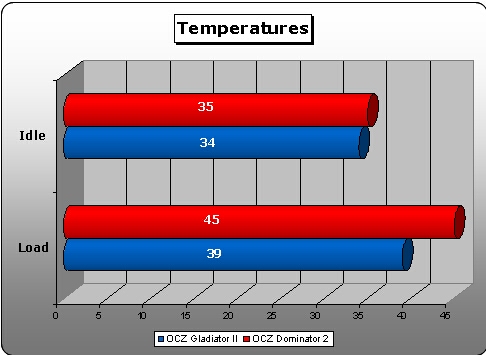
After installing the heatsink I booted up my computer and went into the BIOS right away to get the idle temperature. After idling in the BIOS for about 20 minutes I got a idle temperature of 35 degrees Celsius. I then booted into Windows and ran Prime95 for about 15 minutes. After getting the CPU to load it came to be 45 degrees Celsius which isn’t a bad temperature. The heatsink did a really good job cooling my CPU while only being semi-loud.
Conclusion
This heatsink was able to dish out what I basically expected it to, it isnt the best heatsink on the market but its not bad by any means. The fact that it is low profile, aluminum, and comes with a thermal pad simply means it isnt for your highly overclocked machine.
This heatsink would be best suited for a server, home/office PC, or budget system. I like the fact that it has a copper insert because without it the temperatures would have been much higher. The cons to this heatsink are simply the fact that its made of aluminum, is a little loud for my taste, and came with a thermal pad.
This heatsink is pretty good and overall I am pretty pleased with it. I am going to give this heatsink a 7/10 after taking all pros and cons into account. I would like to thank OCZ for sending me this heatsink. I am going to be giving away 5 of these heatsinks and 5 of the Gladiator II heatsinks away soon so watch for that!
Pros
- Performs well
- Good clip
- Copper insert
- Low profile
Cons
- Aluminum
- A little loud
- Thermal pad

