

Now that we have introductions out of the way, we should get down and dirty with exact data storage on these discs, and when overburning is possible on which media. It’s common knowledge among burning enthusiasts that CD-Rs are much more forgiving to overburning that any other media type. The disc structure allows for shorter lead-out time, and hardware used for playback readily has access to the outer edges of the disc where the lead-out area is stored. Remember the early nineties when every band put hidden tracks at the end of their discs and you could punch in any track number you wanted on CD players? They were taking advantage of unused space near and on the Lead-Out. Which can be dangerous to your burner and your media if you do not know what you are doing.
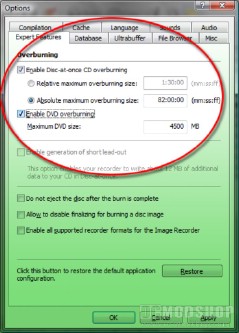
The same goes for any other type of media as well. Consider this; In joint testing conducted by the National Institute of Standards and Technology (NIST), the Optical Storage Technology Association (OSTA), and the DVD Association (DVDA), they found that 76% of failures occurred in the outer 10% of the disk, most significantly in the outer 5% of the disk. When the outer 10% of the disk wasn’t used, playback compatibilty rose to 98%, which is why they recommend not filling a disk to capacity. Considering their findings, actually overfilling a disk is something to be avoided at all cost. The media is made up of three zones that your player uses to tell when media begins and ends. The Lead-In Zone, Media Zone, and Lead-Out Zone make up the surface area of your disc, with certain bytes reserved for each, respectively. That is why DVD players have such a hard time playing back overburned or filled discs.
DVD players only go as far as the edge of the Media Zone, so when you are burning into the Lead-Out zone, you are actually going beyond what the player can read at all. And you are causing errors for the player as well by taking away the areas it sees as the “beginning” and “end” of your disc. In short, it is possible to overburn your DVDs with success, although that success is around 50/50 in terms of chances. In the case that you do succeed, you have a 50/50 chance of your player actually playing the disc. Given that DVD5 media costs just under $1.00 per disc, and Dual Layer is a little pricier, you’re taking a 1-in-4 chance of ruining a disc and damaging a $75.00 burner permanently. Trying to cram as much as you can on an 80-cent disc at that kind of risk is not really worth it. Try larger media, or split your data in two. But don’t take stupid risks with expensive hardware to save a penny or two.
If you absolutely MUST overburn your discs, I suggest using programs like Nero and reading up on it as much as possible so you understand the consequences. Googling for information is always a positive way to get information, but look for reputable forums for success stories. If you haven’t bought your hardware yet, they might be able to point you in the right direction. And then you have to read up on your player to ensure that it will play overburned discs. There are a lot of variables leading up to a 10-minute burn, but if you don’t cover your bases ahead of time, your wallet will be getting burned as well.



5 comments
Remember, this article WAS written in June 2009, so it isn't going to be perfect now, in nearly Feb 2012 ;)
But this is what I'm still confused about: Is overburning a standard operating mode for some storage devices, just not recommended because of higher risk of damaging the media? OR Is overburning disks analogous to overclocking CPU? :S In other words, a DIY that might be done if the reliability risk to performance trade off is worth taking that chance? :S
The longest intro to a topic that I haver seen. SO long, in fact, that there must not have been room left for the topic. B)
That was an excellent overburning guide. The only thing it was missing was an actual overburning guide.
If this were a how-to article, it would have been in the "how-to" or "guides" section. This is an introduction about overburning for the uninformed.
"Given that DVD5 media costs just under $1.00 per disc, and Dual Layer is a little pricier, you’re taking a 1-in-4 chance of ruining a disc and damaging a $75.00 burner permanently."
How can attempting overburning/overburning ruin your burner?
Comments are closed.