

Okay, first thing is that you need to know what motherboard you have. This is important, because once you know the make and model of your board you’ll have access to a list of what your mother does and doesn’t support. There are a lot of varieties of memory out there. Here are the most common types:
- 72-pin SO-DIMM (not the same as a 72-pin SIMM), used for FPM DRAM and EDO DRAM
- 100-pin DIMM, used for printer SDRAM
- 144-pin SO-DIMM, used for SDR SDRAM
- 168-pin DIMM, used for SDR SDRAM (less frequently for FPM/EDO DRAM in workstations/servers)
- 172-pin MicroDIMM, used for DDR SDRAM
- 184-pin DIMM, used for DDR SDRAM
- 200-pin SO-DIMM, used for DDR SDRAM and DDR2 SDRAM
- 204-pin SO-DIMM, used for DDR3 SDRAM
- 214-pin MicroDIMM, used for DDR2 SDRAM
- 240-pin DIMM, used for DDR2 SDRAM, DDR3 SDRAM and FB-DIMM DRAM
- 244-pin MiniDIMM, used for DDR2 SDRAM
Right now DDR3 is all the rage. When I built the computer that is now my media center just a short two years ago, DDR2 was at the top and DDR3 was just coming onto the scene. This time next year? It could be a whole new story.
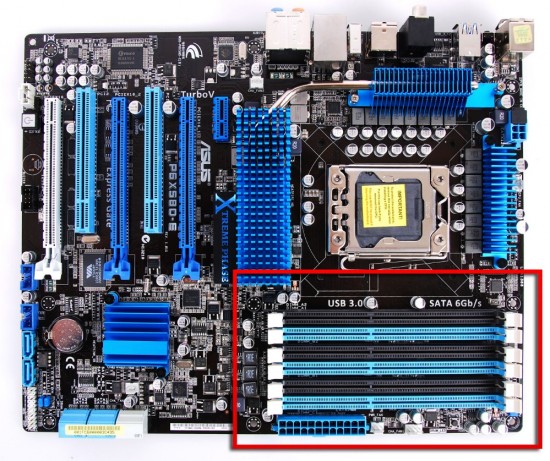
So how do you find out what kind of motherboard you have? Okay, then from here on in I’m going to assume that the reader is the kind of person who ordered their computer from Dell or something, and they’ve never cracked the case. Now’s the time, virgin…
WHOA! Hold on there cowboy, you need to go get some protection. Make a quick run to your nearest computer supply store or major retail store and pick up a can or two of compressed air. You can never have too much, in my opinion. I buy a can every time I go shopping.

Make sure your computer is off, unplugged from the wall, and give the power button a push to get any extra electricity out of the PSU’s capacitors. Now, figure out how your case opens. I can’t give you any pointers here. They’re all different. Pandora’s box gave up the goods easier than some cases. Once you get it open, clean it out good with the compressed air. Just follow the directions on the can. Get the entire motherboard, clean out all the expansion slots, the DIMM slots, the heatsinks, get it all. If you see lint or dirt anywhere, treat it like a zombie horde and blast that shit back to wherever the hell it came from.


2 comments
No problem!
Thanks!
Comments are closed.