

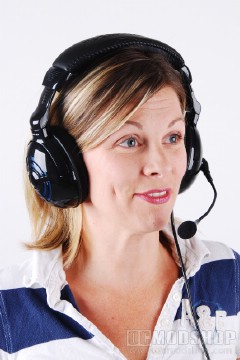
The TeknMotion PulseWave headset looks like most other gaming headsets. It uses an over-the-head design, and has a cushioned top for comfort. Both sides of the head strap can be adjusted, and are notched in 12 positions. The nothes are even labeled so you can adjust the phones before placing them on your head (assuming you remember which number fits you). The earcups are the around-the-ear style, which passively blocks out noise, but everything around you is still muffled until you turn on the audio juice. The inside of the earcups are edged with a sturdy foam and covered with a thin material. The outside of each earcup house an array of LEDs that can light up to the audio being played.
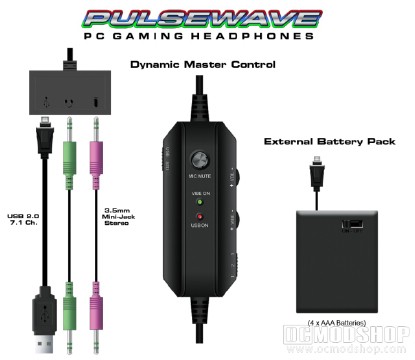
The headphones are powered through a single cable to the left earcup, which is then routed through the headstrap to the right earcup. Between the earcup and the end of the line is an in-line remote control, which is rather large. The remote control has several features and indicators. It has a switch which toggles the headphones between USB and standard mode (standard mode uses traditional headphone and mic jacks). The top of the remote has a microphone mute button, and 2 LEDs to indicate the vibration status and USB status. The right side of the remote control has wheels to control the volume and vibration intensity. There is also a 3-way toggle switch which puts the headphones in one of three modes:
- Vibration off
- Vibration on, LEDs on
- Vibration on, LEDs off
The end of the lead terminates into an oblong breakout box. This box has a mini-USB port, headphone port, and microphone port. A standard mini-to-USB cable can be plugged into the port and then attached to any PC, which then powers the headphones. You can also choose to use the standard connections, but then the headphones won’t receive the necessary power to use the vibration mode or flash up the USB lights. TeknMotion does include a battery pack which can then be plugged into the USB port, which provides the power to drive these features if, for example, you want these features on while listening to your iPod.
The microphone is flexible, and can detach from the left earcup. The microphone has a standard 1/8″ mono plug, you you could in theory use any microphone in this socket. The microphone can swivel over 60 degrees, from parallel to the headstrap to well below the average person’s chin.


3 comments
Could i get it to work for an xbox
You probably could get it to work on a console. It comes with analog adapters, but you have to use AA batteries to get the rumble to work.
I just got this set yesterday and your review is 100 correct I am glad i did not get the fatality 1 set this is much better then them. $50 great for gaming.
Comments are closed.