

Which brings us to my error. No Beep. Which usually means either a bad or incompatible CPU. After some research on the Asus M5A78L-M LX motherboard I found that it was compatible, but only after a BIOS update. However, as the motherboard stated that it only supported CPUs up to 95W and mine was 125W, I was doubtful. I sent the motherboard back to my supplier and they updated the bios for free, then shipped it back. I put the system together again and low and behold… Nothing! Not even a chirp. Regardless of the website’s claims, a BIOS update doesn’t change the wattage capabilities for CPU support.
So I a couple days ago I got a new motherboard in the mail. This one an MSI 970A-G46, which fully stated that it supported my processor and all its 125 watts of electricity-sucking power. The former motherboard, and Asus, was put back in the box for a later build. I put it together and got a successful three beeps with no memory or CPU installed. I put the CPU and RAM in, with a PCI-E video card as this motherboard has no onboard video. And low and behold… Nothing! Again.
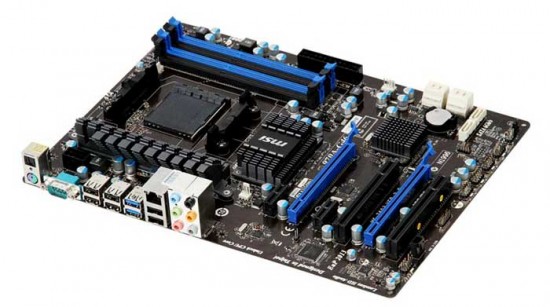
I did some research and found that while this motherboard did support my processor fully, it had to have another BIOS update. Neato. But as I already had one motherboard going to waste and one sitting there needing a BIOS update that couldn’t be done without a lower level processor, I decided to order a new processor and update the BIOS myself, leaving me with an extra CPU for a side build project; two birds with one stone, if you will.
The point is that even though the website says they support your processor, it might not be true. Why Asus thought that their motherboard supported a higher wattage CPU than what the motherboard was rated for is beyond me. And I contacted the PR rep at Asus about this, with no response. The MSI board, after a little research, did reveal that it would support the CPU with a BIOS update, and went up to 125 Watts to begin with.

he point here, and one that I forget myself sometimes, is to read. Read, read, research, and read. If you’ve never encountered this before or this is your first build, it can turn you off to the joys of putting together a PC with your bare hands. To hand pick each and every component and know that the game you’re capable of building something that would cost twice as much if you bought it already put together. Once the new CPU comes in, we shall see if everything is operational or if I have to start writing scathing reviews on hardware.
Stay tuned to see how the build turns out with the updated BIOS in part two…



2 comments
Comments are closed.