
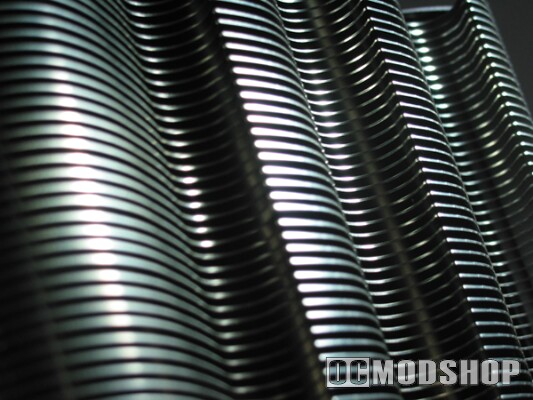
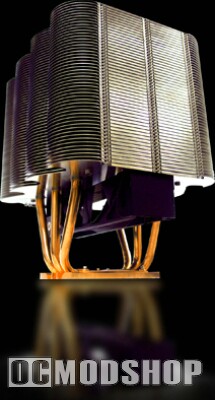
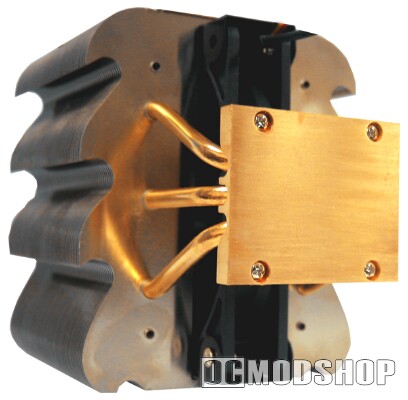
The cooler itself is impressive to say the least. There are over 50 radiating aluminum fins (arranged in an artistic design somewhat resembling flames) to disperse heat and three copper heat pipes attached to a copper base. The build is high quality and sturdy – I know this because I actually dropped the thing! I’m not kidding, it is heavy! Thank God I didn’t drop in on the motherboard, or I am sure it would have broken some fragile capacitor or resistor. Physical installation looks like it could be harder than it actually is. Tuniq included a very thorough and detailed manual giving excellent instructions on how to connect the Tower 120 to each socket type (except of course AM2).
Now, to cool this idolatrous mass of metal, Tuniq has included a monster 120mm fan, which actually sits inside the radiating fins, and utilizes nine blades. The fan speed is controllable via a little dial that lets you vary between 1000 and 2000 RPM – the dial is installed in a slot in the back of your case where a PCI card would go. The fan is very quiet, but does a perfect job of cooling the unit.
 Testing
For the test setup:
- Motherboard: ASUS A8N32-SLI Deluxe Socket 939
- Processor: AMD Athlon 64 X2 3800+ 2.0GHz
- Memory: 2GB Corsair Value Select DDR400 dual channel mode (kept at stock speeds throughout the evaluation)
- Video card: EVGA GeForce 6800GS
- Hard disk: 2 x 120GB Seagate Barracuda 9 series
- Optical drives: LG DVD-R/RW; 1 old-school Panasonic DVD-ROM
- OS: Windows XP Professional SP2
- Case: Apevia X-Cruiser-BK
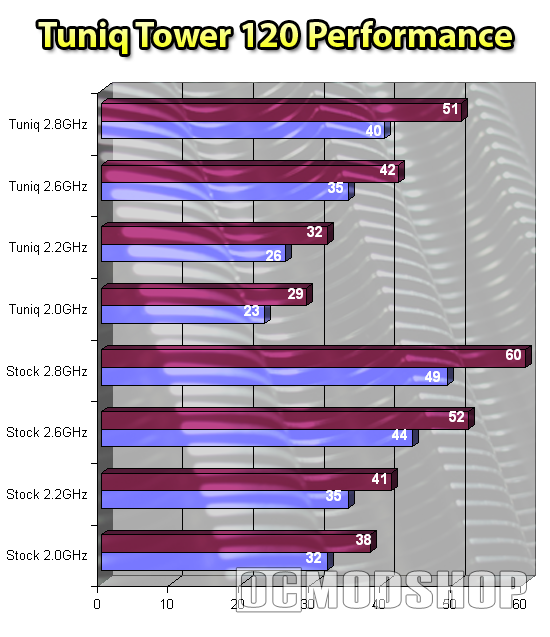
At regular speeds, the stock heat-sink-fan (HSF) works just fine. It’s not particularly quiet though, and once you start overclocking, the stock units become less and less adequate. At regular speeds of 2.0 GHz, all is well with the stock cooler; idle temp was 32 degrees Celsius, under a full load of Prime95 on both cores, temp went up to 38C. That’s not too bad at all, really. The good air-flow design of the Apevia case also certainly contributes to lower overall temperatures.
But let’s turn up the juice, and put this CPU through its paces a little shall we? Cranking the bus up to 220 gives us a little 10% overclock (2.2 GHz, the CPU has a multiplier of 10), but this doesn’t seem to change temp too much at all; 35C idle temp, 41C loaded. The Asus board is a champion OCer though, so lets throw something tough at it: ratcheting the bus up to 260 yields a speed of 2.6 GHz, and temps go up a fair amount, to 44C idle and 52C load.
To go higher than 2.6GHz with this CPU it was necessary to increase the voltage, which turns the heat up even more. 2.8 GHz was as high as possible with the stock HSF, and the temperatures were a markedly uncomfortable 49C idle and 60C load. According the AMD’s specifications for the A64 X2 3800+, max temp is 71C – that’s about 160F!! That’s just too hot for my tolerance, but it is amazing that the included HSF could get the CPU to the point it did.
Popping in the Tuniq Tower 120 immediately resulted in temperature improvements as well as a drastic decrease in noise (FYI, the speed of the fan was kept at 2000 RPM). At stock CPU speeds, temps were 23C at idle and 29C under a full load. At 2.2 GHz, temps were 26C and 32C. At 2.6GHz the Tower 120 kept the system nice & cool at 35C idle and 42C load. At 2.8 GHz the Tuniq HSF still managed to keep temperatures at 40C idle and 51C load.
Considering that the processor was previously able to remain stable at 60C on the stock cooler – and with the Tuniq, the highest temp has been 51C, so there might be a little room to go even higher, hmm? So I set the FSB to 300, preparing to meet failure, and then the computer got to the POST screen. Wow! Then Windows started. Wow!! Then the desktop loaded, and I was astounded, but after a few minutes, it proved to be unstable.
Never to easily admit defeat, we turned the CPU voltage up to 1.5v, and it was a little more stable, but eventually the computer still crashed. But knocking back down to 290 FSB and 1.475v, the CPU was able to maintain 2.9 GHz with no issues. The temps were 43C idle and 55C load. Honestly, the poor little processor might have a substantially shorter life span running at this extreme overclock, but I don’t think we should care too much. Let us show no mercy.