

I was excited when I got word that I would be reviewing the new InSight 500GB. I am usually impressed with Verbatim’s goods and was sure that this would be no exception. But when I opened the box and found this little chunk of plastic not much bigger than an iPhone, I was a little taken aback. I mean, this freakin’ thing is teeny. I know we can now fit 60+ GB of space on a flash drive, but this is a 500GB portable.
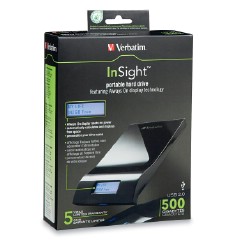
Opening the box, I found the drive itself nestled inside a soft cushion envelope. Underneath it was the instruction booklet and at the top under a fold of cardboard was the USB 2.0 cable that was promised on the box. Taking the InSight out of the cushion envelope I found the piano black top was covered with a plastic sheet to protect the shiny surface. After I had everything out of the box, I hooked the InSight up to my PC to test it out. No power cables needed, which I like. My power strip is full enough as it is. As soon as I connected the portable to my USB it proceeded to scan itself and read the name that had been given to it “Verbatim” as well as the amount of free space it had on hand, which was 465GB. Windows 7 installed the drivers and proceeded to display the options for the drive.
To start out, I had a folder full of random files sitting on my desktop that was just begging to be moved somewhere, anywhere, else. The total size of the folder was 35.5GB, and contained approximately 774 files. This is just a rough test; I’ll see what other speeds I can get out of it with software tests. It took exactly 25 minutes for a full transfer of the entire folder’s contents. That’s an average of 21.6 MBs per second. Not too bad. But that means that it would take you around four hours to back up a 320GB HDD via drag n’ drop. That’s a long time for a data transfer. But who backs up an entire HDD to a portable device anyway? You only want what’s important. That’s where the included Nero BackItUp software comes in. I’ll test that out soon, but first I want to do some speed tests on the InSight using HDTach and SiSoftware Sandra.
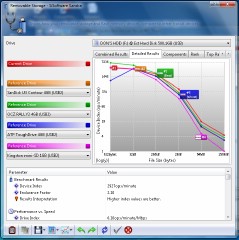
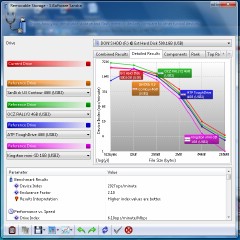
Sandra 2010 Benchmark Results
After messing around with HDTach and then realizing that it wasn’t compatible with Windows 7, I got it configured to run in XP compatibility mode and proceeded to test the InSight with an 8MB Short Bench test and a 32MB Long Bench test. I’d like to say there was difference between the two, but they both showed an average speed of 31.0 MB/s with 7% Utilization of my 3.2Ghz single-core CPU. HDTach isn’t the most taxing or thorough software with which to test this little toy, so I then move on to SiSoftware Sandra. Sandra knows what’s up when it comes to benchmarking. And bench pressing. She can easily handle 350 pounds with steroid-laced muscle to spare.
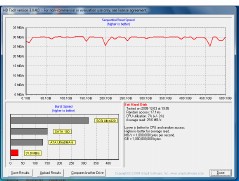
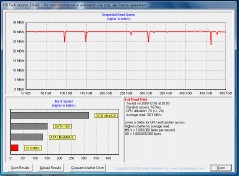
HDTach Benchmark Results
Sandra compared the read/write speed of the InSight 500GB to four other portable drives on the market. The InSight came in third with 2927 ops/sec, with number one being the OCZ Rally2 4GB (read our review here), and second being the Sandisk U3 Contour 4GB. The Kingston Mini-SD 1GB came in fourth, followed lousily by the ATP ToughDrive 4GB. The ATP 4GB also happens to be the very flash drive I use for my Windows ReadyBoost. It appears I could have chosen a better drive had I really put some thought into it.
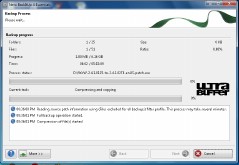
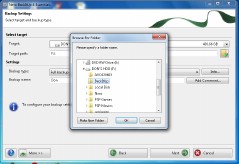
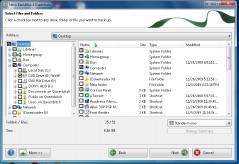
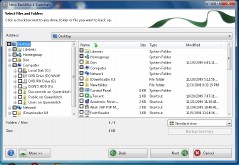
Nero BackItUp Software
So now that all the benchmarking is over, we can check out the Nero BackItUp software that Verbatim included on the drive itself. The program is sitting at the root of the HDD in a folder named Nero, obviously. If you have trouble finding this, you should probably not be messing with anything more advanced than an egg timer anyway. I installed the software and proceeded to select the files that I wanted backed up. I put the dual layer disc with my Warcraft installation files, just over 6GB of files there, and created a file on the InSight named BackItUp. I found naming files specifically helps to avoid confusion later. Especially since I plan on deleting this backup as soon as this review is over. So after selecting my files for backup and then selecting the destination, I hit the Finish button and let Nero do its thing. It took just over an hour for full compression and backup of all my files on the Warcraft disc. It took about 12 minutes for a full backup with no compression.
On the next page… the conclusion!


