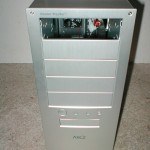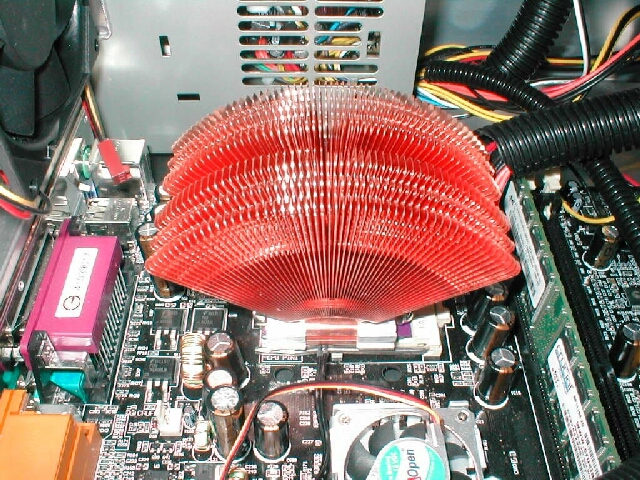
Installation of this heatsink was one of the easiest that I have ever done. All you need to do is drop the clip into the groove, place the heatsink on the core, attach the clip to one side of the tab and use the clip tool to attach the other side to the socket. I think that this heatsink looks really cool installed and if you have a window you can display something different than the standard heatsink.


After the heatsink is installed you need to install the fan bracket. To install it you just screw two to three of the silver screws into the expansion slot screw holes. When the fan bracket is installed you will need to position the fan over the heatsink by using the gold knob on the arm. Then you will plug your fan into the fan control device and the fan control device into a motherboard header. This fan control can be adjusted while the computer is running.
Test Bed
- AOpen AK77 Pro(A)-133
- 1.2Ghz Thunderbird
- 256MB Crucial PC2100
- Asus Geforce 2 GTS 64MB
- Globalwin YCC-8870 case


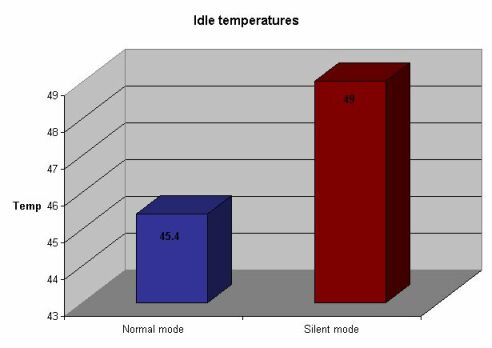
Like always I will be using Artic Silver 3 for testing, I will also be using an external Compunurse thermal probe for the temperature readings. I tested both the normal mode and silent mode of this heatsink. I booted up the computer and let it idle for about 20 minutes and took the reading from the probe. After I had the normal mode results I turned the fan down to silent mode using the fan controller. With it set to normal mode at idle the CPU was 45.4 degrees Celsius and with it set at silent mode the idle CPU temperature was 49 degrees Celsius. I apologize for the poor quality of the graph I need to figure out why it looks so bad.
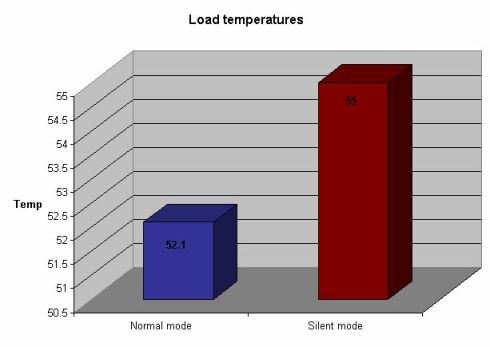
I then used Prime95 to torture test the CPU and bring it to load. At normal mode the CPU got up to 52.1 degrees Celsius which is a little more than I like to see but it is not a bad temperature. With it set at silent mode the CPU at load got up to 55 degrees Celsius, again is not bad if you are not worried about overclocking.
Conclusion
Even though the performance is not the best in the world you must take into mind that this heatsink is designed to keep your CPU at a good temperature and at the same time having it be quiet. There are so many good things about this heatsink which I like. I like that it’s very easy to install, that it’s quiet, you get a lot of stuff and spare parts and that it looks cool. The only con to this heatsink is that it’s not the best if you’re going to be overclocking with a higher voltage.
If you want a very quiet, easy to install heatsink with a lot of extras included I would really recommend this one to you. This heatsink retails for about $45 which is really good considering all that you get, not too much if you ask me. Overall I am going to give this heatsink an 8.5/10 and award it the OCmodshop Seal of Approval. I would like to thank Zalman for giving me this heatsink to review, I will have Zalman product reviews posted soon. You can pick up this heatsink from Sharka Corporation

Pros
- Very cool looking
- Very quiet
- Good performance
- Thermal compound included
- Fan control device included
- Spare parts included
- Easy to install
- Great clip design
Cons
- Not the best for overclocking