Older utilities that aren’t Vista-aware may not run in Administrator mode when running on Windows Vista. Therefore, when you go to run a program (an installation program, for example), the Operating System may tell you that you are not authorized to do so. Many utilities need to be run in Administrator mode in order to function properly.
All shortcuts in Windows Vista have a special settable property that will allow the application to run as Administrator.
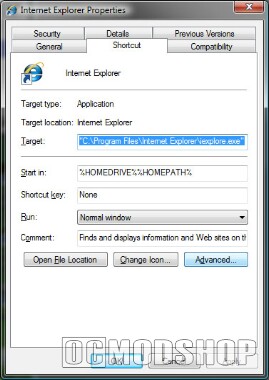
To set this property, just right-click on any shortcut, and click the Advanced button on the Shortcut page to get to the Advanced Properties dialog.
You’ll see a dialog with a checkbox for “Run as administrator”.

From now on, the application will always run as administrator if you use the shortcut to launch it. (You’ll be prompted by UAC if you have it enabled).