

The box has an interesting shape. The front of the box has its left and right corners folded to have three sides, while the left, right and back of the box have typical rectangular features, for a total of six sides. The top flap is secured by velcro circles and opens up to reveal marketing information and a window to see the product itself.
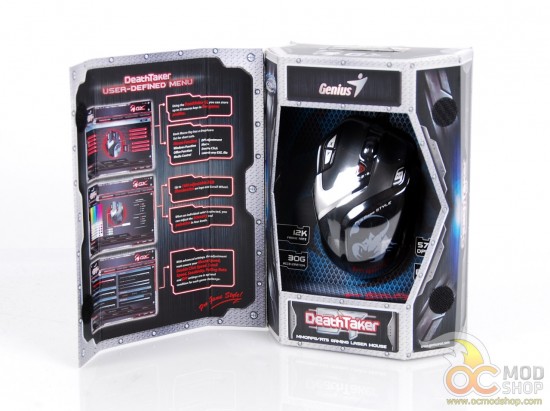
The person who designed every tech website in 1998 must have also done the DeathTaker box art, which is full of the Photoshopped metal and screws of that era. Regardless of their aesthetic choices, there is a lot of information about the mouse on the sides and inner flap. From the box we can see that the mouse has a 6-foot (1.8 meter) braided USB cable, individual X/Y dpi buttons, a patented “magic roller” scroll wheel, profile buttons supporting up to 55 macros, onboard memory and adjustable weight (up to 27 grams).
The mouse apparently supports an “over-clocking” SG Core II. We’re not exactly sure what this means, but we’ll explore this during testing.
The box is secured with three clear adhesive stickers at the bottom of the box, which must be cut to open the bottom flap.
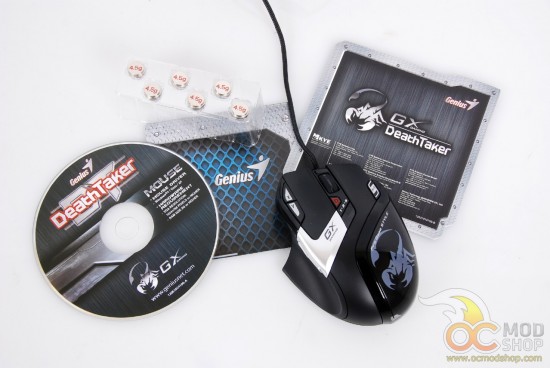
Inside the box is the mouse itself, a folded Quick Start guide, a multi-language installation guide, six 4.5 gram weights and a software CD. Some mouse manufacturers have cut costs by not including a pressed disc and instead require users to download the software from their website (usually with a broken URL as was the case with the Storm Recon mouse here).
The mouse is housed in a cardboard assembly, and the braided mouse cord is tucked into folded cardboard tabs, which really make it difficult to remove without destroying the box. The weights are also tucked into the front of the assembly.
On the next page we look at the mouse’s features.



3 comments
sh*t.. mine died just like the one in your update info even with the same error "USB device is not recognized”… any info about this error? and possible solution (Win8-64bit)… thx
Looks like mine was dead. No way to revive. Just goes to show how cheap Chinese electronics may look cool at first, but then die.
mine is already on the way back to the dealer… I've tried 3 different OS's and 4 computers… It was not bad mouse at all, but dead after 4 months.. shame..
Comments are closed.