

The Light Options tab lets you change the LED color for the mouse wheel and GX logo for the profile you’ve selected. By default each profile has a different color assigned with a slow pulsation. To change the color for each profile, just click the Profile number at the bottom before selecting your color.
There is a color palette with several pre-defined colors, and of course three text boxes to allow you to enter in numerical values for your color. You can’t click-and-drag around the color palette like you can in Photoshop or Paint, as click-dragging will move the window. If you want to pick a custom color with the mouse then you have to be rather precise and click down without dragging. You can change the light to a “breathing” mode similar to Razer products, and can select between Steady (always on), Slow, Middle, and Fast pulsation.
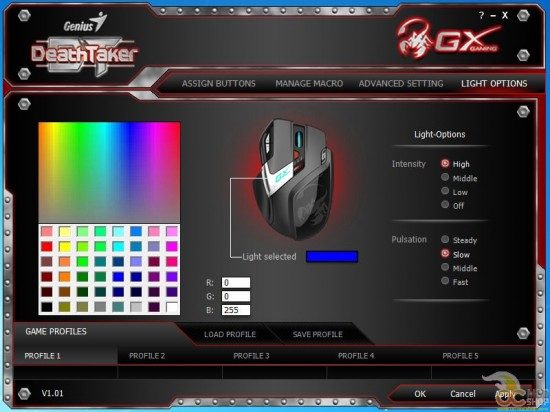
The Game Profiles area is at the bottom of the window, regardless of which tab you have selected. This lets you easily change settings for each profile without having to toggle back and forth. Unfortunately it doesn’t appear that you can name the profiles, so you’ll have to remember what each of them do, and what color you’ve assigned to which game. Macros that you set in one profile are not available in the others, so you have to re-create any macros that are common between games.
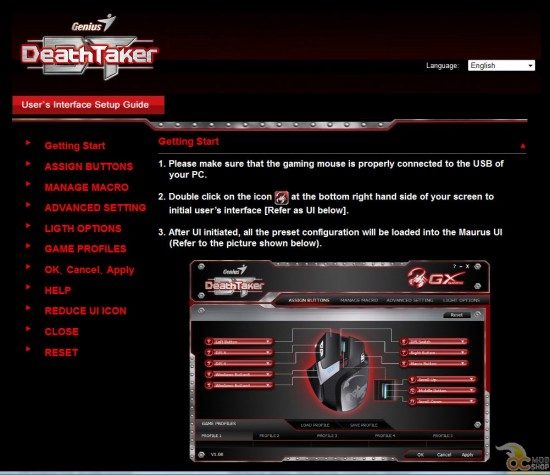
Clicking the Question Mark (?) icon brings up an HTML file in your browser that was copied to your hard drive when you installed the software. There are obvious typos and badly-translated phrases.
Attention product distributors who import products from China: I am available for copy writing and editing. There is no excuse for things like “Getting Start” and “LIGTH OPTIONS” in a product that is for retail sale in an English-speaking market.
Read our conclusion on the next page.



3 comments
sh*t.. mine died just like the one in your update info even with the same error "USB device is not recognized”… any info about this error? and possible solution (Win8-64bit)… thx
Looks like mine was dead. No way to revive. Just goes to show how cheap Chinese electronics may look cool at first, but then die.
mine is already on the way back to the dealer… I've tried 3 different OS's and 4 computers… It was not bad mouse at all, but dead after 4 months.. shame..
Comments are closed.