

First of all, you have to get all those screws out. At first glance, you might think there are only 5 screws. And for some reason, people who do instructionals on this subject on YouTube say there are 5 screws, and then the hidden one. Okay, I’m shooting you straight. There are 6 screws on this thing, and you have to peel back the “Do not open or your sh$t is voided” sticker in the battery compartment to find the last one. It’s not hidden, there are no booby traps, and info on some missing mobster isn’t hidden in there. It’s simply a screw with a warning label over the top letting you know that you are about to void your warranty.
Let’s face it… if your PSP were still under warranty, would be we doing this repair ourselves? (Un)screw it.
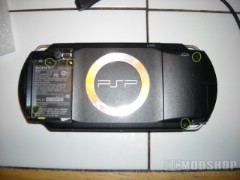
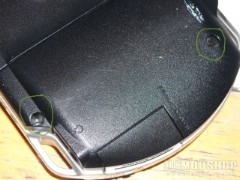
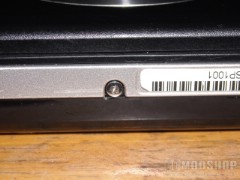
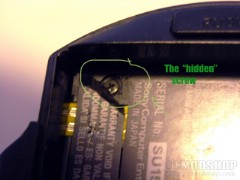
find all of the screws so you can take off the case
There are two screws located in the upper battery compartment as well, two on the back of the console near the Memory Stick compartment, and one on the bottom in the dead center. Take them all out and then come back to me. Got them all out? Good. Now let’s pry that faceplate off and set it to the side. Start at the bottom and slowly pull it up, it should come off pretty easily. Once you have that off, you can get to work on taking the LCD out. Some people think it’s necessary to remove the L and R buttons from the top. It’s not. Ignore them and try not to scuff them up with a screwdriver.
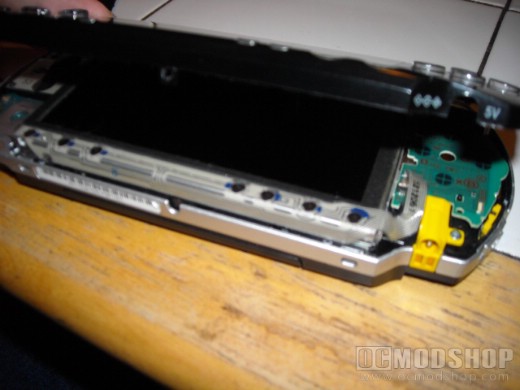
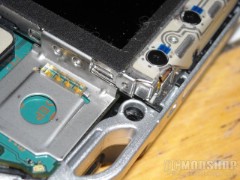
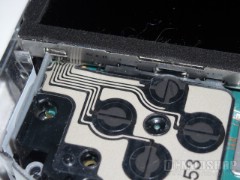
revealing the creamy goodness
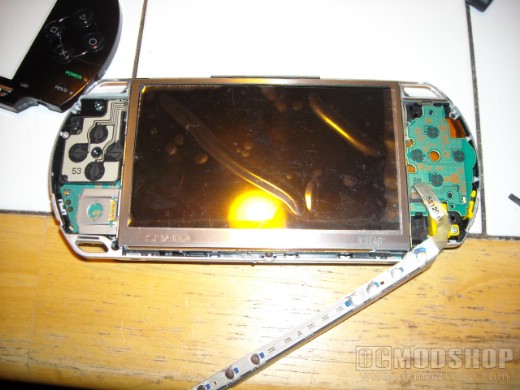
Assuming the PSP is facing you in the proper orientation, with the L/R buttons at the top, you’ll see that the metal plate containing the menu buttons at the bottom crosses right in front of the LCD panel. To remove this, you simply take a small flat-head screwdriver remove it at the lower left hand corner. Slide the screwdriver under the menu plate and pop it off gently. This won’t take much pressure at all. Try not to disconnect the wire ribbon that is attached at the other end.
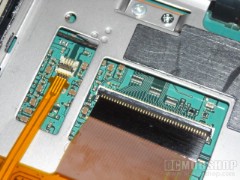
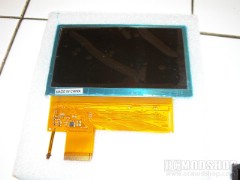
The LCD and its ribbon cables
Once this is moved to the side, it’s time to remove your LCD. See how easy it is to get to this point? Take your tiny flat-head once again and go to the upper left corner of the LCD. You’ll see there is a peice of raised metal on the LCD’s frame holding in the compartment. Slide your screwdriver in here and slowly move the LCD up and out until it is no longer held down. Do the same with the one at the lower left corner. Now you should be able to just grab the screen with your fingertips and remove it. Be careful once again with the wire ribbons that are attached.
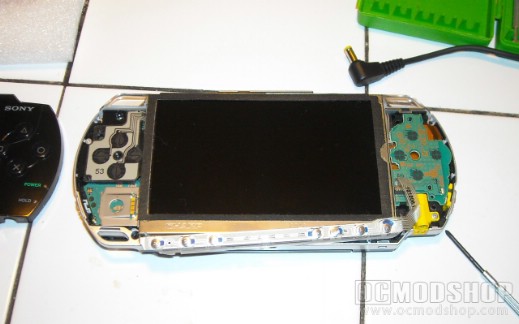
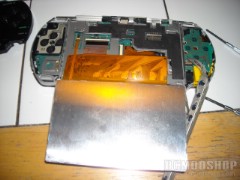
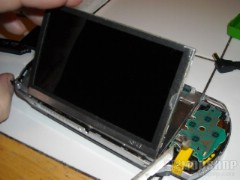
pull up the LCD and disconnect its ribbon cables
You will see that there are two ribbons that connect to the PSP’s motherboard. A large one and a small one. The large once can be removed by simply popping the black connector up and away from you, then sliding the ribbon out. The small one is reversed. Grab the black snap with your fingernail and pull it up and toward you, then slide this ribbon out as well. Congratulations, you just removed the broken LCD panel and are halfway home.
Okay, grab your new LCD panel. They typically come with a blue film over them and a sticker underneath this to protect the screen. Remove the blue film, but not the sticker. We need to make sure we don’t scuff or scratch the screen during the installation. Also, fingerprints are a pain in the ass when they require you to dismantle the system to wipe them off.
peel off the protective film from your new LCD
Okay, take the ribbons and slide them in the way the old ones came out. Pay close attention to make sure they are pushed in all the way. If they are not far enough in your screen won’t work. Now close down the black tabs and get ready to put your screen in its cradle. Start with the right side, sliding it into place, then the left side. Once this is snapped in, you can replace the menu plate that you took off. It snaps in just as easy as it came off. The only thing left is to replace the faceplate and put all those screws in. Remember, the longer silver screw goes on the outside at the bottom of the PSP, the shorter silver screw goes next to the black one in the battery compartment. The black screws are pretty much all interchangeable.

good as new! Let’s play some homebrew games!
Okay, everything is back together once more. Power up your PSP. If your screen works, then congrats to you. You just repaired your broken PSP and didn’t even break a sweat. Or your wallet. Sorry greedy PSP techs. And that concludes today’s lesson. Tomorrow I will show you how you can derive solar power from a sun-baked pile of dog feces.


42 comments
I sat down on my couch and my knee hit my PSP 3000 and my screen broke, i dont see any cracks but the LCD screen shows cracks when i turn it on, anyone know what can be the problem and how i can fix it? i need help ASAP
[…] PostsHow to repair your PSP’s LCD Screen – August 9, […]
i kinda…got mad at a game and…yea was it a good idea to bite my psp because now my screen is broken
This could be the dumbest way to break your PSP ever.
ok so i dropped my psp charger on my psp screen idk what type it is got it new christmas but anyways the screen is jacked up its got huge crack on te lcd the outer 1 is perfect wat the hell happend??
[…] How to Repair your PSP’s LCD Screen […]
Okay, let me try this… but first i gotta save 25 $? for my lcd… T.T holy smokes i miss it even though its broken for just a day
hay my psp screen is all black and has some color patterns on the left side of the screen but i can still hear sounds got any solutions????? Tnks
Hello. I seem to have something stuck in the bottom right screw housing on the outer covering. Have you encountered this before, and if so, do you know how to remove it?
i had also a broken lcd psp1000but i had made it in 4000nrs so what is the price of one lcd
I was HUGE into the PSP scene. I had a Website with over 300 isos on it for free, After the release of the new Final Fantasy game, I wanted to pick it up again. Only to find my PSP LCD is displaying Random Colors, and patterns. making me believe one of the wires may it pinched. I opened it and found NOTHING wrong. if you have a clue what it may be, drop me a line.
TehBlackGamer, Do you mean an object is stuck in the screw well? If that's the case, I would suggest a small pair of tweezers or a needle to pry it out. A mounted magnifying glass is always helpful. If that doesn't work, I guess you are stuck asking a friend for their eyesight and nimble fingers.
my psp screen cracked bad yo. i got mad and threw my xbox 360 controller and it hit my psp screen, i was pissed.
I left mine in my bookbag and when I took it out it looks exactly like the picture. I still found out how to get to my music, though. Can the people at GameStop fix it for me?
how can you fix it with out going to a store and paying for it if you want to do it at home by yourself?
my psp got hit by my usb when i was swinging it and my psp has a little crack any soultions???????
where can i buy the lcd screen and how much does it cost?
I recently replaced my psp's lcd following these steps, and everything works fine except for one thing. If I put my psp on standby for a while, when i turn it back on the screen is black (sounds indicate that everything else is working fine). I can make the screen work if i quickly put it on standby and turn it back on again. Do you have any clues as to why this would happen?
My psp screen has problems,(i.e. repeated lines, white lines, mirrored objects) but it was never been dropped! Before it experienced the worst case – (upside-down screen), the game I was playing crashed and stopped, the psp then restarted with upside-down display. Can this be a virus?
i dindnt drop mine i cant see half of the screan
how much will one psp lsd screen cost how can i replace it send me info daniel.mcpherson95@yahoo.com
this was really healpful. made me alot happier that i didnt hav to buy a new psp. hell yeah
dude you should of just bouqht a whole new psp. bcuz u just spent more money repairinq it. dumb asz.
i cracked my screen so i went & bought a brand new psp then i found the page & hit my head because i felt so dumb for bying a brand new psp when i could have just fixed it(i'm soooooooooo dumb).
the LCD of my psp was broken, i don't know where should i go to repair this because it is really broken and you cannot see any item inside the psp…..my psp's lcd was broken inside the psp screen….
hey man tell me how much one psp lcd screen will cost….???
how can i replace it…???
pls send info to my email…
Hey, my screen is broken too, where do I get a new one? And what's on your thumb on the last picture?
ya my whole screen is broke the psp(GOW COO(red))wont evan show the things it shuld!! how much??
you can get LCD screens with backlight from amazon.co.uk and probably from .com too if when u broke your LCd your faceplate broke too they sell them too ive just bought both these for my psp-1001 still managed to install 5.00-m33 on it with a half screen
your psp is funny cause its old!!!!!
DUDE I pUT IT ON THE DESK BEHIND MY BED ONE NIGHT, WOKE UP EARLY CUZ WE had to go On a lonG tRiP, ANd WHEn I TurnEd It oN, IT Was CraCKed Up
I wish i could do this….ill ask my cousin or my brother to help. And im okay with sending this to sony so should i do that or no? just incase i cant get me an LCD screen
Thanku for easy instructions. bought screen off ebay then did what u said and now have psp back. My son is very happy.
i dont know what the f*** happend to mine when i left it overnight at a friends. all i know is my screen is dead.
Umm, Logan. I think you are pretty much screwed bud.
lol my psp got ran over by a car!
are you retarded? warranties don't run out on lifetime warranties? you must have had paintchips covered in thinner for breakfast. how did you make it this far in life? PSP don't have lifetime warranties.
You, sir, Alan, can kiss my ass.
Believe me… if Don was able to do it then ANYONE can!
who gives a damn abot taking apert your psp? thats what your warranty if for and you can take it to soemone who can fix it for you. warranties don't run out on lifetime warranties.
dude thats why he fixed it himself.. so he DOSENT have to pay a trillion dollars just to get his screen fixed… lifetime warrenties or not its easier to fix it by hand
Dunno what you've been smoking, but PSPs have NEVER come with lifetime warranties – nor any kind of game system, software, or accessories that I know of. On top of that, no worrying about the PSP coming back in pieces (as a member of the package handler workforce, believe me when I say that there is no lost love towards small boxes). Plus, he saved a ton of money by doing it himself.
OH! Best of all: he bought it second-hand OFF A FRIEND, so warranty or no, he wouldn't have had one to work with, as they only apply to the one that originally bought it. Nevermind that, given it was an original Series 1000 PSP, it was probably well past it's 90-day warranty or whatever it came with, thereby rendering your argument completely null and void. :D