To answer this rapidly increasing bandwidth shortcoming choking even servers with 1066 MB/s of bandwidth on each bus and multiple busses, PCI Express was created. Notice it is not called a PCI Express bus, as that is a misnomer. In a bus, like PCI, expansion cards plugged into one shared resource. PCI-E uses a point-to-point technology where each slot receives its own path to the northbridge or southbridge, very similar to the difference between using a hub on a network and using a switch. Also, unlike PCI where a number of bits are sent in parallel (32 or 64), PCI-E is a serial interface, like Ethernet. Since there are fewer bits being sent at once, PCI-E uses a different method to create speed by simply increasing the signaling rate. Where a PCI-X bus can run at up to 133 MHz, a single PCI-E runs at 2500 MHz, or 2.5 GHz, and can send data both to and from the controller at the same time in a full duplex manner, giving a maximum theoretical bandwidth of 500 MB/s, 250 MB/s in each direction.
PCI Express and Graphics
As if all this speed wasn’t enough, PCI-E also allows channels, or “lanes” to be teamed to create larger channels, allowing the slots to be used for graphics applications as well as standard expansion. Currently the graphics slot of choice for PCI-E is a 16 lane, or X16, slot providing 75 Watts of power (up from 50W for AGP Pro). With its 16 teamed lanes it allows for a maximum of 8 GB/s combined bandwidth, 4 GB/s each direction compared with the AGP 8X maximum of 2 GB/s total. While this is still overkill (most graphics cards today would suffer little performance penalty from being placed in even an AGP 4X slot), it does allow enough bandwidth to reintroduce a now disfavored technique that AGP was originally designed for and hasn’t done very extensively at all since the nVidia Riva 128: texturing in main memory, allowing for more realistic games on lesser graphics cards.
Another possibility is installing two PCI-E X16 slots on a single motherboard allowing two high-powered graphics cards to be used in a single system. Alienware is currently preparing such a system, although due to current chipset limitations when a second card is inserted it will run each slot with only eight lanes rather than the full sixteen, that will still be more than sufficient bandwidth for graphics cards for the next several years. In the future chipsets will be designed to allow 32 lanes directly off of the northbridge to handle the extra load, as graphics channels are preferred to run directly from the northbridge for better performance to memory. Eventually it will not be unreasonable to remove the southbridge entirely and have all PCI-E lanes controlled directly from the northbridge, allowing more bandwidth than today is currently available. As of now, both ATi and nVidia have added PCI-E 16X products to their lines and they are currently battling it out for top performer.
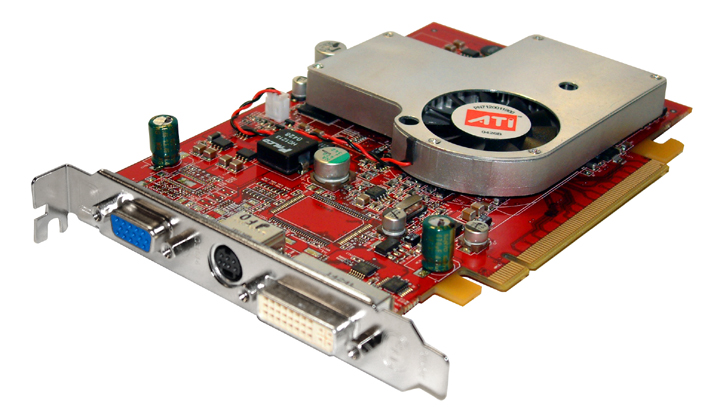
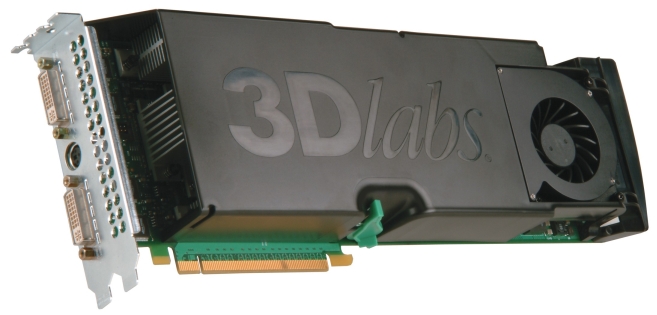
Left: ATi’s Radeon X700 PCI Express showing connector
Right: a bit beefier solution, the 3Dlabs
Realizm 800 professional card
PCI Express and Expansion Cards
Just as with graphics cards where 16 lanes are combined at once, likewise in normal expansion cards they can be teamed together as well. Currently, of course, It would be reasonable to install a SATA controller or Gigabit Ethernet, even dual port, into one single lane slot, in the future the bandwidth can be expanded by using PCI-E 2X, 4X or even faster slots. As an added bonus, if you purchase a PCI-E 1X SATA controller and next year you purchase a system with PCI-X 2X slots, they will plug into them. The reverse is not true, however: you cannot plug a PCI-E 16X card into a PCI-E 1X slot, due to the slot and card configuration as shown below in Picture 1, below.

Above: PCI-E 16X; Below: PCI-E 1X
As you can see in the above picture, to the left of the key there is 22 pins, and on the right there is 14 on the PCI-E 1X and 142 on PCI-E 16X. This key arrangement allows forward compatibility with future slots, although not backwards compatibility for future cards and older slots. It should also work to plug a hardware RAID controller using a 4X or 8X interface into the 16X graphics slot allowing for a very capable uniprocessor home server on the cheap, although the PCI-E specification does not require a slot designed for graphics to be capable of accepting other expansion cards so your mileage will vary on this capability. I believe that Via and SiS chipsets would be most likely to accept such a configuration over Intel and AMD, but there’s no hard data on this.
PCI Express also allows for more power to individual cards: up to 25W. Intel states that PCI-E 1X is for, “Gigabit Ethernet, TV Tuners, 1394a/b controllers, and general purpose I/O,” and I heartily agree. PCI-E is for next-generation PCs where rather than just using a monitor, keyboard, mouse, printer and the other peripheral devices that we are used to seeing in every computer, TV tuners, video editing, HD gaming and et cetera demanding more bandwidth than current PCs can provide. However, in normal gaming, PCI-E 1X slots won’t make a lick of difference until a normal PCI bus is close to saturated. The most important key will still be graphics, memory and CPU, and PCI-E 1X doesn’t touch those.
PCI Express for Servers and Workstations
Without delving into too much depth, PCI-E can be configured in 6 different slot sizes: 1X, 2X, 4X, 8X, 16X and 32X. For servers and workstations serving up multimedia content, this is a dream come true. Needless to say, with PCI-E 4X well outperforming the best PCI-X slots and PCI-E 8X being seen on some server motherboards today, PCI-E suits their needs as well.
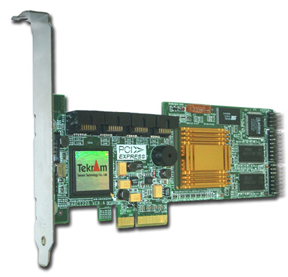
SIR-808X PCI-Express 8-port SATA RAID Host Adapter with a PCI-E 4X interface