

Throughout the years I’ve gone through a shed loads of keyboards and mice. Remember the good old times when optical mice just where invented? You couldn’t move them too fast or your cursor would jerk around the screen like a spast on speed…
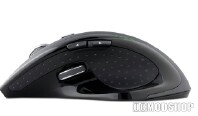
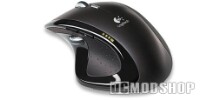
Back then I started with the Microsoft IntelliMouse (a nice mouse for its time), and after that I have always been a Logitech fanboy. Now I’ve handled the Logitech Dual Optical, the MX900, the MX Revolution and the G7 Gamer mice. “So if you had all mice why is that MX Revo so bad?” you might think… Well for one, I am a Firefox enthusiast and I totally love that browser and its usage of tab browsing. I read up on a lot of news and forums I usually open up 20 tabs, which can be done easily with firefox by just pressing the middle mouse button…
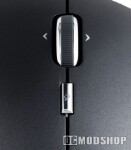
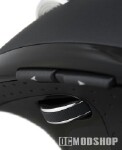
Yes the middle mouse button.
My old MX900 thought it would be a great practical joke to die on me after 3 years of service, so I needed a new one. I popped into the local PC shop and got me the MX Revolution. The thought had crossed me just get that G7 mouse and no problem, but I didn’t and brought back the shiny new MX Revolution box with me.



10 comments
Actually, the option WAS in fact, in the Setpoint 3.01 that came with the MX Revolution.
Daft, it is.
This article was written over 3 years ago, and at that time there wasn't a way to set the middle mouse button. It has apparently been resolved since then. I advised Daniel not to shun the mouse based on a few features, but that's why this was an editorial.
Make middle button work by:
1) open setpoint
2) click the mouse tab
3) number 3 button
4) press choose function
5) in the dropdown box find and choose the "Generic button" option
6) go to the wheel tab
7) make sure the option "Press the wheel to switch scroll function"
it has a middle button, if you have a problem with a specific program then give it program specific mappings, if firefox is the problem then add it as an exception with the manage programs option, you might have to put game detection on and such.
@Gazeebo: Well this was written when the logitech software wasn't as mature as it is now.
Pretty sure you're just daft. SetPoint allows you to configure all the buttons on the mouse.
Well, I assume you mean "the MX Revolution may have a middle mouse button, but I cannot use it to open a new tab in Firefox". In that case, this will interest you: http: blog.briandicroce.com 2007 12 27 opening-a-new-tab-in-firefox-with-the-logitech-mx-and-vx-revolution-series-mouse
Wow, what an incredible unaccurate article. The Revolution has a middle button. You have to use the SetPoint software to turn it on and off. And if you use "uberoptions"-software too, you can program the search button as the middle button instead (or any of the other buttons for that matter).
About time to the article maybe. You've googled for hours?
Er…I dont know about you, man, but the setpoint software that includes both the drivers and the software for the mouse can do a LOT with it. also, if you click both left and right mouse buttons, it does a middle click.
rtfm before you denounce great products.
Um….my MX Revolution has a Middle Mouse Button. Not sure if you got one has was messed up or something, but both MX Rev's I've had have had a Middle Button.