
The side that comes off for motherboard access is pretty nice. There’s a massive 230mm blue LED fan near the rear of the case, which would blow nicely on the CPU and video card. There are two windows that start in the middle of the fan at the top and bottom and move forward to surround the fan, but not quite meet. The end result is a nice mechanical-style Plexiglas window that doesn’t crowd the eye, but doesn’t pull in punches in design. It offers style and cooling without compromising one or the other.
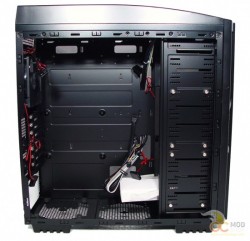
Taking the side off of this case is nothing unusual. Unscrew the two heavy steel thumbscrews on the back and slide the side back with the built-in plastic grip. Once it moves back about a half inch then you pull it away from the side of the case. I don’t know if it’s just this case or if it’s all of them, but it was a struggle to get the side to come off once it slid back. It really wanted to be on there. But once I got it off I got a better look at the inside of this hull.
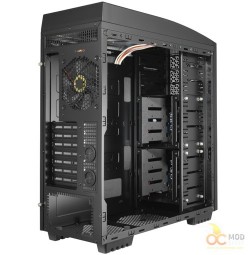
The coolest thing about this case is the internal drive bays. The eight are divided into two sets of four. AzzA advertises that there are up to ten 5.25” bays and eight 3.5” bays. It needs to be noted that these are not separate numbers. If you take away one set of 3.5” bays to install one 5.25” drive then you are immediately down to four slots for HDDs. You are also going to be missing a fan. Each set of 3.5” bays is a cage that screws into the case. You have to take off both sides to install or remove these cages. Once you remove one you have access to four more 5.25” bays underneath. Each cage has a front fan built into it. The cage and fan all comes out as one piece. So if you take away HDD space, you also take away come airflow.