

The Boxee team had a chance to address some of the most-asked for features in this release, but have chosen to ignore (at least for the time being). Most of these features are present on the Windows and Linux versions of XBMC, from which Boxee is based on.
- Play DVDs or Bluray from a USB drive
- Backup meta database
- Default to stretching 4:3 media
- Never crash
- Ability to auto-start the next file (or at least build a queue that resumes)
- Background still not skinnable
- Switching audio tracks still problematic
Netflix still broken
The Netflix app for Boxee has been one of the worst implementations of “full-blown” Netflix applications. Its interface is nowhere near the quality of the Playstation, Wii or Xbox 360 implemenations, and has horrible usability bugs. For example, the main menu doesn’t scroll, so you cannot see half the menu and must wait for the movies to populate to guess what section you are on.
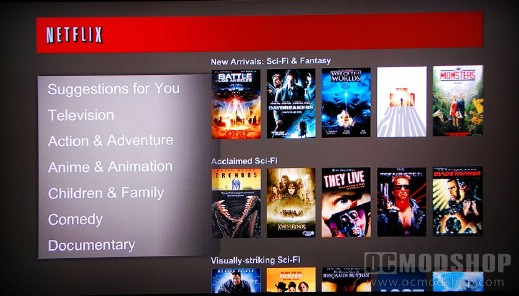
See the menu on the left? It doesn’t show the “Sci-Fi & Fantasy” section currently selected
The Netflix app is still amazingly slow, and has none of the nice gui features of their console cousins. Watching a movie is fine, but skipping through sections can tend to be a little slow as the thumbnails update. The interface is usable once you figure out how to hobble around half-blind, and is still way better than the “mini” Netflix apps (which only show your Instant Queue), but just doesn’t have the spit and polish that other versions have.
Of course, one of the main reasons that the Boxee team removed volume control from the main interface is to remain consistent with the Netflix app. My advice to the Boxee team is to write your own Netflix and YouTube apps (with volume support), and tell these third-party teams go hire some UI designers.
Hulu Plus support still absent
There has been an on-again, off-again relationship between Boxee and Hulu, and most of that has been because of licensing and rights management legal issues. Hulu seems to have been able to play nice with almost every other device out there, as the PS3, Xbox 360, and even Internet-connected Blu-Ray players have support. Boxee still hasn’t been able to nail this down. Believe me, with both a Netflix and Hulu Plus subscription you can realistically kick your cable or satellite provider to the curb. Sure there are ways around this, such as using a seperate PC to transcode Hulu in real-time, but a more elegant solution is to have native support.
Pairing Devices
A new section called “Paired Devices” now appears under Settings. This is currently a placeholder for functionality that will be implemented in the “near future”. In my opinion, this will just confuse customers as there are not currently any devices to pair.
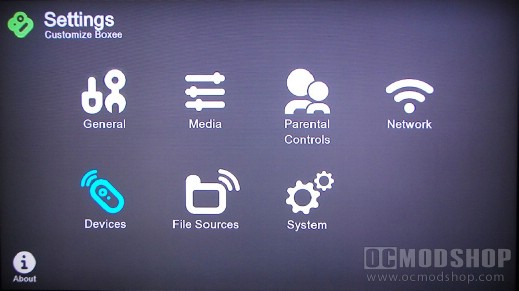
Devices section is added, but there are currently no devices available to pair
Should you update?
There are a lot more minor features and updates in the new Boxee Box 1.1 update, which you can check out in the entire feature list on the next page. The things we’ve listed are the major features (and issues) that most people will care about.
Should you update your Boxee Box to 1.1? Well, if you’re connected to the Internet then you really have no choice, as Boxee requires it. If you find your Boxee behaving badly after the update, then you’ll have to do a factory reset, which requires you to install 1.1 again, on top of losing all of your existing show and movie information.
I still have a love/hate relationship with the Boxee Box. Many things have improved for the better, some critical issues appear to have been ignored, and some things have been made worse. The Boxee team has committed themselves to 3-month updates, so I guess we’ll have to wait until August to see if Boxee can truly be all that it can be.
If you’re interested in the entire features and bug fixes, then they are listed on the next page.


5 comments
[…] http://www.ocmodshop.com/boxee-box-1-1-update-fixes-and-woes/ TAGS: boxee, boxee box, dlink […]
I've been following this, too, as Boxee has been putting out patch after patch… seems like twice a month. It seems like they have it down pretty stable now. I used to be unable to wake up my Boxee but haven't had the problem with the last few builds.
Hi guys, I bought Boxee 2 days ago but I cannot find Power Management so I can turn it off. Where is that located in the latest firmware? Thanks!
Also, turning off Power Management means that my TV is on all night. Sure, my TV has a sleep timer, but I was so used to Boxee turning it off for me (My TV turns itself off if it doesn't get a signal for x minutes).
Yet another manual thing I have to do just for the sake of keeping Boxee stable.
A little update: I did find a way to make Boxee much more stable. If you turn off Power Management and change your file sources from "Daily" update to "once" then it seems to crash less often. I have experienced the Box slowing down to the point that it needs a reboot, but the twice-a-day reboots seem to be gone. :)
Unfortunately this means either using the Box in File mode all the time, or manually populating the meta data after I copy a new file over to the NAS. Either of these solutions nullfies the reason you choose a Boxee over other media streamers, which is for the user experience.
Now you have to choose between a great user experience or having it crash all the time. :S
Comments are closed.