
Wacom released their completely redesigned pen tablet in Canada and the USA on March 25, 2009. This black, sleek upgrade of the Intuos3 series is a long-desired and welcomed addition to the graphic tablet community. The Intuos4 pen tablets, with a 2-year warranty, positions the ExpressKeys (for shortcuts) and the Touch Ring (for quick scrolling and zooming) on the side instead of on top (on the Bamboo and Graphire).
The Intuos4 also adds tilt control and tool recognition (Tool ID) to the mix, added bonuses for any serious user. It even offers more pen tips for different writing and drawing results with the one accompanying latex-free cushioned Grip Pen which provides extra comfort and reduces tension.
Extra accessories are available for the Intuos4 such as an array of different pen types ranging from the classic pen for a more natural, day-to-day work and feel to the sophisticated airbrush for unbelievably realistic paintings and other art designs.
If you are a serious graphic artist or a professional with elaborate artistic ideas who spends long hours using artistic software, an Intuos4 is certainly a worthwhile investment. Most professionals, be they graphics artists, technicians or designers, with highly detailed expectations would describe it as an essential tool. That said, there are still 4 different sizes to choose from!
– easier and faster access to editing, navigation, media control
– improved ergonomic features on both the tablet and the digitizer pen
– a show-settings function to help you remember your shortcuts and functions assigned to the ExpressKeys,
– ExpressKeys and a new Touch Ring with Toggle Button situated all on one side, therefore easily accessible to the non-dominant hand,
– increased precision for working with the finest of details combined with the lowest activation pressure thus far, capturing every nuance with the lightest touch,
– reversibility accommodating left-handed as well as right handed users without the need to disable ExpressKeys due to accidentally activating them with the dominant hand.
If you are a serious graphic artist or a professional with elaborate artistic ideas who spends long hours using artistic software, an Intuos4 is certainly a worthwhile investment. Most professionals, be they graphics artists, technicians or designers, with highly detailed expectations would describe it as an essential tool. That said, there are still 4 different sizes to choose from!
- Intuos4 Small (6×4) is easily portable with more features than the Bamboo series and perfect for small desk spaces yet affordable. It has less ExpressKeys (6 in all) than the 3 larger Intuos4 models and the ExpressKeys show-settings function is a pop-up display on-screen.
(All the other Intuos4 sizes Medium, Large and Extra Large have 8 ExpressKeys
and an illuminated EspressKeysDisplay directly on the pen tablet.
Forgetting shortcut-settings is now a thing of the past.)
- Intuos4 Medium (9×6) is the most popular Intuos4 pen tablet due to its versatility: it offers a sufficient amount of work space on the drawing area, yet still small enough for cramped spaces. It’s also a perfect traveling companion for the laptop and ideal for serious students on the go.
- Intuos4 Large (13×8) targets the CAD users, and technical illustrators which may desire a larger surface area and artists who are used to drawing or painting with large sweeping motions. It is also optimized for work in single screen or for multiple monitor work stations and is ideal for editing HDTV videos. Remember, the larger your tablet surface, the more you will need to move your arms which may be viewed as a disadvantage to some users.
- Intuo4 Extra Large (18×12) is the only Intuos4 pen tablet with an integrated USB cable. All the other smaller sizes have a detachable cable (detaches from the computer and the tablet for easier storage and portability). Intuos4 XL greatly assists professional photo-retouching artists, illustrators, animators and industrial designers in any industry including automobile, textile and fashion with challenging endeavours, allowing for wider sweeping strokes. It is geared towards sophisticated and high-performance work involving precision and accurate results like digital imagery, audio-visual tasks, graphic arts, and architecture. It offers optimal use of wide screen and double monitors and is excellent for creating HDTV videos.
Since the Intuos4 has new technological components and more powerful upgrades,
the Intuos4 digitizer pens only work with Intuos4 pen tablets.)
Given that the Intuos4 replaces the Intuos3 series, the latter has been discontinued.
However, all Intuos3 accessories will remain in production
because they are also used with the Cintiq pen displays – below.
All of the enhancements and Wacom technological breakthroughs become evident the instant the pen is applied to the tablet. Every Intuos4 graphic tablet offers:



7 comments
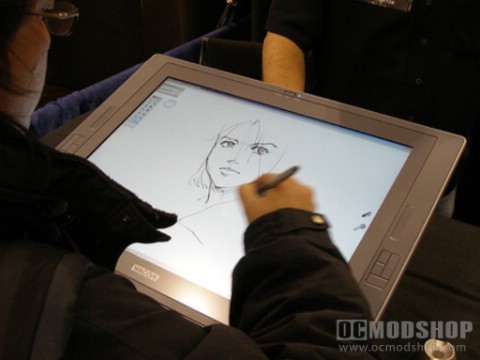
can someone please tell me what tablet is the one in the picture?
its Cintiq
We probably need to either refresh this article to include the new Wacom tablets, but this article still lets you know what to look for.
[…] Choosing the Right Graphics Tablet […]
[…] wacom graphics tablets ocmodshop.com […]
No mention of the Intuos 4 line that has replaced the Intuos 3? Also the 20 inch wide screen Cintiq has been out of production for months and is no longer even mentioned on the wacom website.
The author had a refreshed version of this article, so it has been updated.
Comments are closed.