
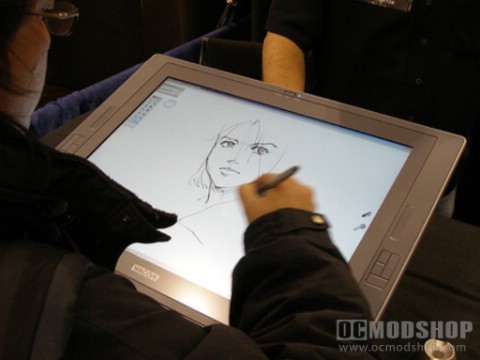
Cintiq is the combination of the Intuos3 technology with an LCD monitor. The result: a state of the art monitor that allows you to write or draw directly on the screen with unparalleled accuracy! The fact that it is totally adjustable to any angle and for any purpose (on your desk or on your knees) makes it the holy grail of the Wacom graphics tablets and obviously, the most expensive.
The Cintiqseries (which comes with an Intuos3 Grip Pen for optimal comfort and fatigue prevention) will greatly improve work flow and efficiency while providing spectacular, detailed results in any professional field ranging from industrial designers, audio-editors and animators to doctors, educators and story-board creators requiring faster visual effects. This interactive pen display, with leading edge technology, literally becomes your canvas or your easel.
Many claim to have improved productivity by as much as 100% thanks to the ultimate working / drawing freedom and comfort a Cintiq provides. Yet again, there are 2 Cintiq ’s to choose from. First, they differ in size, measured diagonally, from the small 12.1” to the large 21.3”.
Cintiq 12WX (1280 x 800 native resolution) is very light (4.4lbs) and portable thanks to an extra cable and a converter box to keep it small and lightweight. It’s half the price of the other Cintiq model, boasts 2 more Express Keys than it’s larger brother (10 in all), provides a smooth, flat surface, and has an aspect ratio of 16:10, perfect for widescreen monitors. However, due to its small size, you may want to add this to a multi-monitor set-up. If you are a very serious artist or technical designer, it is recommended that you save for the larger Cintiq model.
Cintiq 21UX (1600 x 1200 native res.) is the top of the line for pixel perfect results and adjustability. Weighing in at 22.4 lbs, it’s has an aspect ratio of 4:3 (standard resolution). This larger Cintiq boasts a textured, durable, scratch-resistant surface (with anti-glare coating) to enhance the pen on paper feeling. With a variety of available digitizer input devices like the Airbrush, the 6D Art Pen and it’s partner Grip Pen, it easily outperforms any graphic tablet on the market.
When trying to choose between all of these great Wacom contenders, wallet and desk size will always be an issue…
Everyday users for home and basic office duties will delight in Bamboo, andBamboo Fun.
Educators, students, conference hosts and seminar conductors will find the Wireless Graphire Bluetooth graphic tablet an awesome and invaluable cordless device.
Professionals at home or at the office in all fields will require and thoroughly enjoy the Intuos4 Small and Medium (Academic specials for students and schools do exist for the Bamboo Fun and the Intuos4.)
Serious illustrators, educators, technical designers and artists demanding elaborate detail and high pixel perfection will be delighted with the larger Intuos4 pen tablets and will absolutely love the freedom, comfort, efficiency and convenience of drawing directly on the screen with the Cintiq … and for many users – those virtues are priceless.



7 comments
can someone please tell me what tablet is the one in the picture?
its Cintiq
We probably need to either refresh this article to include the new Wacom tablets, but this article still lets you know what to look for.
[…] Choosing the Right Graphics Tablet […]
[…] wacom graphics tablets ocmodshop.com […]
No mention of the Intuos 4 line that has replaced the Intuos 3? Also the 20 inch wide screen Cintiq has been out of production for months and is no longer even mentioned on the wacom website.
The author had a refreshed version of this article, so it has been updated.
Comments are closed.