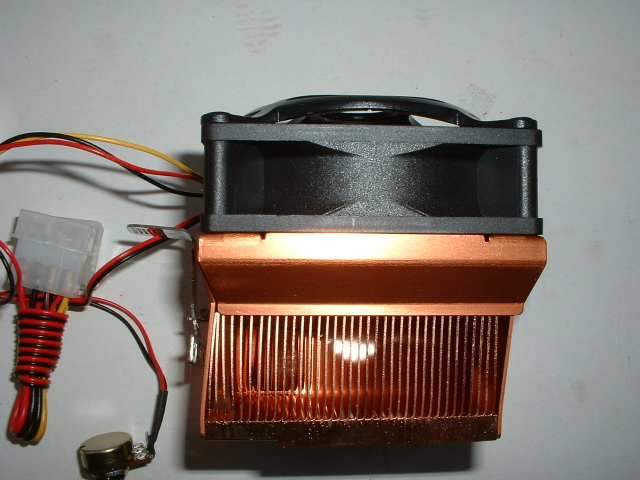
I installed this heatsink to the test bed below and it was really easy to install because of the good clip. The one problem with this heatsink is that it is really large and because of that fact it was a little tough to get it hooked because of the capacitors around the socket. After finally getting the clip hooked onto the back of the socket clipping the front was no problem due to the fact no screwdriver was needed. As you can see from the pictures below the heatsink is quite large and could probably cause problems with some motherboards.
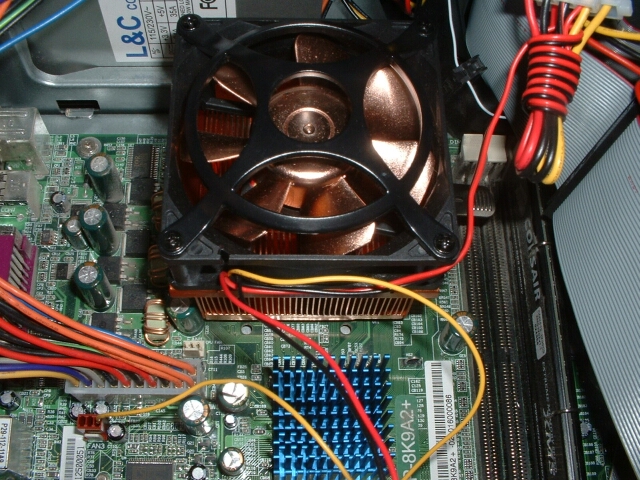
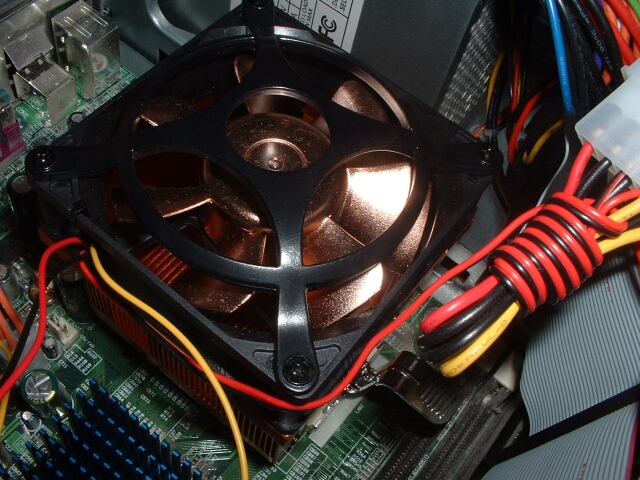
I will be using an EPoX 8K9A2+ with my Athlon XP 1800+ (1.53GHz) and will be using Motherboard Monitor to get the temperature readings of the CPU. This was done by setting motherboard monitor to “Winbond Diode 2” which will read the on-die thermal diode of the XP. I will be using Arctic Silver 3 as the thermal compound because it is the best on the market. Idle temperatures were taken while idling in the BIOS and the load temperatures were achieved by using Prime95 which put the CPU up to 100% load.
Test Bed:
- EPoX 8K9A2+
- 1800+ Athlon XP
- 60GB Seagate Barracuda IV HDD
- Corsair 512MB PC3200
- Abit Geforce 4 Ti4200 OTES 8x AGP 128MB
- PcToys VGA MAXX Heatpipe Cooler
- PcToys NB MAXX
- Koolcase’s Panther
- Zalman 400w APF PSU
- Plextor 40x12x40 CDRW
- Plextor PX-504A DVD+RW (review to come)
- pioneer 16x DVD
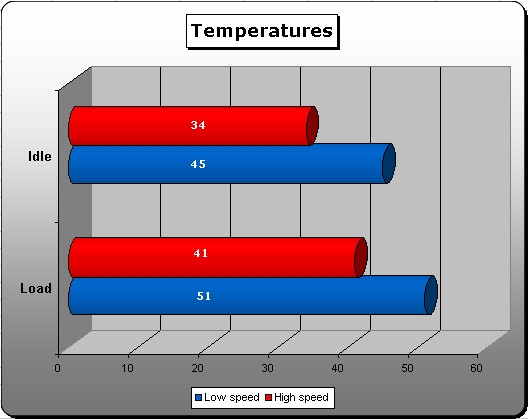
I tested the heatsink on low and high speed by using the rheostat on the fan, low speed was with it all the way down and high speed was with it all the way up. I first tested the low speed so I booted up my computer and went into the BIOS right away to get the idle temperature. After idling in the BIOS for about 20 minutes I got an idle temperature of 45 degrees celsius which is a little high but the fan was pretty quiet. I then booted into Windows and ran Prime95 for about 15 minutes. After getting the CPU to 100% load it peaked at 51 degrees celsius which is also a little high.
After getting the temperatures from the low speed I turned off my computer for a while so the copper could cool down and rebooted with the heatsink at the high speed. With the fan at high speed it is really loud, too loud in my opinion. I went into the BIOS and let it idle for another 20 minutes after which time the temperature was 34 degrees celcuis. After getting the idle temperature I again booted into Windows and ran Prime95 for 15 minutes to get the load temperature which ended up being 41 degrees celcius, which is much better than the slow speed temperature.
Conclusion
Being my first encounter with a Cooler Master heatsink I can say that I am pretty impressed. I think the best thing about this heatsink is that it comes with a rheostat to control the speed of the fan. The base was well protected and regular thermal compound was included, It did a good job cooling my CPU at both low and high speed. This heatsink is quite large so it may have some problems fitting on motherboards with little space around the socket, which isn’t good.
The only thing I didn’t really like was the fact that the fan was so loud at the high speed but I guess that’s all right because the rheostat is included so you can decide. I am going to give this heatsink a 8/10 after taking all pros and cons into account. I would like to thank Cooler Master for sending me this heatsink.
Pros
- Performs well
- Rheostat included
- Good clip
- Base well lapped and protected
- Thermal compound included.
Cons
- Loud on high speed
- Doesn’t perform the best on low speed
- May not fit on some motherboards