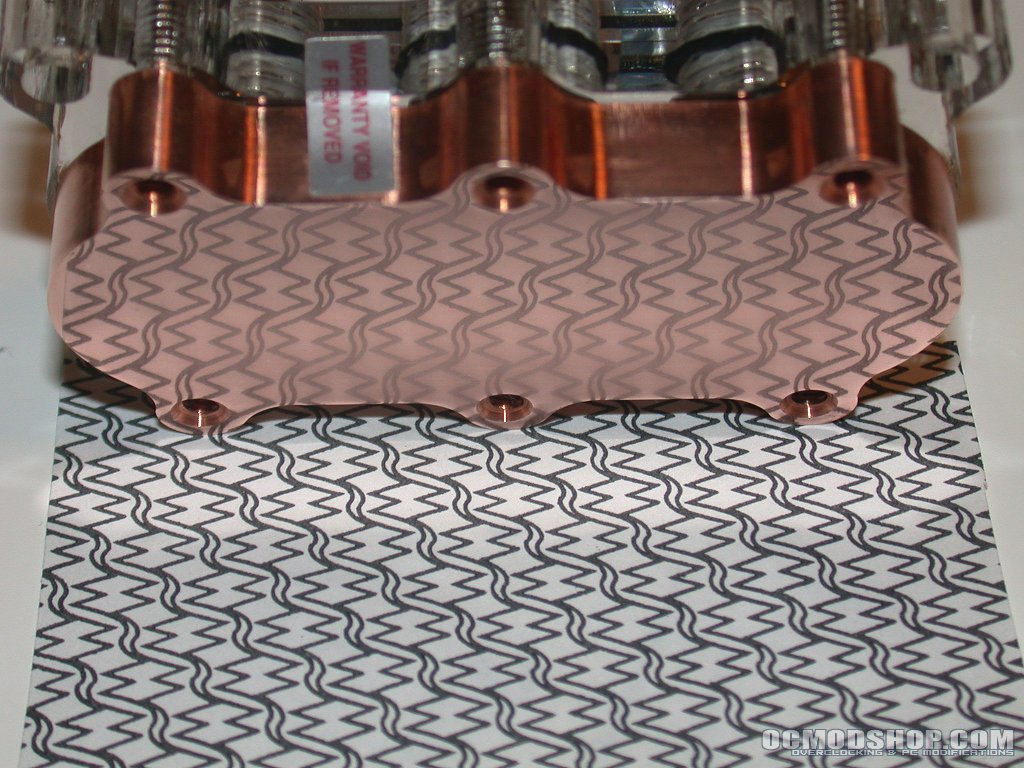
Since the RBX was now packing the more performance oriented accelerator nozzle and a brass top I decided to give it a battle worth fighting. The processor that I had on hand was an AMD Athlon XP 2100+ but that was not enough to really stress this block. So, I promptly overclocked it and cranked up the core voltage a notch. The processor was happy enough at 210mhz front side bus with the multiplier set to 11 for a total clock speed of 2.32ghz and 1.80 core voltage. I used those settings which produces something in the range of a 94 watt heat load (as estimated by OCTool). The rest of the system used for testing consisted of an EPoX 8RDA+, 512mb (256mb x 2, dual channel) of Buffalo Technology PC3200 (with Winbond BH-5 chips) set at 2-2-2-11 and an ATi 9800 Pro. It is not the fastest system on the planet by any means but it can pump out enough heat to test just about any water cooling system.
In addition to the RBX, the following gear was used in the cooling loop:
• An Original Rainbow Lifeguard Quiet One water pump (1140gph at 0 feet)
• 3 feet of 1/2″ ID Clearflex tubing
• Weapon 302 Core and Shroud.
• Two San Ace 120mm x 38mm fans were used on the shroud to move air through the 302 core (fan model # 109R1212H1011 – approximately 103 cfm each at 12v).
To make sure I was getting solid thermal transfer between the processor’s core and the water block, I first cleaned the core and the base of the block with Arctic Silver’s new ArctiClean which is a two-step cleaning and surface preparation process. While I have used a good number of chemicals to prep these surfaces in the past, I believe I will be using ArctiClean from now on as the results it produced were very impressive and it did not leave my computer room with the odor of a toxic chemical waste dump like some of the solutions I have used. As I was a little pressed for time, I used a fast break-in thermal testing compound from Arctic Silver after prepping the surface of the block and the core.
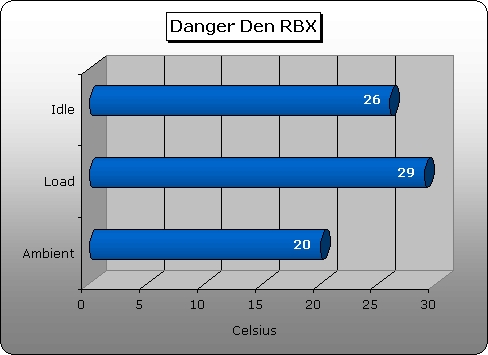
To obtain idle temperature readings, I stressed the system with Toast for about 30 minutes and then let it set for another 15 minutes before taking the idle reading. Ambient temperatures were measured with a Radio Shack temperature probe and those on a Digi Doc 5. For load temperatures, I cranked up Toast for 2 hours and then took temperatures from the onboard sensors and a flat sensor I had placed next to the core before mounting the block. Then, I used Prime95 with the same duration and took readings from the flat sensor. The cooling performance of this block was good enough to where I had to pull it and remount it several times to verify the readings I was getting. Despite pulling the block for remounting, checking the temperature sensors, remounting, etc., the same numbers in the chart continued to pop up for each test.
Conclusion
As can be seen by the above temperature results, the RBX performed amazingly well in this cooling loop. In fact, The results were the best I have seen with this particular setup. The RBX is very reasonably priced considering the performance it offers and the overall quality of the machining on the block. Danger Den definitely hit the mark with the RBX so I give it a solid 10/10 and the OCmodshop Seal of Approval. I would like to thank Directron for making this review possible. As always, they were great to deal with and they are a top notch source for computer gear.
Pros:
Cons:
|
 |