

The box itself is the usual Noctua makeup. It’s brown and tan with the see-through window showcasing the fan inside, along with the rubber isolator mounts I despise so. There is also an adapter to go from the standard three-prong fan plug to a four-prong molex plug. I love those adapters and keep several around just in case I run out of places on my mobo to plug a fan in.
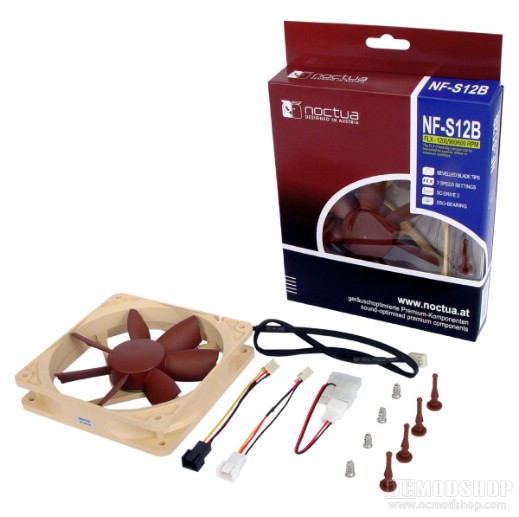
I won’t go into detail on installation. I’ve gone over that several times, and by now even the nuevo builder has installed one or two. Let’s just say it’s pretty standard fare, the sleeved fan lead is more than adequate, and the power adapters have you covered no matter what plugs you have.
As usual I unhooked my other fans to get a clear judgment of the fan’s power. Upon starting my computer up I was happy that this was yet another triumph for Noctua. The S12B’s airflow is tremendous, if only lacking in pressure a little. After the first few inches of distance, the airflow becomes little more than a breeze, and without other fans to back it up there’s not much for cooling there. Luckily, not many people who have moved on from their crappy Dells are still using just one fan in their case. However, I feel that if the fan had a little more pressure behind it, it would be optimum. The airflow is still impressive by today’s standards and would do nicely as a case fan positioned over the VGA or CPU.
The fan’s specifications state that this fan has 3 speeds, and they are somewhat correct, but you have to use the included power adapters. With the fan plugged directly into your motherboard (or fan controller), then the fan runs at 1200 rpm. Using the LNA (Low Noise Adapter), the fan runs at 900rpm, and using the ULNA (Ultra Low Noise Adapter), the fan runs at 600rpm. It would have been nice if the power could be adjusted directly on the fan without having to use an inline resistor. Those using a variable fan controller won’t have use for these inline adapters, but they could be used to silence other fans in your case.
It’s very true that looks are the least of our concerns if we truly care about our computers. We that are true to extending the lives of our beloved machines install so many fans and bulky heatsinks that we can barely fit a card in (or take one out, even if we needed to) and have trouble reaching that spare plug to get a fan running. If we end up having to manually reset our bios due to some failure? God help us.
To conclude, the Noctua NF-S12B FLX is a well-built fan with a lot of innovation and thought behind it. It is on the pricier side of case fans (around $20), but these are also the Ferrarris in the case fan world. If you like to boast about all of the innovative technology inside your PC case, then you’ll want to take a look at Noctua’s products (if you don’t have them already).
 |
 |
 |
|||||||||||||||||||||||||||
|
|
|
|||||||||||||||||||||||||||
 |
|
 |
|||||||||||||||||||||||||||

