
The program shows the before and after performance of the drive, the type of files moved, and how frequently modified each file normally is. Also, the user interface of the program is exceptionally simple, even to someone that has never used a program like this before. I brought in a few people to ask them if the program was fairly easy to understand, and all of them said yes. As long as you know what defragmenting your computer does, you’ll easily understand PerfectDisk 10’s screens. It does, however, have many options for advanced users if you’re into the more hardcore techno mumbo-jumbo.
Next, I ran the program under a fair amount of stress, including through iTunes, World of Warcraft, AIM, Google Talk, and a few other applications. The system performance was in no way noticeably decreased except for the slightly longer lag in switching between the game and iTunes. This is an obvious advantage over the typical Windows Defrag, which, in my case, cuts performance horribly. This is partially due to PerfectDisk’s SinglePass Defrag, which literally means the program goes through the drive once. Also worth mentioning is the SMARTPlacement feature, which takes files you use more often and consolidates them in a much more intelligent, user-oriented style.
Finally, I’ll post some of my statistics for the first pass because that was the test that truly counted. Most people will utilize PerfectDisk 10 on the StealthPatrol setting – the one that runs in the background when the system is idle. My computer is running:
- 2 GB Corsair Gaming RAM (check prices)
- Two 250 gig Western Digital Caviar HDDs (check prices)
- Dual GeForce 9800 SLI graphics cards (check prices)
- AMD Athlon 64 X2 Dual Core 2.61 GHz processor (check prices)
- MSI K9N-SLI v.2 motherboard (check prices)
I just recently reinstalled Windows XP on this system as a fresh copy, completely erasing my main drive. After less than a month of usage, PerfectDisk was able to completely free up about 6 gigs of space on my main drive, defrag the 1.2% of my drive that was fragmented, and increase performance up to 99.7%. Keep in mind that this is on a new drive, which can only stand as testament to what it will do for a year or two old drive, even after it had been defragmented with the Windows defrag.
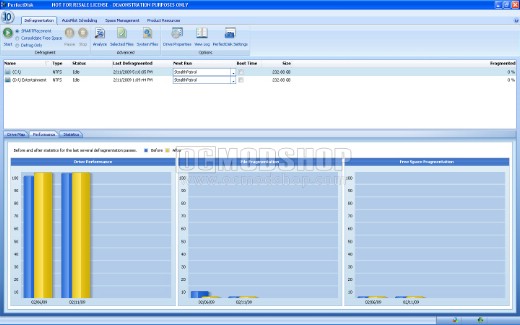
Overall, I would recommend PerfectDisk 10 to anyone desiring any sort of performance and capacity increase on their computer, as it completely puts any other defrag program I’ve ever utilized to shame. It’s a great asset to even the slowest of computers, and slow computers are just what PerfectDisk will aid the most. These guys have truly perfected this kind of software; ease of use, simplicity, and good ol’ doing what you want it to do. Check out the screenshots for a glimpse of exactly what you’ll be receiving.
 |
 |
 |
|||||||||||||||||||||||||||
|
|
|
|||||||||||||||||||||||||||
 |
|
 |
|||||||||||||||||||||||||||



2 comments
PerfectDisk 10 is terrible. I just let it run a full ‘SMARTPlacement’ and it substantially decreased my drive performance and increased my free space fragmentation.
Try Raxco's free 30-day trial first!
Pros:
Ease on installation, Ease of use
Feature Set
Noticable performance increase after a regular and a boot defrag
Price! MSRP affordable, if you get one of their "coupons" it makes it even more affordable.
Cons: None. I wish I'd found PerfectDisk 10 when it was first released instead of paying for the competitor.
Comments are closed.