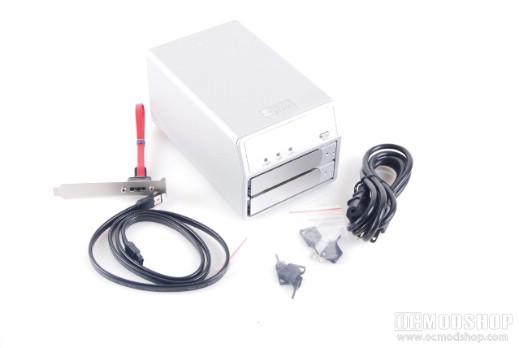
The MobileStor MS2UTN+B comes in two colors: silver or black, and we received the silver model. Inside the box is the enclosure itself, two sets of plastic “keys”, a standard power cord, eSATA cable, sofware CD (including NTI’s Shadow backup) and SATA-to-eSATA adapter.
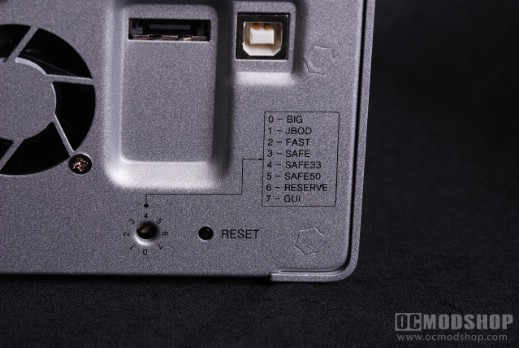
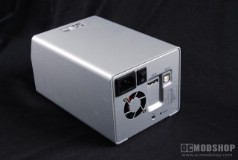
The silver enclosure is made mostly of aluminum, and doesn’t have a lot of distracting bells and whistles. On top of the unit is a printed SansDigital logo, and the sides are featureless, except for rounded corners. The rear of the unit has all of the cable hookups. The front panel has three LEDs: Power, temperature warning, and Alert. There is also a Mute button to turn off any audio warnings the unit may present. Below this panel are two drive trays, with pinhole “locks”. The rear panel features a standard power plug, power switch, small exhaust fan, eSATA port, USB port, a recessed reset button and a recessed pot for setting the enclosure’s RAID mode.
I’m glad to see the unit has its own internal power supply rather than an external power brick. The PSU may introduce more heat into the enclosure, but it is rated for 80 watts (well under what two hard drives will require) so it shouldn’t even run at half capacity. Since the power supply won’t be running anywhere near full load, it should only get mildly warm, which can easily be taken care of by the enclosure’s exhaust fan.
Most of the ports seem pretty standard. The only thing you’ll need to do is set the RAID mode before you insert any hard drives. There is a recessed pot which can be set to one of six positions, each with their own RAID setting.
Big (Spanning)
This mode takes two disks anc combines then to one big virtual disk. If you insert two 250GB hard drives, then you get one 500GB volume.
JBOD
Just a Bunch of Disks. Each drive is treated as a stand-alone disk, so one drive letter is mapped to each drive.
RAID 1 (mirrored)
Data is written to both disks at the same time, meaning that if one drive fails, then the data still resides on the remaining drive. You lose 50% of the drive capacity of your drives, however. If you have a good RAID controller, then the read speed can reach that of RAID 0, as the controller can read from two drives at the same time.
RAID 0 (fast)
This mode splits your data across two or more disks (two in this case). No parity or redundancy is included, meaning that if one drive fails, then all of the data in this array is lost. Read and write speeds are practially doubled, which makes this mode appealing for write-intensive appliations, like video editing.
SAFE33 and SAFE50
Sans Digital has implemented two “hybrid” modes that allow the unit to perform as a backup device and speed demon… SAFE33 and SAFE50 modes. When selecting either of these modes, either one-third (SAFE33) or one-half (SAFE50) of the array is set up as RAID 1 (mirrored), while the remaining space is JBOD. This method will map two drive letters to your PC when plugged in, however (one for each partition). These modes can only be used via USB.
GUI
This mode allows you to set the enclosure’s RAID mode via included software
It is nice that the SAFE modes are included, and can be an alternative to 3-drive arrays with parity (like RAID 5), but you still must manage what data is important to you. What makes some data more important than others? My guess is that if someone is buying an external RAID enclosure such as this, then they’ll probably be using RAID 1 over any other mode.