Installation of this heatsink went pretty easy, the clip worked basically the same as that of the AX-7. Installation of the heatsink was pretty good but the screwdriver did slip off a few times. Uninstallation of the heatsink was worse. While taking off the heatsink the screwdriver slipped off a lot easier. The best thing to use on this heatsink for installation is a butter knife, at least it worked better than a screwdriver. There was plenty of room on the motherboard to install this heatsink, there should be no problems with anymore because of the way the heatsink is designed. The picture on the left is with a regular 80mm fan installed and the one on the right has the screaming 80mm Delta which is huge.


I will be using an EPoX 8K3A+ with my Athlon XP 1800+ (1.53GHz). I will be using Motherboard Monitor to get the temperature readings of the CPU. This was done by setting motherboard monitor to “Winbond Diode 2” which will read the on-die thermal diode of the XP. I will be using Arctic Silver 3 as the thermal compound because it is the best on the market. Idle temperatures were taken while idling in the BIOS and the load temperatures were achieved by using Prime95 which put the CPU up to 100%.
[wpdm_package id=’28851′]
Test Bed:
- EPoX 8K3A+
- 1800+ Athlon XP
- 80GB Maxtor ATA133 HDD
- Corsair 512MB XMS3200
- 3DPower Geforce 3
- Cooler Master ATC-101-SX2
- Zalman 300w PSU (review to come)
- Sound Blaster Live! Value
- ATi TV Wonder VE
- 10/100 NIC
- Plextor 40x12x40 CDRW (review to come)
- pioneer 16x DVD
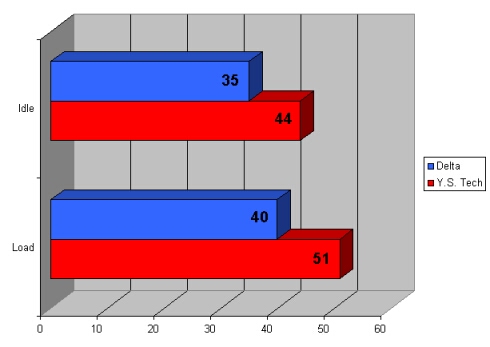
I tested with the Delta fan first and I was really impressed with the results, idle temperature was only 35 degrees!!! That’s the lowest I have ever seen with air cooling, the load temperature ended up being only 40 degrees Celsius, 5 degrees higher than idle. Let me tell you, if you are willing to put up with the noise from this fan your CPU is going to be a happy camper. Even though this Delta pushes 80 CFM it also spits out 50dB of noise which I am not willing to listen to. I strapped on a Y.S. Tech fan model #FD1281253S-1N which is only 22.5 dB and pushes 27.9 CFM the results are not as impressive as they are with the Delta with an idle temperature of 44 degrees and a load temperature of 51 degrees but in my book I would rather a system that is quiet and a little hotter than one that is louder than a dust buster and cooler.
With the stellar results that this heatsink produced at stock speeds I wanted to see what it could do with some overclocking. I rebooted the computer and went into the BIOS, I bumped the Vcore up to 1.85v and upped the FSB to make this 1800+ a 2100+. I saved the settings and exited, I returned to the BIOS and let it idle and recorded the temperature.
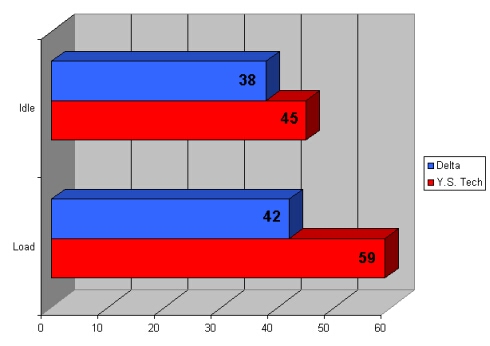
I then booted into Windows and ran Prime95 again, the Idle temperature was only 38 degrees, a 3 degree increase from stock. The load temperature was only 42 degrees which is only 2 degrees higher than stock. With the Y.S. Tech fan the idle temperature was 45 and the load temperature was 59, the load temperature is a bit high but as long as your computer is stable then its fine.
With the Delta fan there is much more that it can do, I am sure that it could handle more overclocking and more voltage and keep the CPU at the good temperature. I would suggest getting something a little more powerful than the Y.S. Tech fan if you are looking to overclock, but you don’t necessarily need the Delta because it is really loud.
Conclusion
I am thoroughly impressed with this heatsink and can say that it is the best that I have ever tested. Thermalright has again produced a high quality heatsink which can perform really well. This heatsink has a lot to offer especially because it can hold a 60mm, 70mm, and regular 80mm fan, not to mention the huge 80mm fans. The clips that hold the fan on are excellent and are very easy to use, I really like how you can quickly changes fans and don’t have to use screws.
The heatsink is protected with a plastic bag and the base has a plastic strip to keep it from getting scratched and the finish on the bottom is great. The only thing I do not like about this heatsink is the clip part of it. I really like that it uses all 6 tabs but like I said before the part for your screwdriver is horrible and will not make it easy for you to install this without it slipping off. I really think that Thermalright should have fixed this problem because it was evident in the AX-7.
Overall I am going to give this heatsink a 9/10 and award it the OCmodshop Seal of Approval. I would like to thank Thermalright for sending this over to review,

Pros
- All copper
- Best heatsink to date I have tested
- Can accommodate a 60mm, 70mm, and 80mm fan
- Finish on the base is good
- Thermal compound included
- Clip uses all 6 tabs on the socket
Cons
- Clip design is poor