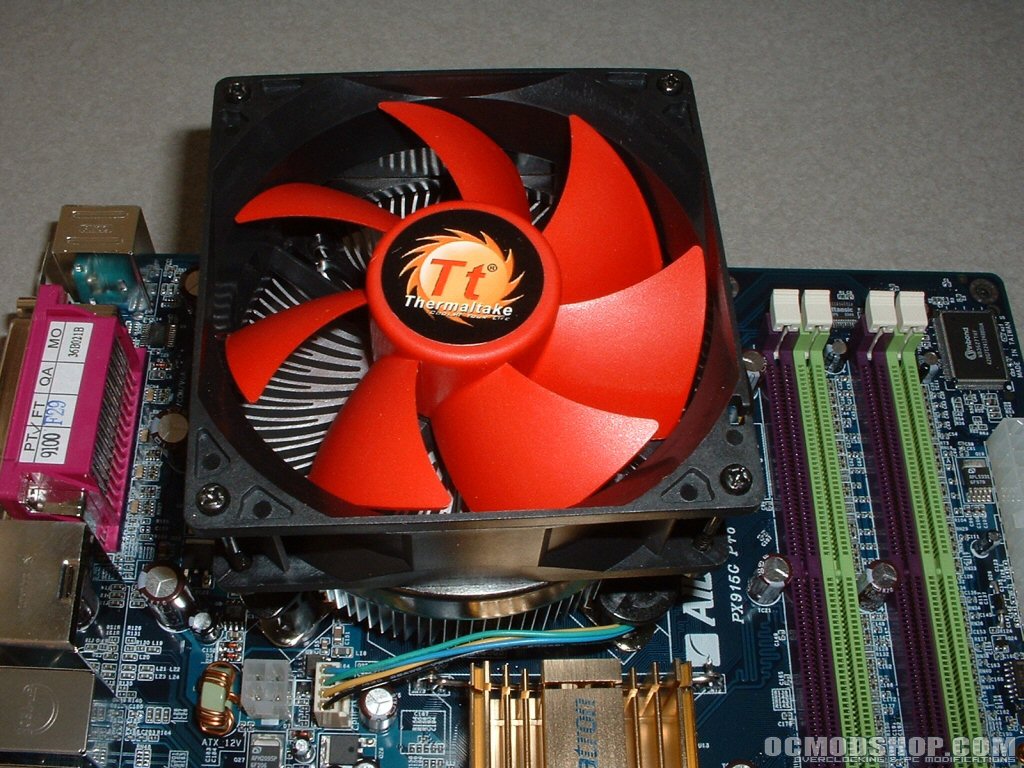
I will be using an Asus P5GD2 Deluxe motherboard with my Intel 2.8Ghz Pentium 4. Idle temperatures were taken while doing nothing in Windows XP and the load temperatures were achieved by using Prime95 to bring the processor to 100% utilization. Installation was pretty simple and quick because of the push pins used; it was just like installing a large northbridge or GPU cooler. Uninstallation was also quite simple and quick, by turning each pin counterclockwise with a screwdriver you can effortlessly remove each pin.
Test Bed:
|
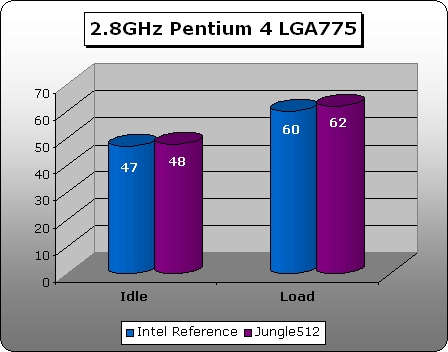
I used Intel’s heatsink provided with my retail Pentium 4 2.8GHz to compare against this heatsink. I initially ran the heatsink with the generic thermal compound provided but when I got high temperatures I thought that could have been part of the reason. I removed the thermal compound it came with and replaced it with Arctic Silver 5 but that didn’t change things much. I then tried reseating the heatsink many times again with no significant change in results. After trying all that I gave into the idea that it might just be the motherboard reporting incorrectly. So I switched the motherboard to an Albatron PX915G Pro and still got very similar results. I again reseated the heatsink a few times on the Albatron board and used Arctic Silver 5 which didn’t change anything. As you can see from the graph below the idle temperature with the Jungle512 is 48 degrees while the Intel reference heatsink is a degree lower. After bringing the processor to 100% utilization the temperature was 62 degrees with the Intel heatsink being 2 degrees lower. Not only were the temperatures very high but the fan is very loud, much louder than the Intel heatsink.
Conclusion: Cons: |