

Also on the front is a temperature display. A small sensor fits into your processor’s heat sink. It’s just that easy. Then you connect the power to one of the 4-pin molex connectors and it’s ready to go. The case is kept cool by two fans working in tandem (aside from the one in the included power supply). An 80mm fan at the front pulls cool air in to the case and then a 120mm fan at the read removes hot air from over the processor. They are audible, with the rear one generating the bulk of the noise.
However, it would likely be drowned out by a beefy graphics card’s cooling. The display is very bright though–much brighter than the tiny power and hard-drive activity LEDs. This can be a nuisance if you’re trying to play a game or watch a movie in a dark living room. If you don’t run into any cooling problems, it probably won’t hurt to just unplug it, although it is a fantastic feature to have if you want it.
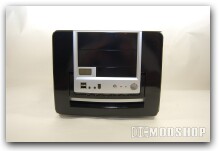
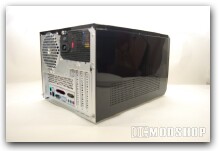
The MicroFly has everything you need to get up and running with a new case. With a power supply already uninstalled all you need to do is decide on the fun stuff, like processor and graphics card. Ultra’s like of micro cases have a very small form-factor. You can cram in everything a micro-ATX board can handle without taking up any extra space. With the thermal display you can monitor how well the two fans are keeping the tiny area cool. The case is has what you need and does what you want—a solid, classy piece of equipment.
 |
 |
 |
|||||||||||||||||||||||||||
|
|
|
|||||||||||||||||||||||||||
 |
|
 |
|||||||||||||||||||||||||||


