

Our goal when testing this card is not only to see how well USB 3.0 devices perform, but how well it compares with internal SATA and USB 2.0. We have discovered that performance of USB 2.0 devices varies greatly depending on the motherboard chipset, so we tested fast USB 2.0 devices on a motherboard with the Intel ICH7 chipset as well as the Vantec SuperSpeed card. Below are the specifications on our test machine:
- Intel Q6600 Core 2 Processor
- Asus P5W-Deluxe motherboard
- 8GB OCZ DDR2-1000 memory
- Sapphire Radeon ATI 4870 Toxic Video Card (read our review here)
- Asus Xonar PCIe sound card
- Seagate 7200.10 250GB SATA HDD
- OCZ Rally2 Turbo 4GB USB Drive (read what we think about it)
- Rosewill USB 3.0 Hard Drive Enclosure (read our review here)
- Windows 7 (64-bit)
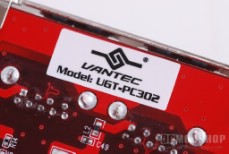
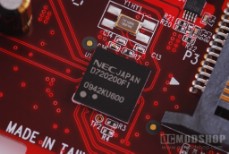
The OCZ Rally2 Turbo USB Drive is absolutely the fastest memory stick we’ve tested in the OCMS labs, so it was the best choice to get an honest benchmark on the different interfaces. Our Seagate drive was placed in a new Rosewill USB 3.0 hard drive enclosure, which was used for both USB 3.0 and 2.0 testing. The same drive was connected directly to the motherboard’s SATA port to determine the maximum throughput the drive can deliver. Although the Seagate hard drive is only 250GB, the 7200.10 series uses perpendicular technology, which packs more bits into the same amount of space, which translates into higher throughput per platter spin. Just for kicks and giggles we tried other hard drives we had laying around, but the 7200.10 drive provided the best output in these tests. Any hard drive can easily saturate the bandwidth of USB 2.0, so we used the fastest drive we could to demonstrate if there was a limit to what USB 3.0 could provide.
Some reviewers use a “file copy” test to determine the speed of the interface. This is good to get a slice of “real life” performance, but additional tests are necessary to get more detail and thus a bigger picture of what the technology can do. We used the ATTO becnhmark as well as Simpli Software’s HDTach 3.0.1. With both of these benchmarks we can form a good picture of how your devices will behave with the USB 3.0 (SuperSpeed) interface.
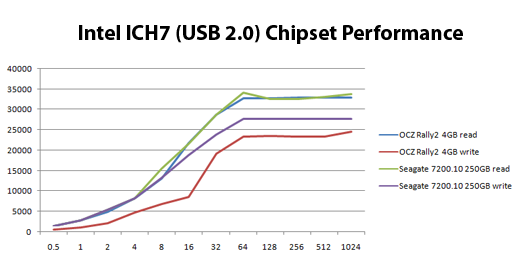
Devices tested under the Intel ICH7 USB chipset using ATTO
First we tried our devices on the motherboard’s integrated USB chipset. Pretty much standard fare here. The OCZ Rally2 performed very well for a memory stick. The Seagate drive maxed out both read and write speed at 34MB/second, which is the most anyone can expect from last generation USB.
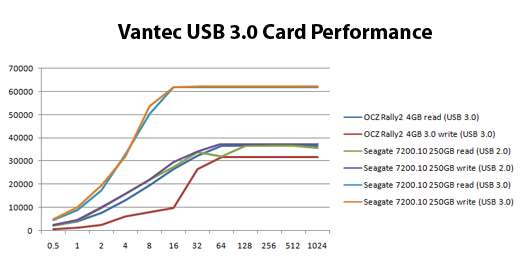
Devices running on the Vantec SuperSpeed card in USB 2.0 and USB 3.0 modes
Next we tried all of our devices on the Vantec SuperSpeed USB 3.0 host card. All of our USB 2.0 devices performed much better under the new card. The Rally2 drive originally had a read /write speed of 32MB and 24MB, but was supercharged to 36MB read and 31MB write when running under the Vantec card. The Seagate hard drive also performed bettter under the Vantec. Under the Intel chipset the Seagate reached 32MB read and 27MB write, and under the Vantec hard had a 36MB read and 37MB write while using a USB 2.0 cable. Of course, the Seagate hard drive running under USB 3.0 (using the new USB 3.0 cable) provided the best read and write speeds at around 64 MB a second.
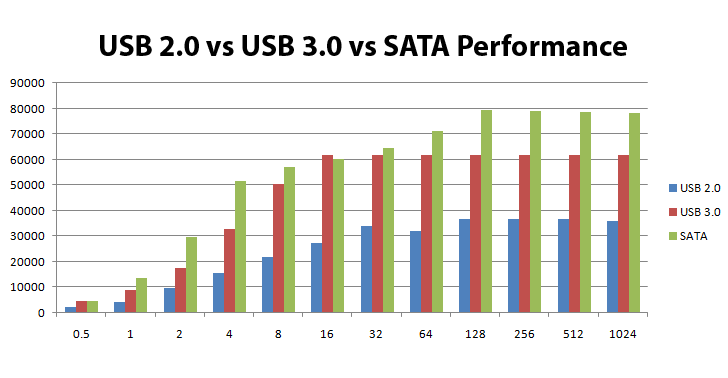
Seagate 7200.10 drive on all three interfaces
We also tested the same hard drive under the motherboard’s internal SATA chipset and benchmarked under ATTO. The hard drive reached a read speed of 56MB a second and a write speed of 78MB/second. This is a little odd, as usually read speeds are much faster, but nevertheless the drive achieved write speeds up to 78MB/second.
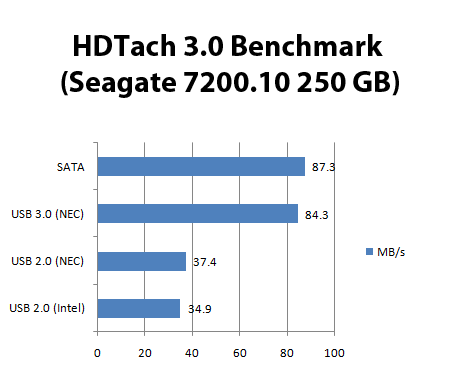
SATA slightly edges out USB 3.0, but not by much
If you go by the ATTO’s read speed alone then technically USB 3.0 was faster than SATA on the same drive. That’s why we used HDTach to help complete the picture. Running HDTach 3.0.1 we got another snapshot of what the interfaces can do. ATTO showed a maximum drive transfer speed of 62MB a second, but HDTach appears to show the drive’s true potential at 84 MB a second. HDTach showed higher top performance, but the trends remain the same: USB 3.0 is more than twice as fast as USB 2.0, and has about the same performance as SATA.
Using different benchmarks we see that USB 3.0 can easily compete with SATA, and connecting a USB device is a lot less hassle than external SATA, or opening your computer and connecting a drive internally for that matter.


1 comment
Thanks for the review. Good stuff.
One aspect you didn't comment on: impact on system CPU load when using this PCI-e host.
USB 2.0 tends to consume more CPU cycles while doing real work. You don't compare how using this card affects CPU consumption. When compared against the ICH7 or comparing the PCI-e host CPU consumption comparing USB 2.0 against 3.0.
Comments are closed.