

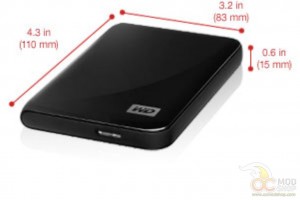
There really isn’t a lot to this small drive. It is about the same dimensions as other ultra-portable drives, such as the Seagate GoFlex, but this 1TB model is a little thicker. There is a small white activity LED on the back right of the unit, and the back has a mini USB 3.0 port.
The kit comes with a USB 3.0 cable that has a standard blue 3.0 port on one end and a mini 3.0 port on the other, and is about a foot long. The short length may be adequate for notebook users who tend to keep their data close, but can be a little short when connecting to a desktop PC.
The drive is pre-formatted with the NTFS filesystem. This is good news for Windows users, but Mac users will either need to re-format the drive or install software to read NTFS before they can use it (from my experience with Linux, you will get better performance from the drive in a native format, but that’s my two cents).
The drive does come pre-installed with WD SmartWare, which lets you back up your data on to the external drive. The software is pretty easy to use, and is better than most other included software on other external drives. Seagate’s included software on their GoFlex drives are basically nagware to get you to buy full versions of useless software, but the WD SmartWare seems rather functional without all of the nagging.
Performance
Generally, the higher capacity a hard drive has means that the bits are compacted into a smaller space. The more tightly-packed the bits means that more bits fly across the read head in any given amount of time. This general rule means that the larger a hard drive is, the more throughput you should expect from it. Terabyte models such as this should have some great speed that would rival desktop hard drives from a few years ago.
We tested Western Digital’s MyPassport drive on our big test rig with an Intel i7-950 processor, 12gb of DDR3 memory, and dedicated USB 3.0 controller. We tested with three different benchmarking programs to get a full picture of what this drive is capable of. We tested this drive against Seagate’s GoFlex hard drives with USB 3.0 adapter, as it appears to be a comparable product to the WD MyPassport.
The benchmarks we used disagree with each other a little bit. HD-Tach and HD Tune Pro show the same story for the WD drive, starting out at around 90MB/s, and slowing down to around 40MB/s as it reaches the inner portion of the platter, with an average throughput of around 50MB per second. According to this test, the smaller 500GB Seagate drive is a little bit faster, which surprised us as it goes against the General Hard Drive Rule.
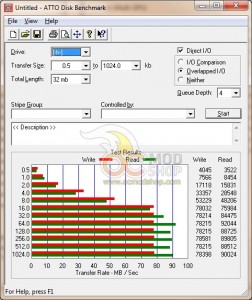
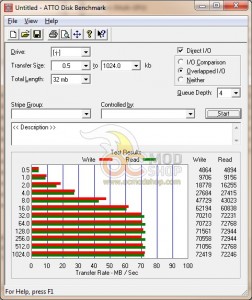
ATTO: WD myPassport vs Seagate FGoFlex
ATTO disagrees with these findings, as it measured the drive performing far better in both read and write speeds: averaging 80 megabytes per second for read, and 70MB per second for write speeds. ATTO also benched the Seagate 500GB drive as slower.
We no longer bother testing USB 3.0 drives on a 2.0 interface, because the result is always the same: the hard drive will max out the USB bus, providing a constant 25 to 32 megabytes per second. The speed you get from USB 2.0 is highly dependent on the USB chipset of your computer.
Overall the drive feels a little underwhelming for a terabyte drive. Even our Acer Aspire One, which is equipped with a much smaller 320GB hard drive performs as well as the 1TB behemoth. The USB 3.0 interface should allow any laptop hard drive to run at its full capacity, but was bested by other USB 3.0 drives with smaller capacities.
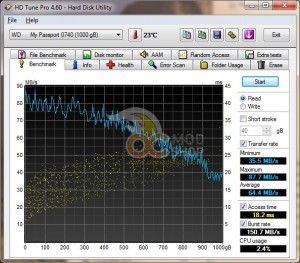
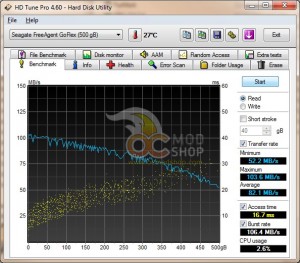
HD Tune: WD myPassport vs Seagate FreeAgent GoFlex
The WD MyPassport is no slouch, though, and comparing the drive’s performance to other units can be seen as splitting hairs. In real-world performance the average user isn’t going to notice that one drive is 10 megabytes faster than any other drive… especially for what laptop users will use the drive for. Most users are going to use this drive for high-capacity storage and backups, not video editing or any other application that requires high throughput.
The MyPassport technically isn’t as fast as it could be, but given its extremely cheap price point it can be a great addition to any student or Road Warrior’s bag.
 |
 |
 |
||||||||||||||||||||||||||
|
|
|
||||||||||||||||||||||||||
 |
|
 |
||||||||||||||||||||||||||




5 comments
[…] WD MyPassport 1TB USB 3.0 Drive Review […]
worked fine until suddenly aparently it can't find drivers and windows can't find the ext drive. Even the WD media player can't access the drive any more.
Nice to use a drive as a backup for files and then the drive fails and you lose them all.. Thanks
There might be a problem with the USB controller. on the unit You could try taking the drive out of the housing and then plugging it up to a hard drive dock or even directly to your SATA bus.
This is the first time I have ever used a portable (tiny) external hard drive. I currently use a Cavalry dual disk external drive in RAID configuration which is huge and not really portable.
This new WD drive is fantastic in that it is quite small, doesn’t require external power, and it is quite good looking. It is amazing how they fit 1 TB drive in such a small package. One bonus is that when I replace my computer in future with one that has USB 3.0 interface, this drive can handle that. (It works fine with USB 2.0 also.) The device looked and felt solid.
The USB port that is on the drive seems to be proprietary, but it could be a standard port for USB 3.0. The cable that comes with the drive fits snugly and works well. The cable should be saved carefully – I don’t have any other cable with that specialized connector.
The backup software resides on the hard disk of the drive. I didn’t bother installing that software. I just want to use the drive as plain old storage drive. I connected the drive to a PC with Windows 7, the OS complained with “WD SES Device USB Device – No Driver Found”, but showed the drive contents anyway. I could immediately use the drive without haveing to do anything.
Drive properties showed the following:
Used 565 MB
Free 930 GB
Capacity 931 GB
I have split the 1 TB drive into 3 partitions easily (using Win7’s built-in tools). I copied a bunch of JPG files into one of the partitions. Everything went smoothly. I am yet to find any issues with the device.
As much as I like my speedy eSata drive, it's not very portable due to the power cord. Maybe it's time to ditch that and get something like this, just in case I need to grab it and run.
Comments are closed.