The console is SMALL. Surprisingly small. Wii keeps with the iPod-inspired decor of baby brother DS lite by giving everything a white lacquer sheen. Even the Wiimote and accessories are impressive in their looks, all sporting simplistic yet functional design. The front of Wii has a CD slot that occasionally glows blue, an SD card slot, and three function buttons.

On the side/top (depending on orientation), there are GameCube controller and card slots that hide away nicely when not in use. On the back, you’ll see two USB ports that, for now, do absolutely nothing, an AV port, the sensor bar port, and the power supply port. Every piece of the unit, minus the controllers, shares the same shape of an SD card, which is novel, but a little strange too. A gray metallic stand is also included to hold the unit upright, though it can also be laid on its side and still look just as nice.


The Channels
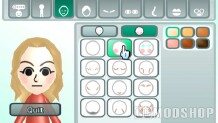
The Disc Channels is pretty straightforward in the sense that it plays the games you insert. The Mii Channel is where you should probably head first after the initial setup. Creating a Mii is a fun way to get oriented with the controls and to personalize your system. Though any real creative or off the wall options are lacking, the Mii Channel has enough choices to make a pretty convincing caricature of almost anyone.
The Mii you create can be store directly onto the Wii remote and taken to other Wiis and used to play games like Wii Sports after you build up your stats and scores at home. The Photo Channel allows you to load JPEG and MOV files off of your SD card and use them in a variety of ways including games, slide shows, and doodling. Slide shows also support MP3 files for background music.
The most frustrating part of this channel is the seemingly random support or non-support of certain files. Only about half of my photos, ZERO of my MOVs, and most of my MP3s will load.
Right now the Internet, Weather, and News channels are not operational, but you can shop for Virtual Console games with the Wii Shop Channel. The shopping center has a clean and easy to use layout, making purchasing add-ons a breeze. I bought some Virtual Console games with my credit card and found that to also be pretty simple and secure.
The currency for the shop is a points system with each point worth a penny (1c). Downloads for the NES games I bought were pretty fast, each running about 30 seconds or so. The games themselves are faithful to the originals and the Wiimote translates in to an NES control pad pretty well too.
You have options as far as what you can use to control the throwbacks. A Classic Controller, sold separately, is recommended. If you own a GameCube controller, however, that can also be used for most games.