Windows Vista is intended to be a technology-based release, to provide a solid base to include advanced technologies, many of which will be related to how the system functions, and hence not readily visible to the user. An example of this is the complete restructuring of the architecture of the audio, print, display, and networking subsystems; while the results of this work will be clearly visible to software developers, end-users will only see what appear to be evolutionary changes in the user interface.
Vista includes technologies such as ReadyBoost and ReadyDrive which employ fast flash memory (located on USB drives and hybrid hard disk drives respectively) to improve system performance by caching commonly-used programs and data. This manifests itself in improved battery life on notebook computers as well, since a hybrid drive can be spun down when not in use. Another new technology called SuperFetch utilizes machine learning techniques to analyze usage patterns in order to allow Windows Vista to make intelligent decisions about what content should be present in system memory at any given time.
As part of the complete redesign of the networking architecture, IPv6 has been fully incorporated into the operating system, and a number of performance improvements have been introduced, such as TCP window scaling. Prior versions of Windows typically needed third-party wireless networking software to work properly; this is no longer the case with Vista, as it includes more comprehensive wireless networking support.
For graphics, Vista introduces a new Windows Display Driver Model, as well as major revision to Direct3D. The new driver model facilitates the new Desktop Window Manager, which provides the tearing-free desktop and special effects that are the cornerstones of Windows Aero. Direct3D 10, developed in conjunction with major display driver manufacturers, is a new architecture with more advanced shader support, and allows the graphics processing unit to render more complex scenes without assistance from the CPU. It features improved load balancing between CPU and GPU and also optimizes data transfer between them.
At the core of the operating system, many improvements have been made to the memory manager, process scheduler, heap manager, and I/O scheduler. A Kernel Transaction Manager has been implemented that gives applications the ability to work with the file system and registry using atomic transaction operations.
Security-related technologies
A User Account Control consent dialog.Main article: Security and safety features new to Windows Vista Improved security was the primary design goal for Vista. Microsoft’s Trustworthy Computing initiative, which aims to improve public trust in its products, has had a direct effect on its development. This effort has resulted in a number of new security and safety features.
User Account Control is perhaps the most significant and visible of these changes. User Account Control is a security technology that makes it possible for users to use their computer with fewer privileges by default. This was often a difficult thing to do in previous versions of Windows, as the previous “limited” user accounts proved too restrictive and incompatible with a large proportion of application software, and even prevented some basic operations such as looking at the calendar from the notification tray. In Windows Vista, when an action requiring administrative rights is requested, the user will first be prompted for an administrator name and password; in cases where the user is an administrator, the user is still prompted to confirm the action they are about to take.
Another significant new feature is BitLocker Drive Encryption, a data protection feature included in the Enterprise and Ultimate editions of Vista that provides encryption for the entire operating system volume. Bitlocker can work in conjunction with a Trusted Platform Module chip (version 1.2) that is on a computer’s motherboard, or with a USB key.
Windows DefenderMicrosoft’s anti-spyware product, Windows Defender, has been incorporated into Windows, providing protection against malware and other threats. Changes to various system configuration settings (such as new auto-starting applications) are blocked unless the user gives consent.
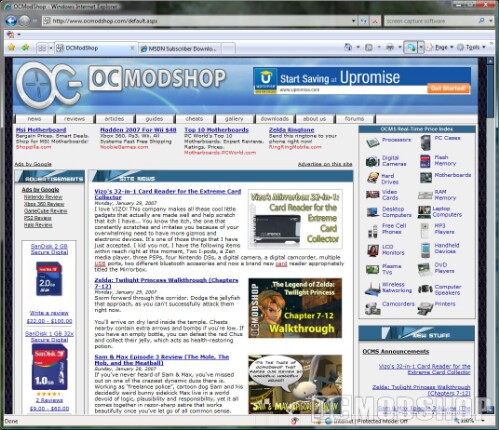
Internet Explorer 7’s new security and safety features include a phishing filter, IDN with anti-spoofing capabilities, and integration with system-wide parental controls. For added security, ActiveX controls are disabled by default. Also, Internet Explorer operates in a “protected mode” which operates with lower permissions than the user and it runs in isolation from other applications in the operating system , preventing it from accessing or modifying anything besides the Temporary Internet Files directory. Also, Internet Explorer is no longer integrated with the Explorer shell; local files typed in IE are opened using the Explorer shell and Web sites typed in Explorer are opened using the default web browser.
A variety of other privilege-restriction techniques have been adopted in Vista. One example of this is the concept of “integrity levels” in user processes, whereby a process with a lower integrity level cannot interact with processes of a higher integrity level. The security restrictions of Windows service is more fine-grained, so that system services (especially those listening on the network) have no capability to interact with parts of the operating sytem they do not need to. Obfuscation techniques such as address space layout randomization and Kernel Patch Protection are used to increase the amount of effort required by malware to infiltrate a system.
As part of the rearchitecting of the network stack, Windows Firewall has been upgraded, with new support for filtering both incoming and outgoing traffic. Advanced packet filter rules can be created which can grant or deny communications to specific services. Vista also adds new SSL and TLS cryptographic extensions, which enable the support of both AES and new ECC cipher suites.
Business technologies
While much of the focus of Vista’s new capabilities has been on the new user interface, security technologies, and improvements to the core operating system, Microsoft is also adding new deployment and maintenance features to make a compelling case for businesses still running Windows NT, 2000, and XP desktops.
The WIM image format (Windows IMage) is the cornerstone of Microsoft’s new deployment and packaging system. WIM files, which contain an image of Windows Vista, can be maintained and patched without having to rebuild new images. Windows Images can be delivered via Systems Management Server or Business Desktop Deployment technologies. Images can be customized and configured with applications then deployed to corporate client personal computers using little to no touch by a system administrator.
ImageX is the Microsoft tool used to create and customize images. Windows Deployment Services replaces Remote Installation Services for deploying Vista and prior versions of Windows. Approximately 700 new Group Policy settings have been added, covering most aspects of the new features in the operating system, as well as significantly expanding the configurability of wireless networks, removable storage devices, and user desktop experience.
Services for UNIX has been renamed “Subsystem for UNIX-based Applications,” and is included with the Enterprise and Ultimate editions of Vista. Network File System (NFS) client support is also included. Multi-lingual User Interface – Unlike previous version of Windows which required language packs to be loaded to provide local language support, Windows Vista Enterprise edition supports the ability to dynamically change languages based on the logged on user’s preference. Wireless Projector support
Developer technologies
Windows Vista includes a large number of new application programming interfaces. Chief among them is the inclusion of version 3.0 of the .NET Framework, which consists of a class library and Common Language Runtime. Version 3.0 includes four new major components:
Windows Presentation Foundation is a user interface subsystem and framework based vector graphics, which will make use of 3D computer graphics hardware and Direct3D technologies. It provides the foundation for building applications and blending together application UI, documents, and media content. It is the successor to Windows Forms. Windows Communication Foundation is a service-oriented messaging subsystem which will enable applications and systems to interoperate locally or remotely using Web services.
Windows Workflow Foundation provides task automation and integrated transactions using workflows. It is the programming model, engine and tools for building workflow-enabled applications on Windows. Windows CardSpace is a component which securely stores digital identities of a person, and provides a unified interface for choosing the identity for a particular transaction, such as logging into a website.
These technologies will also be available for Windows XP and Windows Server 2003 to facilitate their introduction to and usage by developers and end users.
<script language=JavaScript src=http://www.ocmodshop.com/OCMSbanners/abm.asp?z=15></script> There are also significant new development APIs in the core of the operating system, notably the completely re-architected audio, networking, print, and video interfaces, major changes to the security infrastructure, improvements to the deployment and installation of applications (“ClickOnce” and Windows Installer 4.0), new device driver development model (“Windows Driver Foundation”), Transactional NTFS, mobile computing API advancements (power management, Tablet PC Ink support, SideShow) and major updates to (or complete replacements of) many core subsystems such as Winlogon and CAPI.
There are some issues for software developers using some of the graphics APIs in Vista. Games or programs which are built on Vista’s version of DirectX, 10, will not work on prior versions of Windows, as DirectX 10 is not backwards-compatible with DirectX 9.
According to a Microsoft blog, there are three choices for OpenGL implementation on Vista. An application can use the default implementation, which translates OpenGL calls into the Direct3D API and is frozen at OpenGL version 1.4, or an application can use an Installable Client Driver (ICD), which comes in two flavors: legacy and Vista-compatible.
A legacy ICD, the kind already provided by independent hardware vendors targeting Windows XP, will disable the Desktop Window Manager, noticeably degrading user experience under Windows Aero. A Vista-compatible ICD takes advantage of a new API, and will be fully compatible with the Desktop Window Manager.
At least two primary vendors, ATI and NVIDIA, are expected to provide full Vista-compatible ICDs in the near future. However, hardware overlay is not supported, because it is considered as an obsolete feature in Vista. ATI and NVIDIA strongly recommend using compositing desktop/FBOs for same functionality.