Microsoft currently provides a tool to convert the FAT32 format to NTFS, but not the other way around. PartitionMagic by Symantec, PartitionExpert by Acronis and the open source NTFSResize utility are all capable of safely resizing NTFS partitions.
For historical reasons, the versions of Windows that do not support NTFS all keep time internally as local zone time, and therefore so do all file systems other than NTFS that are supported by current versions of Windows. However, Windows NT and its descendants keep internal timestamps as GMT/UTC and make the appropriate conversions for display purposes. Therefore, NTFS timestamps are in GMT/UTC. This means that when files are copied or moved between NTFS and non-NTFS partitions, the OS needs to convert timestamps on the fly. But if some files are moved when summer or “daylight saving” local time is in effect, and other files are moved when winter or “standard” local time is in effect, there can be some ambiguities in the conversions. As a result, especially shortly after one of the days on which local zone time changes, users may observe that some files have timestamps that are incorrect by one hour. Due to the differences in implementation of Daylight Saving between the Northern and Southern hemispheres, this can result in a potential timestamp error of up to 4 hours in any given 12 months.
NTFS 5.0 was the third version of NTFS to be introduced to the Windows world by Microsoft. It included several new features: quotas, sparse file support, reparse points, distributed link tracking and the Encrypting File System (EFS).
 Alternate data streams (ADS)
Alternate data streams allows files to be associated with more than one data stream. For example, a file such as text.txt can have a ADS with the name of text.txt:secret.txt (of form filename:ads) that can only be accessed by knowing the ADS name or by specialized directory browsing programs. Alternate streams are not detectable in the original file’s size but are lost when the original file (i.e. text.txt) is deleted, or when the file is copied or moved to a partition that doesn’t support ADS (e.g. a FAT partition, a floppy disk, or a network share). While ADS is a useful feature, it can also easily eat up hard disk space if unknown either through being forgotten or not being detected.
Quotas
File system quotas were introduced in NTFS 5. They allow the administrator of a computer that runs a version of Windows that supports NTFS to set a threshold of disk space that users may utilise. It also allows administrators to keep a track of how much disk space each user is using. An administrator may specify a certain level of disk space that a user may use before they receive a warning, and then deny access to the user once they hit their upper limit of space. Disk quotas do not take into account NTFS’s transparent file-compression, should this be enabled. Applications that query the amount of free space will also see the amount of free space left to the user who has a quota applied to them.
Sparse files
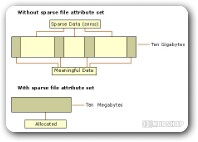
These are files which are mostly filled with zeros. This is called a sparse data set, and most things that generate such data sets are scientific applications, and they can generate very large sparse data sets. Because of this, Microsoft has implemented support for sparse files by only allocating disk space for regions that do not contain blocks of zero data. An application that reads a sparse file reads it in the normal manner with the file system calculating what data should be returned based upon the file offset. As with compressed files, the actual size of sparse files are not taken into account when determining quota limits.
Reparse points
Introduced in NTFS 5.0. These are used by associating a reparse tag in the user space attribute of a file or directory. When the object manager (see executive) parses a file system name lookup and encounters a reparse attribute, it knows to reparse the name lookup, passing the user controlled reparse data to every file system filter driver that is loaded into Windows 2000. Each filter driver examines the reparse data to see if it is associated with that reparse point, and if that filter driver determines a match then it intercepts the file system call and executes its special functionality. Reparse points are used to implement Volume Mount Points, Directory Junctions, Hierarchical Storage Management, Native Structured Storage and Single Instance Storage:
Volume mount points
Similar to Unix mount points, where the root of another file system is attached to a directory. In NTFS, this allows additional file systems to be mounted without requiring a separate drive letter (like C: or D:) for each.
Directory Junctions
Similar to Volume Mount Points, but reference other directories in the file system instead of other volumes. For instance, the directory C:\exampledir with a directory junction attribute that contains a link to D:\linkeddir will automatically refer to the directory D:\linkeddir when it is accessed by a user-mode application. They are the equivalent of a Unix symbolic link, though in Unix a symbolic link can be applied on files as well as on directories.
Hard links
Similar to directory junctions, but used for files instead of directories. Hard links can only be applied to files on the same volume since an additional filename record is added to the file’s MFT record. Short (8.3) filenames are also implemented as additional filename records that don’t have separate directory entries.
Hierarchical Storage Management (HSM)
Hierarchical storage management is a means of transferring files that are not used for some period of time to less expensive storage media. When the file is next accessed the reparse point on that file determines that it is needed and retrieves it from storage.
Native Structured Storage (NSS)
NSS was an ActiveX document storage technology that has since been discontinued by Microsoft. It allowed ActiveX documents to be stored in the same multi-stream format that ActiveX uses internally. An NSS file system filter was loaded and used to process the multiple streams transparently to the application, and when the file was transferred to a non-NTFS formatted disk volume it would also transfer the multiple streams into a single stream.