

The Xbox was tested on a Sceptre widescreen 21” LCD (16:10 aspect ratio), and Dell 19″ LCD (4:3 aspect ratio). We also connected the Xbox to a 21” Sony Trinitron tube monitor.
The dashboard is displayed full screen, no matter which aspect ratio is selected. Xbox 360 games are intended for high-definition, and use a 16:9 aspect ratio. Thus, most 360 games displayed on a traditional 4:3 monitor will have black bars on the top and bottom, much like an anamorphic DVD played on a regular TV. At least the console is intelligent enough to know not to stretch the games to full-screen. Some Xbox live arcade games use the entire 4:3 aspect ratio. So basically any content (games or video) with a 16:9 aspect ratio flag will keep that ratio, and the console will display black bars on the top and bottom when the monitor is using a 4:3 aspect.
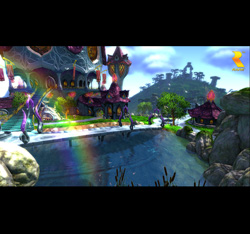
Although the Trinitron would do 1600×1200, only 1280×1024 was obtainable from the 360. The image quality was supurb and crystal clear. The colors were much richer and the darks much deeper than what can be obtained on an LCD monitor. The nature of LCD technology prevents it from competing with a CRT in terms of color reproduction and contrast (an LCD’s “black” is very gray compared to a CRT’s true black).
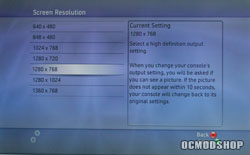
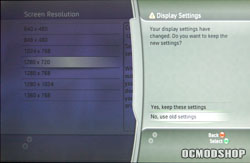
The Sceptre widescreen 20.1 inch wide aspect minotor’s native resolution is 1680×1050 (a 16:10 aspect radio compared to the HDTV standard of 16:9). Only the 1280×768 resolution matched the monitor’s aspect ratio exactly. A 1280×720 resolution is supported (16:9 ratio), but when I selected this, the screen shifted to the left and there was a black bar about 40 pixels wide on the right side of the screen. After selecting the correct aspect ratio for my monitor, the Xbox 360 again looked amazing, with much crisper details and a rock solid image. The colors were not as rich as the CRT, but was forgivable given the extra crispness the image has. High resolution games look amazing when played on a computer desktop monitor.
It seems like a waste to connect the 360 to a HDTV’s DVI connector, as the signal is still analog. DVI connectors have different pins for digital and analog signals, so using the DVI connection is not going to convert VGA’s analog signal to digital. It would then be possible to only have 1 cable for high definition TV and monitor support. We did not have a VGA to DVI converter so we were unable to test DVI input on a rear projection set. HDTVs with VGA inputs should have no problem.
Conclusion
If you have a PC monitor (and who doesn’t these days), the Xbox 360 VGA HD AV cable is a must for your gaming arsenal. If you could only afford (or could only get your hands on) the Core system and don’t have a HDTV, then this cable is a no-brainer. It can be had for $39 (the same price as the HD cable kit). You can experience the full potential of the Xbox 360’s visuals without having a Mercedes in the driveway.

