
The Xtreme Mac MicroPack charger dock looks very simple, but actually has quite a few connectors and buttons. On the rear of the unit is an on/off switch, a standard iPod connector cable, an 1/8″ A/V out audio jack and two 1/8″ headphone jacks. The top of the unit has a recessed area meant to cradle your iPod, which has a standard iPod connector. Near the top front are two sets of “up and down” buttons, which independantly controls the voume of each headphone jack.
Now then, what is the frickin’ point? What can you do with this dock and charger that simply cannot be done by other, less-expensive models?
For one, you can use it’s gigantor base to rest stuff on, like a cookie, or maybe your forearm. Since the point of this base is to take it traveling, it is a wonder to me why the thing is so dang big. Don’t get me wrong, it doesn’t weigh much. But it does take up a bit of space. Here’s a scenario:
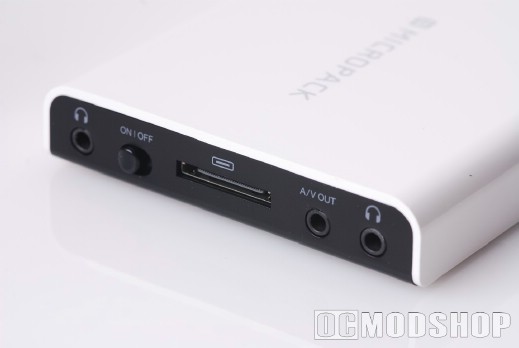
You go on a trip with a friend via airplane. You take out your micropack so that you and a friend can share music, using your own individual headphone jacks. Now that is assuming you AND your friend enjoy the same music or have the same taste in videos or podcasts. So you whip out your huge…ahem…micropack, and try to set it on one of those skinny airplane armrests, which it promptly falls off of. So, you resort to pulling your collapsible dinner tray into your gut so you can set your dock on it. Now that the dock is on your dinner tray, you have the perfect excuse to put a nice, airplane cookie on the micropack.
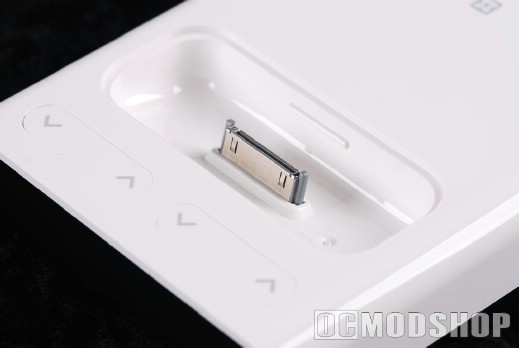
Functional for travel? I don’t think so. It’s light enough, skinny enough, but it is too damn big to sit anywhere that visibility wouldn’t be an issue. You’re trying to watch a movie with your friend, but you have to rest the micropack on your leg. How awkward is that?
So if you can’t easily take it traveling, then what do you do with it? Ah…paperweight.