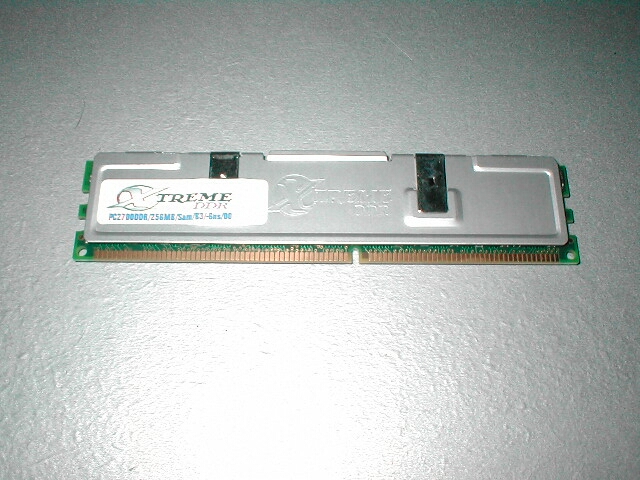
For benchmarking I will be using SiSoft Sandra’s memory benchmark, Quake 3, and Jedi Knight 2. All of the timings on the RAM will be set to 2-2-2 1T making it the fastest possible. All of the settings for Quake 3 and Jedi knight will be at 640×480 and have the lowest detail to more stress the CPU and memory rather than the video card. I will also be seeing how high this RAM will overclock as far as the FSB is concerned.
Test Bed
- EPoX 8K3A+
- 1.2Ghz Thunderbird
- 300w Zalman PSU (review to come)
- XtremeDDR PC2700
- 3D Power Geforce 3 @ Ti500 speeds
- Sound Blaster Live! Value 5.1
- 80GB Maxtor ATA133 HDD
- Pioneer 16x slot load DVD
- Plextor 40x12x40 CDRW (review to come)
- Thermalright SLK-800 w/ 80mm fan (review to come)
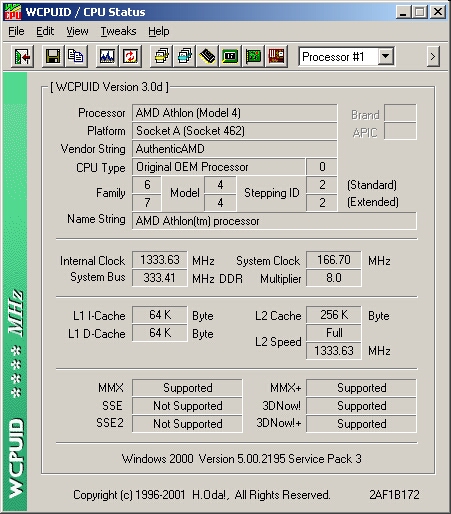
WCPUID is a program that tells you a lot about your CPU like the Internal clock, system bus, system clock, multiplier and a slew of other things like whether it supports MMX, MMX+, SSE, SSE2, 3DNow! or 3DNow+. It will also give you detailed information about the CPU itself like what kind of processor it is, platform, vendor string, CPU type, family, and name string. This is a really small program that is free but it does a great job at telling you what you need to know. At 133 FSB you can see that the internal clock is 1.2Ghz and the system bus is 266MHz which is the RAM bus.

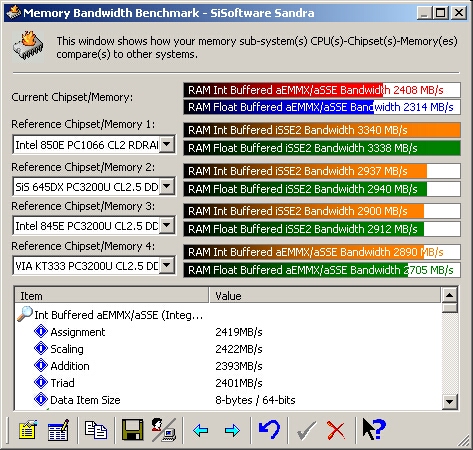
I first tested this RAM at 133FSB just to see what kind of scores I would get and to get a feel for what this RAM could do. SiSoft Sandra put out some pretty good scores but they can do a lot better because this RAM is designed to run at 166FSb and higher!

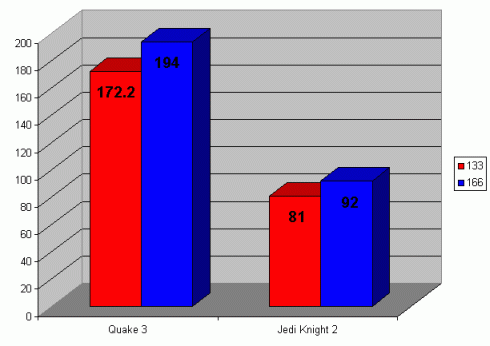
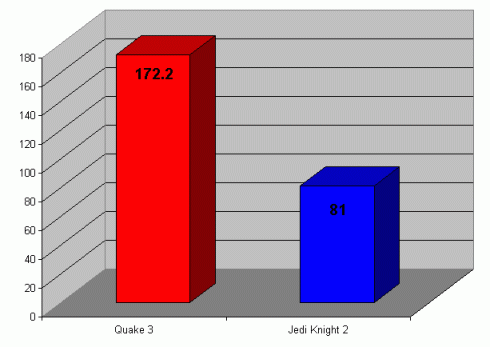
I ran Quake 3 demo001 and Jedi Knight jk2ffa time demos just to get some gaming benchmarks, all of the settings were at the lowest and the resolution was at 640×480. I had all of the settings at the lowest because I wanted to stress the system as a whole rather than just the video card. Quake 3 spit out 172.2 frames per second while Jedi Knight 2 pumped out 81. Jedi knight gets about half the FPS that Quake 3 does because it is a newer game and even at the lowest settings still is more intensive overall.
I rebooted and set the FSB to 166 in the BIOS and dropped the multiplier to 8 which gave me an overall speed of 1.33GHz, this also bumped the RAM bus up to 333Mhz rather than 266MHz. The RAM is now running at the speed that it is intended to run at so lets see some benchmarks.
SiSoft shows us that this ram is indeed working better at 166 FSB than 133. There is a considerable increase in score with the overclock and I can feel that this RAM can do much more. there is usually a big increase in score from 133 to 166 because not only is the RAM running faster but the CPU is also running faster.
After bumping up the FSB to 166 Quake 3 gained 22 more frames per second than at 133FSB. Jedi Knight 2 gained 11 FPS more than at 133FSB. Its interesting to see that after overclocking there is still a 50% difference between Quake 3 and Jedi Knight 2 which we saw in the initial testing at 133FSB.