
Apple prides itself on being much easier to use than Windows. I disagree wholeheartedly. iTunes has so many caveats and hidden features that leave many users scratching their heads as to why features are greye out for no reason.
I won’t get into all of the problems I’ve had syncing music and video between my iPhone and PC… and it gets more complicated if you want to actually connect the device to more than one computer.
The issue I’m tackling today is the problem with apps that I’ve purchased directly on my iPhone. These apps do not appear in the Applications library, and there is no apparent way to sync them other than to purchase the applications again.
There are several things you need to check.
- For one, click on Edit –> Preferences. Then click on the Devices tab. Make sure that “Disable automatic synching for iPhones and iPods” is UNCHECKED.
- Also make sure that your iPhone is authorized to use this computer. Click on Store –> Authorize computer.
If both of those options are in order, then click on your iPhone in the Devices list on the left. On the right side of the screen, click on Applications. You may notice that none of your apps that you purchased directly from your iPhone do not appear on the list. If you click “Sync applications” then iTunes tells you that your entire library will be replaced by what’s on your PC.
To copy your iPhone purchases to your Applications library (and populate the Applications list), you need to perform the following action:
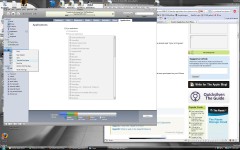
- Right-click on your iPhone in Devices.
- Click “Transfer Purchases” from the right-click menu
iTunes will begin copying the applications you’ve downloaded via your iPhone and will place them in the Applications library. Now you can select “Sync applications” and your old apps will remain on the iPhone.
One of Apple’s Mantra is the denial of the right-click function. For Apple to bury such an important feature in a right-click menu is absolutely absurd. Stupid Apple. I swear if I ever meet Steve Jobs I will kick him in the nuts.

8 comments
Thanks for this – it has been so frustrating . Now I have my apps in my itunes and can sync properly. :)
Thank you so absolutely much. I was so worried and fretting over this and NEVER knew that little right click was possible. You've really made my day, that's for sure. Thanks again.
Even though I have authorized the computer, Itunes still won't transfer my purchases :(
WOW this was SOOO HELPFUL!!!!! Mine is currently transferring my purchases from iPhone to my iTunes. You were SOOO VERY HELPFUL thank you so much!
THANK YOU! :)
THANK YOU. Damn, you're right, even with the latest iTunes, that feature is still buried. I ran into this same problem and haven't figured out a solution until now, since I pretty much download all of my apps right to my iPhone.
Make sure your computer is authorized, then go to file and click on "transfer purchases". This will back up your purchased apps on your iphone/touch to itunes.
[…] alan wrote an interesting post today onThe [OC]Mod Blog » Blog Archive » Apps purchased on biPhone/b Won#39;t b…/bHere’s a quick excerpt […]
Comments are closed.