

Disable Memory Holes in BIOS
PC periherals allow the CPU to access registers and memory arrays on the cards as if th they were local addresses. When the processor acesses a resource that falls into these address ranges, the request doesn’t go to RAM, it goes to the PCI (or PCI-e or AGP) bus and is serviced by the appropriate card. The peripheral doesn’t care which addresses are used, but Windows places them at the top of the 32-bit address space, which translates into less available RAM for programs.
If Vista still cannot recognize all of your memory, then you may have to go into the BIOS and disable some of the memory mapping. This is usually found in the Advanced Chipset section of your BIOS and is probably called Memory Mapped I/O (MMIO) but there is no standard terminology for this feature. You may have to turn to your motherboard’s manual to determine what this feature is called, and this feature may not be available at all. Memory Remapping changes the address space for peripherals to the 4.0GB to 4.5GB address space, so Windows may report that you have 4.5GB of memory when you only have 4GB installed with this enabled.

You may find that Vista is unstable with Memory Remapping enabled, as some services may stop working, hang, or other various stability problems. Your motherboard must have a chipset that supports at least 8GB of address space, such as the Intel 975X, P965, 955X, or a modern AMD processor (since the memory controller resides in the CPU’s die).
Use a 64-bit OS
Depending on your hardware, your mileage may vary when using these tips. The only sure-fire way to utilize all of your RAM is to use a 64-bit flavor of Vista. There really isn’t much of a performance difference when running “legacy” applications, as the 64-bit core runs 32-bit apps using a 32-bit subsystem. 32-bit Operating Systems have a 16-bit subsystem to be compatible with DOS and Windows 3.1 appliactions, and you’ve probably never noticed any compatibility problems or speed issues. The only issue you may face is finding 64-bit drivers, but most vendors that have Vista drivers have released 32-bit and 64-bit versions simultaneously for their hardware.
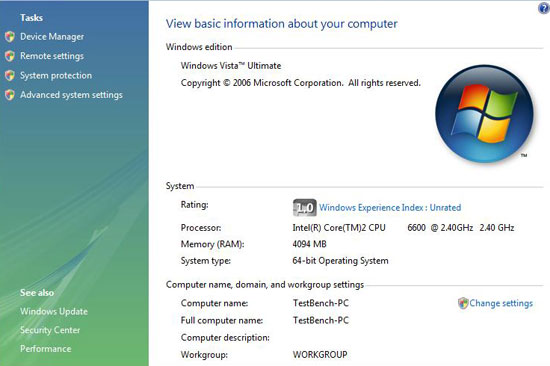
If you actually need all 4GB of your RAM, then you should probably be using a 64-bit Operating System anyway. If you even remotely use Virtual PC then you’ll recognize the benefits right away. Graphics professionals benefit greatly because each application in their entire suite won’t fight with each other over RAM. I use Photoshop along with Adobe Illustrator and InDesign on a daily basis, and even though they can only address 2GB of RAM each, they can each use the maximum available, and still have overhead so VIsta isn’t thrashing the swapfile like a red-headed stepchild.
Hopefully this article has enabled you to step into the bleeding-edge high-gigabyte world. Those into computers already know that a memory upgrade is one of the cheapest ways to increase your system’s overall performance, and now you can use Vista to its full potential.


53 comments
[…] Enable 4GB of memory on Vista […]
Why are people still hammering on about this? Don't most PCs that come with 4GB of RAM have Windows 7 64-bit? I have an Acer Netbook that only has 3.7GB of RAM and it has 64-bit version of Windows.
I built my computer in 2007 and I have been trying to find a way to use all my ram without spending another $400 bucks for Windows 7. This did not increase my RAM usage at all. Windows still reports that I have 2.8 GB RAM available, which is a lot to lose out of 4 GB.
i`ve tried your way… still the same
Mine has worked well over a year now have no complaints.
Presence of the NOEXECUTE switch on a system with a processor that supports hardware-enforced DEP implies the PAE switch. If the system processor is capable of hardware-enforced DEP and the NOEXECUTE switch is not present in the boot entry, Windows assumes NOEXECUTE=optin by default & enables PAE mode.
To boot the system and utilize PAE memory, the PAE switch must be added to the corresponding entry in the Boot.ini file. If a problem should arise, Safe Mode may be used, which causes the system to boot using the normal kernel (support for only 4 GB of RAM) even if the PAE switch is part of the Boot.ini file.
I was planning to upgrade my RAM from 2gb to 4gb. I use Vista 32 bit OS. But what I get from reading the above comments is that vista 32 bit will not recognise all 4Gb. So does it mean that in 32 bit OS we cannot have >3Gb RAM?
this is bulls***,whoever post (how to get 4gb ram in vista 32bit) don't know what he's doing,you won't get 4gb ram in vista 32bit,you need vista 64bit ,don't try this settings because it make your computer run slower and make some programs not working….get windows vista 64 bit.
Apparently Vista Service Pack 1 enabled Vista to use 4GB. I have just upgraded my PC's memory to 4GB from 3GB. Vista recognises it being 4GB in the machine on system properties yet refuses to use anything other than 3B of it. Whats going on?
@forsamori: The short answer is yes, you will probably not be able to use > 3.5GB of RAM in Vista 32-bit. There are hacks that require using a Server 2008 core, but the safe short answer is: 4GB of RAM or greater should use 64-bit OS.
I entered to commands as explained, they were all executed successfully.
But, when I open the Windows Task Manager, it still shows only 3 GB (The Vista does find the 4 GB in the computer properties). Should I see something else in the Task Manager ?
Good article but missing some essential info: setting pae will ONLY work if your processor, chipset and BIOS support >4GB memory addressing. You need to check your system specs …
I have 4GB of Kingston PC 2700 184 pin Dual Rank RAM and Vista 64 Bit SP2. RAM is indicated in BIOs and In Vista, but after about 5 Minutes system will crash and shut down. Is This A Graphics card problem (VisionTek ATI Radeon 3650 1GB Card) or a OS problem? or a MOBO Problem (Abit UL-8) ( CPU Athlon 64 )? The System is 64 bit dedicated.
you FORGET to mention the side effect of these method!!! this is crap!! totally CRAP!!! FK!! now my vista have its WINDOWS AUDIO not working!!! asshls!!
After running the command i rebooted,fine, everything seems t run like 3 times faster then it used to, its kinda scary cause i dont want it to fry.
However, it does not show the total 6 gigs of ram installed, it still shows 3gigs. i didnt do the second step cause i dont know what it is. internet is faster so is restart and boot up by 5 times. Are these things normal?
this thing works
this is what i run
System NameTURKISHROYAL-PC
System ManufacturerHewlett-Packard
System ModelHP Pavilion dv7 Notebook PC
System TypeX86-based PC
ProcessorIntel(R) Core(TM)2 Quad CPU Q9000 @ 2.00GHz, 2001 Mhz, 4 Core(s), 4 Logical Processor(s)
i'm shocked at the level of ignorance people have when it comes to extended memory switches. Microsoft disabled these features in none server OS for a reason. 32bit apps can only address 32bit worth of memory unless they are coded for PAE. for example SQL server is coded to use PAE but your average game isn't. If you need more than 4gb of ram just go buy a 64bit OS
Just wanted to thank you this worked os see 4gig taskmanager see 3gig http: support.microsoft.com kb 946003 explain where the one gig went to the graphics which can bee see on Performance Information and Tools on view and print details.
I HAD TO FILL IN THE SHELL:BCDedit set PAE forceenable and all other possibility,but the windows say me :denied access,what can I do?thanks
well, my HP notebook only has 3GB, so Vista in theory should not have been different by enabling PAE, but i enabled it through Ultimate Windows Tweaker, and now the thing boots and runs like a demon!!!!!!!
Yeah , this realy works . i am now using 6 GB RAM , because the page file ( by me ) is 6373 MB .
Vista SP1 is smart enough to detect that you have 4gb installed, however, it can not use it all, take a look at your task manager (pres ctrl + alt + delete) and under the performance tab, you'll see a field under physical memory called, total, this field is how much ram your os has access to.
Interestingly enough I tried the baove solution because my Vista Home premium was only reporting 3.5 GB of RAM. After following the above it now reports 2.99 to all apps although the 4 Gig shows in the system properties. I disabled both DEP and PAE and cannot get the RAM back that I was using for process before…. any suggections?
Interestingly, I installed Vista Ultimate 32bit SP1 on my machine, and system properties reports all 4 GB of ram…. XP only reported 2.99GB. Any explanation for this?
@ BRAM I also have the same problem.. instead of getting 3.55 GB i know have 2558 MB thanks to DEP and PAE enabling and stuff.
Horrible Guide. F++
Please note that your mileage may vary depending on your motherboard, chipset, and other factors. If you got bad results, then don't blame this guide, blame your chipset. The only sure-fire way to enable 4GB or more is to use a 64-bit OS and modern chipset.
Ricky: what is your hardware configuration?
This guide didn't work after the PAE DEP step. Although I thought I'd give it a shot it didn't work. I'm not complaining though because it's still running fine.
Question–does it help if a memory-intensive device (like a video card) has its own memory? I just ordered a 32-bit Vista SP1 machine with a 512 MB video card and 4 GB of RAM intuitively, it seems that a card like that would defer to its own memory and stay out of system memory, so I wouldn't have to enable PAE. Anyone have any thoughts?
Help i can't use internet explorer anymore because dep is turned of can't be turned on again …
i have Vista Ultimate sp1 32 bits with 4 gb ram. i DISABLE in bios on-board card video cause i have an off board one with 512 mb…. otherwise all of 4gb should be available…justa an on board audio is enable.. my precessor is a Phenom Triple Core 8400 2.1 ghz .. and i havee memory remmaping at bios… but no more than 3gb is recognize by Vista….. just in BIOS appear 4 GB but not in Vista…. any clue for me:??? thnaks in advance and hugs from Brazil
I should read the comments before the article :). The system is now reporting 3.55GB.
anyone figured how to get this back?
This simply doesn't work. To get support for more than 4GB RAM, you either need to get any 64-bit version of Windows or Windows Server 2003 2008 32-bit.No matter what you do, Vista 32-bit will not address more than 4GB RAM.
I have found something like the above guideline in a forum. And I haven't tried out yet..cuz afraid of I can't go back. Then I check out in google and see this. I also have Vista sp1 ultimate with 4gb of Ram. In the welcome senter, in the basic information I see the Ram status is 4GB. But if I look in DirectX it show only 3326MB something like that. Does this mean I have to follow this guideline..?
Please delete this post. It returns atop of google search result for Ɗgb on vista'. Not only does it not work as intend on any machine my collegues and I have tried (6 different setups) but it also reduce 5 out of 6 machines memory to 2.8gb, instead of 4gb.
A 32-bit OS can only assign 4GB of address space. If you have 4GB of RAM, you're trying to have your computer use all available addresses on RAM, which would mean that nothing else in your system could work. Instead of letting this happen, the 32 bit OS will use the address space for devices and then assign what's left over to your RAM.
If you have 4GB of RAM on a 32-bit OS, the more memory used by your devices, the less address space available for RAM. A 512MB video card gives you a max of 3.5GB available for your RAM, because there is 1GB less of address space available.
Sadly this doesn't work at all for me… My system could easily run 64 bit windows which sadly looks like the only way I'll get my 4 gigs of RAM to work
Hey Alan M.
I followed your instructions as listed above and nothing happened. My computer(Vista Home Premium 32bit) does not recognize any additional RAM.
Then I set the PAE back to default to get back where I started. Now, however, Internet Explorer will not run. It says to set the DEP settings but it won't let me. Says I'm not an administrator, but I am! PLEASE, can you help?
Thanks,
Chris B.
Chris B. I had the same problem with access, if you boot in safe mode (F8 at startup) then log in normal you can access BCDEdit through the start menu or C prompt
I have exactly 4gb ram 2 modules of the same manafacturer and same speed 667 mhz 2 gigs each. my mobo supports 4 gigs and bios reports it accuratelt as well, but when windows starts i get a BSOD, even using this tutorial still gets me a BSOD when 4gb is attached.
WARNING!!! If you are using BitLocker, Before using BCDEDIT make sure you have your bitlocker key on a USB external flash drive that you have handy or you will be unable to boot!
I tried entering the bcdedit set pae forceenable command and my computer tells me that "access is denied". I'm the administrator, why can't I do it?
tested it on windows 7 7260.. no effect
Really works and works well. Just gutted my computer and replaced everything. Got 4gb of memory, entered the command prompt entered the code and man did it take off…Love it
Strangely enough, doesn't work for me…
Vista SP1 will recognize 4GB. However, it won't operate with 4GB. Just use msinfo32 and you will see that the total physical memory still reports the number of ~3.3 – 3.6GB RAM.
To make it works with >3GB RAM, the only way is to use 64bit OS.
You can use Windows 7 beta 64bit
Enabling PAE will not by itself let 32-bit Vista see any memory above 4GB. The code is there for using memory above 4GB, but you are not licensed to use it. For details, see my article http: http://www.geoffchappell.com notes windows license memory.htm.
If you have a retail version (non-OEM, that is) of Vista, you can get a free 64 bit disc from Microsoft. Shipping is ten bucks, but it's any easier workaround to 4+ gb. Search the msft site for 64 bit upgrade.
If you have exactly 4GB of RAM, then depending on your other hardware and configuration, 64-bit Windows may not see any more RAM than does 32-bit Windows. Moreover, since 64-bit code is bigger, what memory it does see, it won't use as efficiently. And there is still the problem of being directed to 64 bits by a fake limit.
well i have good news this actually has boosted memory usage and has stabilized my system. with fingers crossed i rebooted, and it actually worked it took a little time, like a couple minutes but its a lot better tnx!
There is no way to use more than 4Gigs on Vista 32bit. I have tried everything, all kind of setting PAE etc. The best approach was using Win 2008 Server kernel, but with this you need the Win 2008 Server license + Media Center wouldn't work.
The only solution, get all 64bit compatible hardware and then get Vista 64bit. No way around.