

When you first pick up the G700, it feels heavier than other mice, especially if you just got finished playing with a small Razer Imperator mouse. Weight is an important issue to a PC gamer, which is why some of the more expensive ones come with weight cartridges that allow for a custom feel. Since the G700 can be run with or without a cable, we compared it to several popular gaming mice, and some wireless office mice.
When compared with others, the G700 doesn’t appear so heavy after all. If you run the mouse corded (and without a battery) it’s about the same weight as the very lightweight Mionix Naos or SteelSeries Ikari. If you run the mouse wirelessly, it is still much lighter than the paperweight which is the Microsoft Natural Wireless (which requires 2 AA batteries). The G700 is the heaviest of them all if you are charging the battery (data cable plugged in plus AA battery). Keep in mind that you usually don’t feel much of the cord weight when moving the mouse, but the cord weight can affect mousing, especially when the cord “pushes back”.
 |
 |
 |
||||||||||||||||||||||||||||||||||||||||
|
Gaming Mouse Weight Comparison
|
|
||||||||||||||||||||||||||||||||||||||||
 |
|
 |
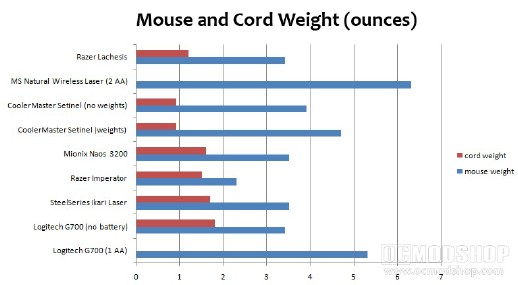
The sum of the previous two paragraphs is that the Logitech G700 isn’t too light or too heavy, and can be run in different configurations to suit your weight requirements. It’s not as granular as the CoolerMaster Sentinel, but fits inbetween a “light” and “heavy” configuration.


