
The keys are not very high, similar to many laptop keyboards. This in theory reduces travel, so your finger doesn’t have to press down as much to press a key. Those familiar with mechanical keyboards know that they only don’t have to press the key all the way down to register, which also benefits from a lighter touch.
The arch takes some getting used to. Like other of Microsoft’s ergonomic products, I find myself arching my wrists a LOT more than comfortable, which is ironic since this product is designed to improve comfort. I preferred the ergonomic keyboards that lifted the front of the keyboard, but sadly the Comfort Curve 3000 does not have any adjustments at all.
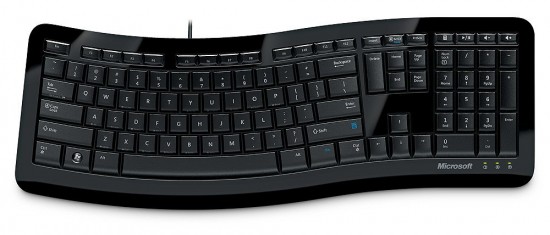
The arch gets in the way and I find myself mashing way too many keys when trying to type the T, Y, U, V, and C keys.
The space bar has been improved from the Comfort Curve 2000. The previous model’s space bar very loose and sloppy, and now is nice and tight.
Like all shiny plastic things these days, it picks up fingerprints like you wouldn’t believe. The product description states that it makes a statement on your desk, and that statement is “CSI would have a field day here.”.
Like other Microsoft keyboards, common Windows keyboard shortcuts are printed on the front face of the keys. These keyboard shortcuts either show the Windows symbol or Control symbol to indicate which key toggles the function. These are listed below:
| key | front-face | key | front-face |
|---|---|---|---|
| Tab | Alt Switch | S | * Save |
| E | ♥ MyPC | X | * Cut |
| Y | * Redo | C | * Copy |
| U | * Undrln | V | * Paste |
| I | * Italic | B | * Bold |
| O | * Open | N | * New |
| P | D | ♥ Desktop | |
| A | * All | F | * Find |
♥ = Windows key, * = Control key
Even though this keyboard was made with Windows 7 in mind, there are a lot more Windows keyboard shortcuts that were not printed on this keyboard.
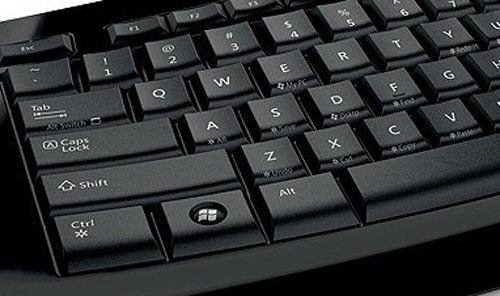
The media and function keys work out of the box on Windows without any software required. Thankfully Microsoft has axed their previous “F-lock” initiative on their keyboards, which frankly just frustrated users rather than provide any benefit.

3 comments
Been using this keyboard instead of the laptop crap all are stealing from the mac and putting in their portables. I mean by that the spaced out squared keyed ones. So in my book, as I am a long time user of MS keyb and mice, since the first Natural they made, I can tell you that the reviewer neither used extensively nor has an idea what he is talking about.
The device is awesome, and none of the flaws you mentioned are actually there, so I find this review a rather subjective to say the least. I also own the first model M keybs and use them on my old machines, so for a start I do know what a good keyb feels like, and even though this MS one is cheap, it is still a good product unlike their line of mice, which I will let you spit on at your own pleasure. However natural keybs made by MS are bloody awesome, and so far they are unrivaled in the experience and downgraded rsi.
Are you seriously saying a $20 keyboard is the best Microsoft keyboard ever? I think it is you, sir, that has no clue what he is talking about. Go look at Amazon or any place that sells this. User reviews all agree that this keyboard is just o.k. at best.
None of the flaws are there? Let's see….
Membrane keys? Check.
Silk-screened letters? Check.
Lack of adjustments? Check.
Crowded keys? Check.
The only thing that is subjective is the comfort level. I, too have used all (and I mean ALL) of the Microsoft keyboards and have been typing for over 20 years. So I do have some experience when it comes to keyboards.
Comments are closed.