
The top of the box is very cool looking and lets you take a look inside to see what you will be getting. The bottom of the box shows you some of the major features of the board.


The AOpen AK77 Pro(A)-133 comes with an ATA133 cable, a floppy cable, and ATA33 cable. Its nice that they provide an ATA133 cable to take advantage of the ATA133 controller provided. The motherboard also comes with a CD which contains drivers, and utilities. It includes version 4.37 of the VIA 4-in1 drivers which is the newest version to date. The motherboard also comes with Norton Antivirus 2002 which is very cool.


The AOpen AK77 Pro(A)-133 comes with a lot of good, high quality documentation. It comes with a manual and an “easy installation guide.” I would have liked to see the BIOS described better in the manual, but that is the only thing that was a negative.

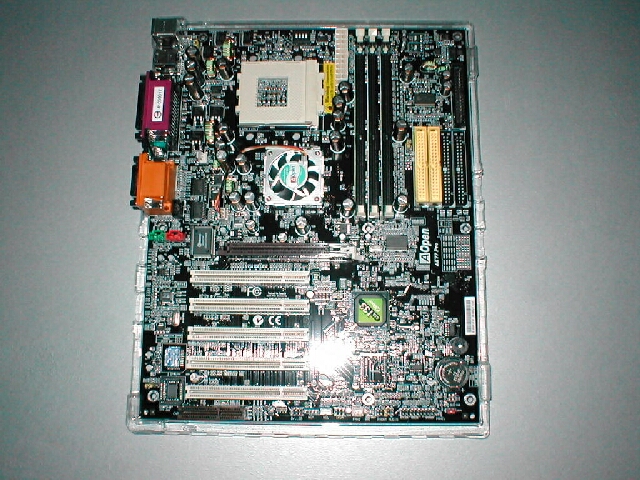
The AOpen AK77 Pro(A)-133 has a killer looking black PCB, I really like it a lot. The board is well laid out from just looking at it, we will see later if it installs as well as it looks. The only thing that I do not like from looking at it is the CNR slot I find that these serve little to no purpose and would have rather seen another PCI slot.


The VIA 266a northbridge is covered by a nice aluminum heatsink as you can see from the picture above. The heatsink has no clips which hold the cooler in place so I twisted it off and found that it is attached by thermal tape. Like I have mentioned before I do not like the use of thermal tape on any components, even though the northbridge will not get very hot and does not require the best cooling it would be better if thermal compound was used. I went ahead and removed the thermal tape and replaced the heatsink with Arctic Alumina epoxy


Like I mentioned before the AK77 Pro(A)-133 has ATA133 capabilities which is denoted on the southbridge of the motherboard. You can also see just to the left of the southbridge there is a chip missing. This is where the RAID controller would be which is available on the plus version of the board. Both of the IDE and floppy connections are at the top of the board which is a good thing. You can see the imprint of where the RAID would be on the board under the regular IDE connections.


The AOpen AK77 Pro(A)-133 comes with a die-hard BIOS with optional upgrade. This feature which you can upgrade to is a backup BIOS that you can install which incase your motherboard is infected with a BIOS virus you will have a backup. This would also be a good feature for overclockers who flash their BIOS a lot, the only bad thing is that it is not included.
The jumpers on the board are very well laid out all in a line in one location, not all over the place like some other boards. There are also a lot of different jumpers which is nice, there is another optional upgrade which is the Dr.LED it’s a diagnostic LED system for troubleshooting. Again it would be nice if this was included, however that would raise the cost of the board. You also get Infrared jumpers, a fan header, front audio jumpers which is a cool addition, the system jumpers and the CMOS jumper.


The AK77 Pro(A)-133 comes with on-board sound which uses the AC97 CODEC as do most of the motherboards today with onboard sound. The motherboard has 3 connectors that will go to your CDROM devices if you decide to use the onboard sound.
The I/O panel has a gameport, MIC-in, line-in, and speaker out. I used this while benchmarking the games which you will see the results of later and listened to a few MP3s. The quality is good but not great, if you are not worried about 5.1 digital sound this will work great for you. To the right of all of this you can also see the header for the northbridge heatsink and another above it for the CPU heatsink.
The AK77 Pro(A)-133 has DIP switches at the top of the board above the socket which controls the multiplier of the CPU. When all the switches are left in the middle the BIOS auto detects it. You can change the positioning of the switches for different multipliers if your CPU is unlocked.
I do not like having to use DIP switches to change the multiplier it makes overclocking much more complicated than it needs to be. I would have liked to have been able to change the multiplier from the BIOS, it would have made overclocking a lot better.


I started installing all of the hardware to setup a test bed, I liked the fact that the AGP slot was far away enough from the DDR slots so that you can take out RAM while a video card is installed. Everything went together well and without any trouble, there was enough room around the socket to accommodate my SVC Glacial Cooler 68 heatsink and should have no problem with large 80mm heatsinks. The only thing that was a little irritating was that the ATX motherboard power connector was too close to the first DDR slot, I was unable to remove the plug while the RAM was installed.

