Test Bed
- Abit NF7-S Rev 2.0 (review to come)
- 1800+ Thoroughbred
- 60GB Seagate Barracuda IV HDD
- 80GB Western Digital HDD
- 1024MB PC3200 Corsair TwinX (review to come)
- Abit Siluro Geforce 4 Ti4200-8X OTES
- Koolcase’s Panther
- Plextor 40x12x40 CDRW
- Plextor PX-504A DVD+RW (review to come)
- True Silent 450w PSU
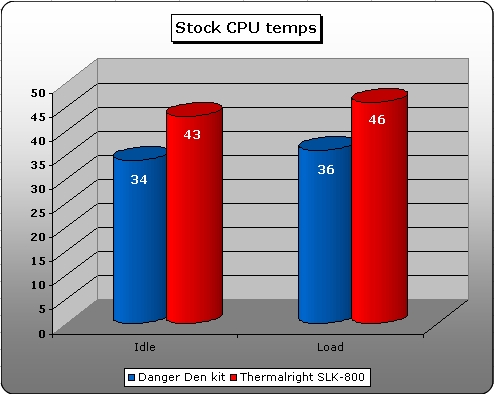
After getting everything installed I booted my computer and went into the BIOS. I recorded the idle temperature, restarted, and booted into Windows 2000. After Windows was done booting, I loaded up Prime 95 to get the load temperatures. I used my Thermalright SLK-800 to test against the watercooling kit with a Y.S. Tech 27.9 CFM fan on it because I like to have a quiet system. The watercooling did a very impressive job keeping my CPU cool, while idling the temperature was only 34° Celsius and at load it was only 36° Celsius. The heatsink was much less impressive with the fan that it had on it, the idle temperature was 43° Celsius while the load temperature was 46° Celsius. As you can clearly see this watercooling kit does a really good job.
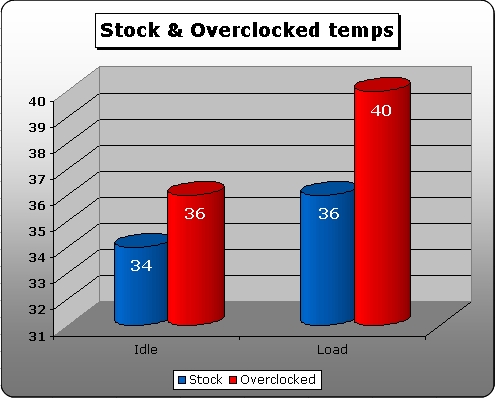
Watercooling is not just designed to be quiet; it is also designed to be able to take a lot of heat which means you can increase your Vcore a lot. After getting the stock CPU speed temperatures I restarted my computer, went into the BIOS again and started overclocking.
With this watercooling kit I was able to easily overclock the CPU to 7.5×215 which is 1616MHz. I know I dont have a very fast CPU at the moment but it will have to do. Because I had this watercooling setup installed to my system I was also able to raise the Vcore to 1.75v which would have been more difficult to do with just air cooling, I also could have gone higher however I had no need for this overclock.
The same method was used to get the idle and load temperatures as with the stock speed. With all this said the idle temperature of the CPU was 36° Celsius and the load temperature was 40° Celsius. I did not attempt to get the results with my Thermalright SLK-800 because the fan I have on it is made to be quiet not an overclocker.
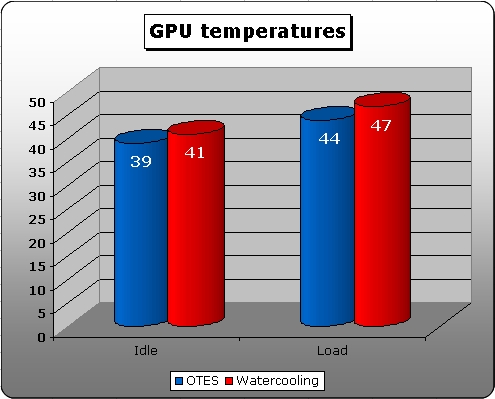
I also tested the GPU waterblock and compared it against the stock cooling on my Abit Siluro Geforce 4 Ti4200-8X OTES. To get the temperature from the core of the CPU I placed a thermal probe on the backside of the card and taped it into place.
I let the computer sit for about 15 minutes and recorded the idle temperature which was 41° Celsius. I then loaded up 3DMark2001SE and ran it for a while, after watching the temperature fluctuate it finally rounded off at around 47° Celsius. As you can see the waterblock does not perform as well as the OTES does.
My thought on why the waterblock did not do as well as the stock cooling is that it is getting the hot water from the CPU which means the GPU is not being cooled as well as it could be. It would be best if a smaller radiator, such as the Black Ice Micro was placed in-between the CPU and GPU block so that the water would be cooled down before it hit the GPU block.
Conclusion
This is my second experience with Danger Den watercooling kits and I am as impressed as I was before. Being very familiar with watercooling I would say that this kit ranks very high up among the other compactors on the market.
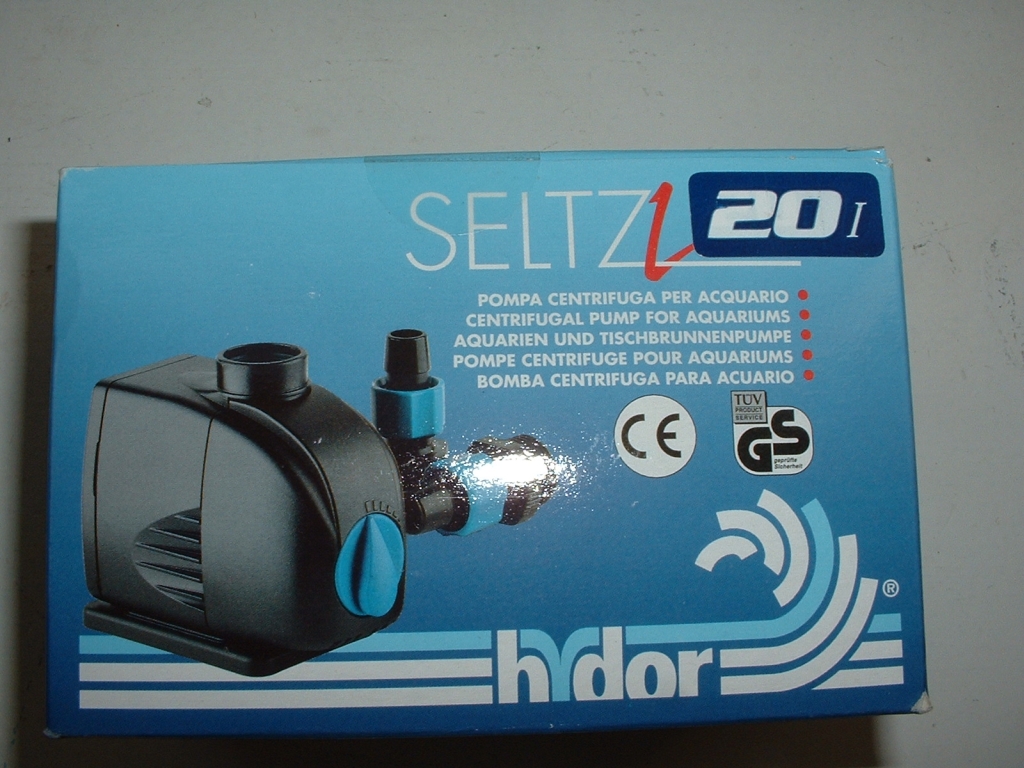
This is the first time I have ever used a Hydor pump and to be honest I did not like it as much as the Eheim I had previously used. This of course is my own personal preference and you may or may not disagree with me. I also was not very fond of the reservoir included. It did not line up with my 5.25″ bay and was a little hard to work with.
If I were configuring a kit I would have bought a regular one. There was also no documentation included with the kit which I hope Danger Den addresses in the near future.
This particular kit did not come with a relay for the pump either but Danger Den does sell them so you can include one with your kit which I would recommend.
The radiator, waterblocks, tubing, fan, clamps, water wetter, and thermal compound, were excellent and would recommend them to anyone looking for the best parts for a superior water cooling setup. Though this kit does have its pros and cons overall I am still very satisfied with Danger Den and their products.
Even though there are some negative aspects to this kit the positive ones override them. I am going to give this kit a 9/10 and award it the OCmodshop Seal of Approval. I would really like to thank Dan from Danger Den for sending me this kit to review.
Pros

- Performs really well
- Everything is very quiet
- Easy to install
- Maze 4 is compatible with AMD or Intel (with different tops)
- Pump is small and has suction cup feet
- Radiator looks and performs really well
- Tubing does not easily kink
- Water Wetter included
- 12 hose clamps included
- Arctic Silver Ceramique included
- Everything came packaged very well
Cons
- Bay-Res did not fit correctly
- No instructions included
- No pump relay included