

The DisplayLlink technology is definately neat, but not really all that useful unless you have no other options. If you need multi-mon and have a video card with an additional DVI port, then by all means hook up a regular monitor to it for faster response times and smooth sailing.
You do need to have a moderately powerful CPU for this technology to work without a noticable performance hit. We tested the DisplayLink adapter on a modern (but low-powered) notebook and had satisfactory results for office work, but video slowed everything else to a crawl. A modern desktop computer with decent video card will do just fine, and the performance impact is minimal.
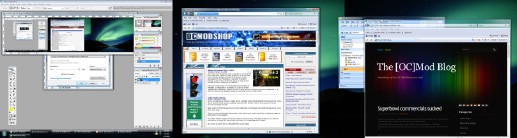
Triple 1280×1024 desktop
If you actually do have a need for this adapter, then you’re probably a laptop or netbook user and are probably doing office tasks. This adapter is great for these applications, as well as “casual” multimon use, like when you need to do a presentation or hook up to a projector with little fuss.
The DisplayLink USB Graphics adapters are a great way to expand your multimonitor needs. If you have any spare video ports on your computer or video card, use these as your first monitor expansion option. If you expect this adapter to be as fast as your internal video card, then you will be rather disappointed. You will get the most value from the DisplayLink adapters on a computer with very limited expansion options. If you find yourself in this niche, then the DisplayLink Graphics adapter is a no-brainer.
 |
 |
 |
|||||||||||||||||||||||||||
|
|
|
|||||||||||||||||||||||||||
 |
|
 |
|||||||||||||||||||||||||||




1 comment
not working in 3 lcd?? please help… the third monitor has no display…
Comments are closed.